If it’s an oversight, it isn’t just Photoshop you’ll have to deal with. Photoshop is simply being consistent with how things work everywhere.
Open the other applications on your computer, especially the ones that are not by Adobe. You will find that on the File menu in most applications, the Close command is next to the Save command. This happens everywhere. You always have to be mindful to choose the command you want (e.g., Save) and not the one next to it (e.g., Close).
Photoshop adds a few more commands that are variations, such as Close Others and Close and Go to Bridge. Photoshop does what we would expect in grouping its additional Close commands with the standard Close command; unfortunately this does place them next to the Save command.
In the picture below, the left example is from the Wikipedia entry for the generic File Menu: Close is next to Save. The right example is from another popular photo editor that competes with Photoshop; again, Close is next to Save. The standard is that ingrained across almost all software.
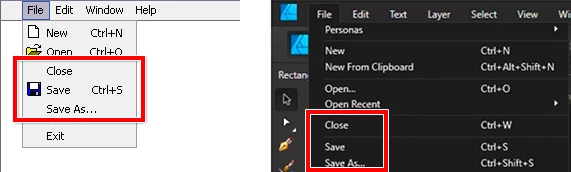
I’m not saying what you want is wrong at all, you actually have a good point in that it probably would be safer if Close and Save commands were far apart. I’m only pointing out that if this is a critical problem that is just wrong and must be fixed…it looks like you’re going to have to tell the entire software industry to reverse a convention that is 40 years old, and not just on Windows. (Windows probably copied the File menu structure from other, earlier windowing systems such as macOS which also put Close next to Save.)
The nice thing is that you are using Photoshop, and that gives you an option you do not have in most other software: You can customize your menu. If you never want to see that command again, choose Edit > Menus, and hide the command you don’t like, as Ged Traynor showed. So you can solve this problem in seconds.

 AdChoices