
cristoball36641193
Participant
November 16, 2017
Answered

Photoshop keyframes have no effect

  • November 16, 2017
  • 1 reply
  • 4533 views

Im making a simple Gif like always but now photoshop (CC 2017) keyframes are not working and this pop up is showing up.... help
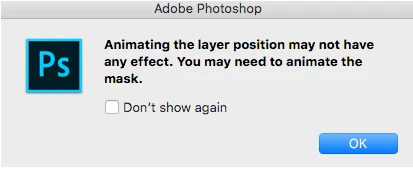
And this is the art, i just want to move the lines side to side a bit and by the way those are regular shapes nothing fancy . Its weird i have done tons of Gif but this is a first one.... ALSO i tried making a new file and moving everything there and making a new file and just making any shape but this pop up keep showing up so basically y click the Position Keyframe move the time bar and then move the shape but it doesnt create the 2nd keyframe and so it doesnt move (As warned), my last try was making myself that 2nd keyframe and moving the shape but it doesnt work....And yes i did some other GIF in this PS in this computer (Mac Mini late 2015 with the latest OS)

This topic has been closed for replies.
Correct answer mark@headTrix

hi again.

Okay I though it seemed as if you knew how to create GIFS, but perhaps it looked different to you. I might have answered too fast.

SO I see the problem now. You probably used the Vector Shapes for the lines... so you have to animate the "Vector Mask Position" instead of the "Position".

Try that. I think that should solve your problem. I hope!

Cheers!
mark

1 reply

Community Expert
November 16, 2017

hi

does your timeline look like this?

this timeline is for adding keyframes, animating objects, video, etc. If you click the little 3 Dots I circled in the screengrab above, that will convert your timeline to a Frame-by-Frame timeline that you might be used to.

hope that helps!

cheers!
mark

headTrix, Inc. | Adobe Certified Training & Consulting
cristoball36641193
Participant
November 17, 2017

i know that there are 2 ways of making a GIF in photoshop and for what i need a frame by frame doesnt work. headTrix

mark@headTrixCommunity ExpertCorrect answer
Community Expert
November 17, 2017

hi again.

Okay I though it seemed as if you knew how to create GIFS, but perhaps it looked different to you. I might have answered too fast.

SO I see the problem now. You probably used the Vector Shapes for the lines... so you have to animate the "Vector Mask Position" instead of the "Position".

Try that. I think that should solve your problem. I hope!

Cheers!
mark

headTrix, Inc. | Adobe Certified Training & Consulting