


- Home
- Photoshop ecosystem
- Discussions
- Re: Painting on iPad in Photoshop zoom problems
- Re: Painting on iPad in Photoshop zoom problems

Copy link to clipboard
Copied
Idk why my photoshop keeps zooming out? It always happens when I zoom in and draw. I'm pretty sure my hand didn't touch the screen because I am always wearing the drawing glove. It's pretty annoying.


 1 Correct answer


Hi,
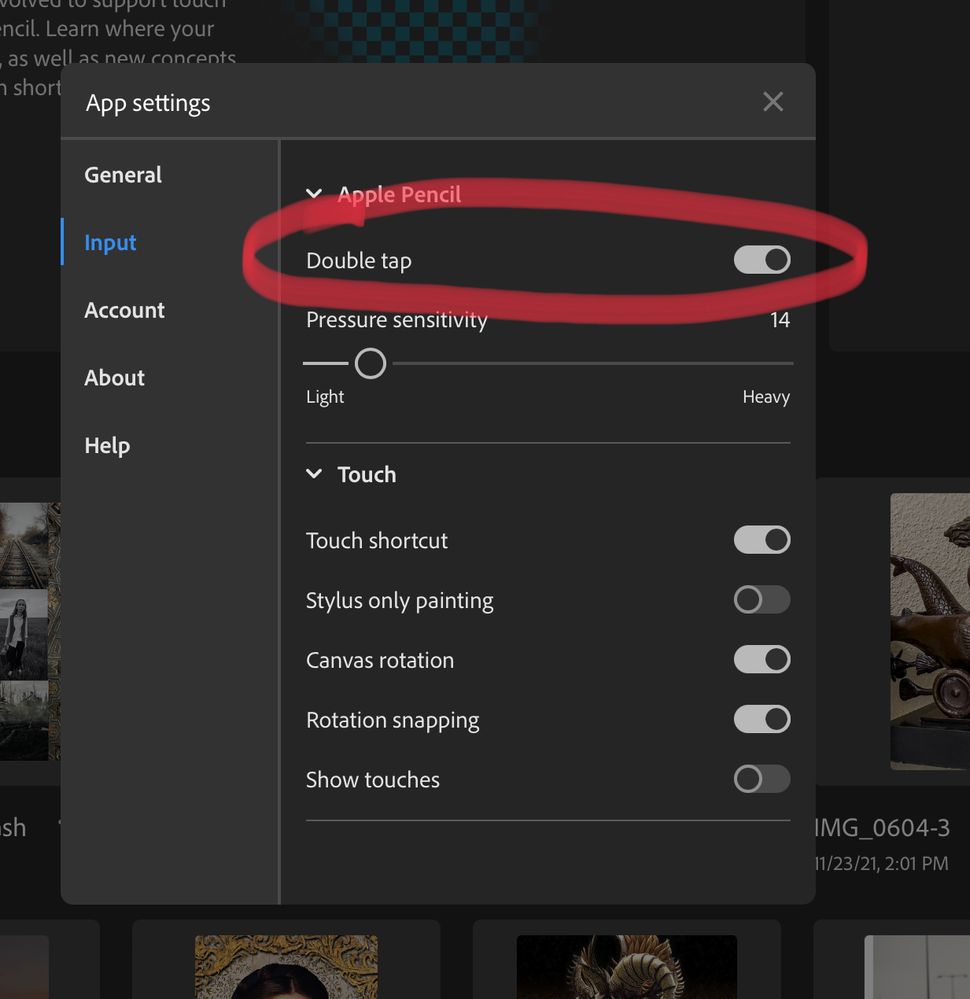
If this is occurring when using the Apple Pencil you are likely accidentally triggering the double tap on the barrel zoom behavior. This can be disabled in application settings/input at the top in the Apple Pencil section.


Explore related tutorials & articles
 12
Replies
12
12
Replies
12


Copy link to clipboard
Copied
Hi there,
That doesn't sound good. Does it happen with any other app? Try opening the Photos app and try to zoom in on an image and see if the same thing happens there.
Also, please try reinstalling the Photoshop app and let us know how it goes.
Make sure to wipe the screen clean with a microfiber cloth once and then launch Photoshop.
Regards,
Sahil
Copy link to clipboard
Copied
Hi,
Unfortunately, I already done that. And it just would”t work.

Copy link to clipboard
Copied
I'm still having the exact same issue and was looking around for solutions. It makes masking extremly difficult. This is specific only to the Photoshop app and happens without any user input. The screen on the tablet does not need to be touched for this behavior to be tirggered.
Copy link to clipboard
Copied
Hi,
If this is occurring when using the Apple Pencil you are likely accidentally triggering the double tap on the barrel zoom behavior. This can be disabled in application settings/input at the top in the Apple Pencil section.
Copy link to clipboard
Copied
That was it, thank you!
Copy link to clipboard
Copied
As optimistic as I was when this was suggested, unfortunately it doesn't work. Just wanted people to know. This bug has persisted for years now and it exists in both Illustrator and Photoshop. Adobe's software for iPadOS is a pretty big disappointments

Copy link to clipboard
Copied
I'm using PS mainly for painting on my iPad. There is a problem when I work on details and the app automatically zooms out to the full view (100%) as soon as I lift my pencil for longer than a few seconds. It's happening quite frequently during the painting session and is ridiculously frustrating and discouraging. I keep zooming back in to continue working on details every time it happens...
I haven't figured out how to change the settings to correct that. Do you have any suggestions?
Cheers
Copy link to clipboard
Copied
tap on the icon at the top right to get to Settings, then turn off the setting in the Input section
Copy link to clipboard
Copied
This absolutely does not resolve the issue. I have observed the software zoom in on its own while no one is touching the device and the pencil isn't being used. There is a serious bug in the sofwtare that has persisted for years.

Copy link to clipboard
Copied
It seems they are more busy on advertising than repairing their apps, such a shame.
Copy link to clipboard
Copied
I have a similar problem, when I press "I" to use the eye dropper then draw with the apple pencil, it keeps zooming out which make this app a pain to draw. I disabled all the zoom function of the apple pencil, (double tap, etc..) so the problem is something else. Can anybody help? At least a way to disable this zoom out or change the eyedropper shortcut?
Copy link to clipboard
Copied
Still no solution Adobe? Go back to work please, we are paying you every month!!


Get ready! An upgraded Adobe Community experience is coming in January.
Learn more
 AdChoices