Salir
  • Comunidad global
    • Idioma:
      • Deutsch
      • English
      • Español
      • Français
      • Português
  • 日本語コミュニティ
  • 한국 커뮤니티

photoshop paints only two colors heeeeeeeeeeeeeeeeeeeeelp!

Principiante de comunidad ,
Oct 05, 2020 Oct 05, 2020

i have a problem plz help >>> photoshop paints only two colors (yellow and green) idk what to do i tried to change to rgb and cmyk but nothing changes i just downloaded it and that happend plzzzzzzz help

TEMAS
Windows
534
Traducir
Informe
Directrices de la comunidad
Sé amable y respetuoso, muestra títulos de crédito de la fuente de contenido original y busca duplicados antes de publicar. Más información
community guidelines

correct answers 1 respuesta correcta

Deleted User
Oct 05, 2020 Oct 05, 2020

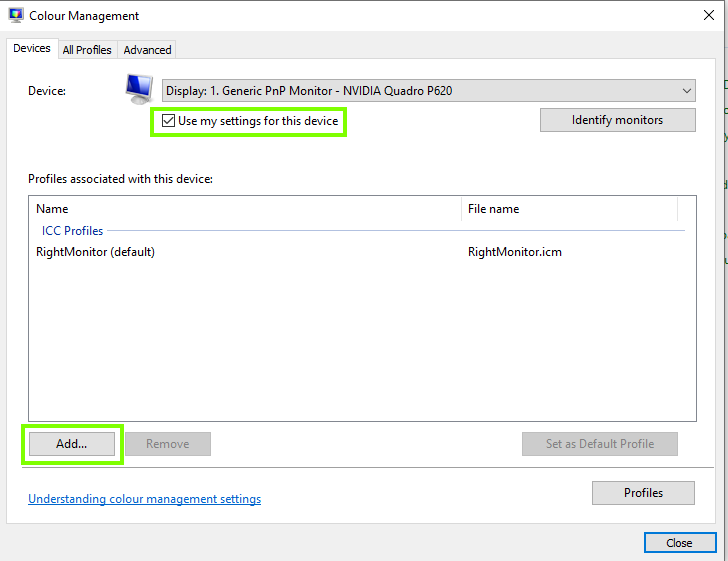
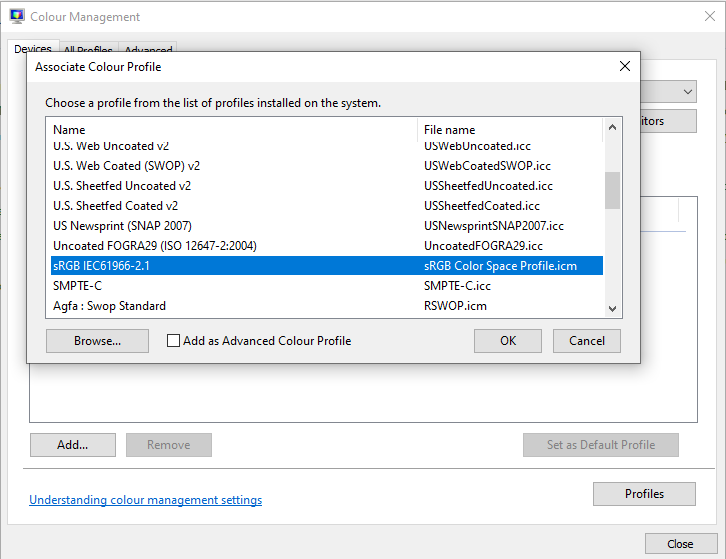
In Windows control panel open up colour management and check to see which if any colour profile is assigned, if there is one change it to sRGB and if there's nothing there add in sRGB

2020-09-03 15_27_08-Window.png

2020-09-03 15_27_43-Window.png

Traducir
Adobe
Community Expert ,
Oct 05, 2020 Oct 05, 2020

What do you want to paint? 

What happens when you click on the Foreground Color swatch in the Toolbar? 

Traducir
Informe
Directrices de la comunidad
Sé amable y respetuoso, muestra títulos de crédito de la fuente de contenido original y busca duplicados antes de publicar. Más información
community guidelines
Principiante de comunidad ,
Oct 05, 2020 Oct 05, 2020

still the same colors!!

like they are default

no other colors


Traducir
Informe
Directrices de la comunidad
Sé amable y respetuoso, muestra títulos de crédito de la fuente de contenido original y busca duplicados antes de publicar. Más información
community guidelines
Principiante de comunidad ,
Oct 05, 2020 Oct 05, 2020

i will try to reinstall it and see what will happen


Traducir
Informe
Directrices de la comunidad
Sé amable y respetuoso, muestra títulos de crédito de la fuente de contenido original y busca duplicados antes de publicar. Más información
community guidelines
Community Expert ,
Oct 05, 2020 Oct 05, 2020

What have you done for trouble-shooting so far? 

If restarting Photoshop doesn’t help then Restoring Preferences after making sure all customized presets like Actions, Patterns, Brushes etc. have been saved might be a good starting point:

https://helpx.adobe.com/photoshop/kb/basic-trouble-shooting-steps.html

Traducir
Informe
Directrices de la comunidad
Sé amable y respetuoso, muestra títulos de crédito de la fuente de contenido original y busca duplicados antes de publicar. Más información
community guidelines
Invitado
Oct 05, 2020 Oct 05, 2020

In Windows control panel open up colour management and check to see which if any colour profile is assigned, if there is one change it to sRGB and if there's nothing there add in sRGB

2020-09-03 15_27_08-Window.png

2020-09-03 15_27_43-Window.png

Traducir
Informe
Directrices de la comunidad
Sé amable y respetuoso, muestra títulos de crédito de la fuente de contenido original y busca duplicados antes de publicar. Más información
community guidelines
Principiante de comunidad ,
Oct 05, 2020 Oct 05, 2020

Thank you so much it works!

Traducir
Informe
Directrices de la comunidad
Sé amable y respetuoso, muestra títulos de crédito de la fuente de contenido original y busca duplicados antes de publicar. Más información
community guidelines
Community Expert ,
Oct 06, 2020 Oct 06, 2020
MÁS RECIENTES

Replacing a broken monitor profile with the sRGB colour space profile is a good diagnostic step. However, for accurate colour you should now replace that with a good profile that describes your actual monitor, preferably using a hardware sensor and its software to produce it ( e.g. the i1Display).

Dave

Traducir
Informe
Directrices de la comunidad
Sé amable y respetuoso, muestra títulos de crédito de la fuente de contenido original y busca duplicados antes de publicar. Más información
community guidelines