Exit
  • Global community
    • Language:
      • Deutsch
      • English
      • Español
      • Français
      • Português
  • 日本語コミュニティ
  • 한국 커뮤니티
0

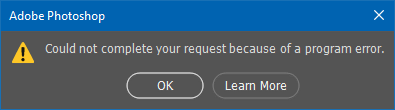
Photoshop - "Could not complete your request because of a porgramming error."

New Here ,
Jun 07, 2021 Jun 07, 2021

I've had this problem lately where if I try to do anything at all in Photoshop with my GPU use ON, I get greeted with "Could not complete your request because of a program error." Whether it be opening a file, closing a file, using any brushes or even trying to exit the program, I get this error. I'm aware the "fix" is to disable the use of my graphics processor, but I refuse to do that because Photoshop lags horrendously when this setting is off as it just uses my CPU's power.


A temporary fix is the reset the settings and then restart, but as soon as I close and re-launch Photoshop it goes back to the same issue. 


Is there a fix at all for this? This only happened within the last month. All my drivers are updated and so is Photoshop. My GPU is a GTX 1070.

TOPICS
Windows
850
Translate
Report
Community guidelines
Be kind and respectful, give credit to the original source of content, and search for duplicates before posting. Learn more
community guidelines
Adobe
Community Expert ,
Jun 07, 2021 Jun 07, 2021

Please confirm which version of Photoshop you're running. The current version is 22.4.1.

Translate
Report
Community guidelines
Be kind and respectful, give credit to the original source of content, and search for duplicates before posting. Learn more
community guidelines
New Here ,
Jun 07, 2021 Jun 07, 2021

I have the latest version which would indeed be 22.4.1. I have also tried previous versions with no luck.

Translate
Report
Community guidelines
Be kind and respectful, give credit to the original source of content, and search for duplicates before posting. Learn more
community guidelines
Community Expert ,
Jun 07, 2021 Jun 07, 2021
LATEST

Report the Problem to Adobe on their Feedback site https://feedback.photoshop.com/ 

JJMack
Translate
Report
Community guidelines
Be kind and respectful, give credit to the original source of content, and search for duplicates before posting. Learn more
community guidelines