
Participating Frequently
January 12, 2024
Answered

Photoshop "Export as" quality problem

  • January 12, 2024
  • 18 replies
  • 885 views

Hello everyone, can someone help me with this export problem? I am trying export some mockup and there is very big quality difference between "Export as" and "Save for web (Legacy)".


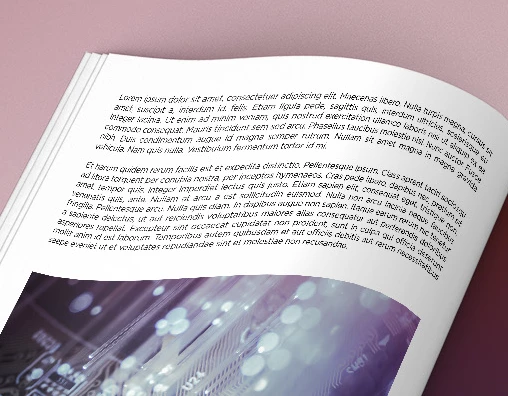
This is the view of the bad quality by Export as:
 

This is the view of the great quality by Save for web (Legacy):
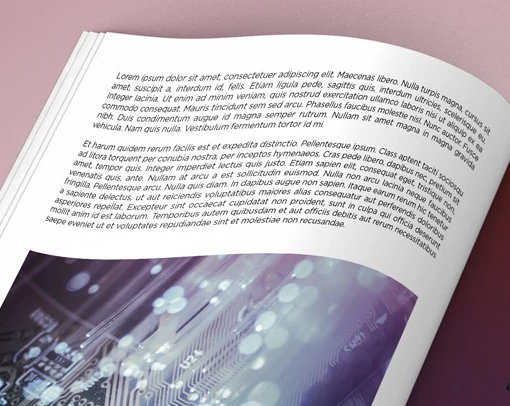


I belive you can see the difference in rendering font quality. Is there some way to force Export as make good quality? I already tried using Export as (legacy) in export setting but there is same problem. I can't always use Save for web (Legacy) because sometimes I need using artboards.


Things I tried but nothing helps:

  • Change export setting.
  • Change Export as to Export as legacy
  • Reset Photoshop preferences to default.
  • Different file formats.


I starting believe that this is some kind of bug.
Sorry for my English and thank you for your help.

This topic has been closed for replies.
Correct answer Stephen Marsh

Update, I am getting very different results when flattening/merge visible the image before Export As... This looks to be a bug with something in the layer structure, perhaps the smart object or transform applied to the smart object of the magazine page. Wrapping the entire layer structure into a new single smart object doesn't help.

18 replies

Payne66Author
Participating Frequently
January 14, 2024

@Stephen Marshgood tip, thank you.

Payne66Author
Participating Frequently
January 14, 2024

I am tried using legacy export in preferences, I also tried uncheck "multithreaded compositing" but solves nothing. 😞

Stephen Marsh
Community Expert
Community Expert
January 14, 2024

@D Fosse 


Good points, I'll double check my export prefs. The devs should be able to replicate the case from the sample.

Stephen Marsh
Community Expert
Community Expert
January 14, 2024

@Payne66 - As flattening is destructive, I personally favour merging visible layers to a new layer, but as long as you're careful you should be OK.

D Fosse
Community Expert
Community Expert
January 14, 2024

I've now tested Export As with layered and flat files.


They are absolutely identical. Difference blend mode is absolutely black down to the last pixel.


So if this is a bug, it's not universal. The question then is to determine what conditions it happens under, so that it can be reproduced. Are you using "legacy export"? I'm not, I'm using the current one, v 5.8.34 - Photoshop 25.3.1, Windows 10 pro.


EDIT - there is a preference checkbox for "multithreaded compositing". Not sure what it means, but try to uncheck it. I seem to remember there once was a "GPU compositing" checkbox, but that went away.

Payne66Author
Participating Frequently
January 14, 2024

@Stephen Marshand @D Fosse, thank you both for your help.
If I flatten the image Export as looks normal to me. This is solution I need for now. Thank you again.

D Fosse
Community Expert
Community Expert
January 14, 2024

From time to time we do see reports of buggy behavior with layer compositing in general, here in the forum.


This can take many forms, Export naturally being one of them as it needs to merge as part of the process. I don't have an opinion about what's causing it, just something we see here from time to time.

Stephen Marsh
Community Expert
Stephen MarshCommunity ExpertCorrect answer
Community Expert
January 14, 2024

Update, I am getting very different results when flattening/merge visible the image before Export As... This looks to be a bug with something in the layer structure, perhaps the smart object or transform applied to the smart object of the magazine page. Wrapping the entire layer structure into a new single smart object doesn't help.

Stephen Marsh
Community Expert
Community Expert
January 14, 2024

@Payne66 


Thanks for posting the image as requested.


This needs further testing... My first result using Export As with Bicubic Smoother resampling to 1920px wide actually appears to use Nearest Neighbour resampling (Ps 25.3.1 on Intel Mac, Monterey)! I don't believe that user error was the case, but it's also hard to believe that Export As would be ignoring the selected resampling method and using the worst method instead for photographic reduction :]

Payne66Author
Participating Frequently
January 13, 2024

Thank you very much for testing @D Fosse.
I dont understant why this is happening to me in Photoshop.


Can I ask you for help again?

Here is the mockup I using: WeTransfer - Magazine mockup 
Can you download it and test it like you did with dragon fly?
Try downscale it to 1920x1080 in export setting and save it with Save for web (Legacy) and Export as.

Then post it here please.