
Inspiring
December 31, 2022
Question

Photoshop save dialogue to the cloud

  • December 31, 2022
  • 2 replies
  • 369 views

I dont want to save to the cloud, I sincerely hope Adobe understands this. The suggestions are there is a preference to disable this, I am not seeing it:
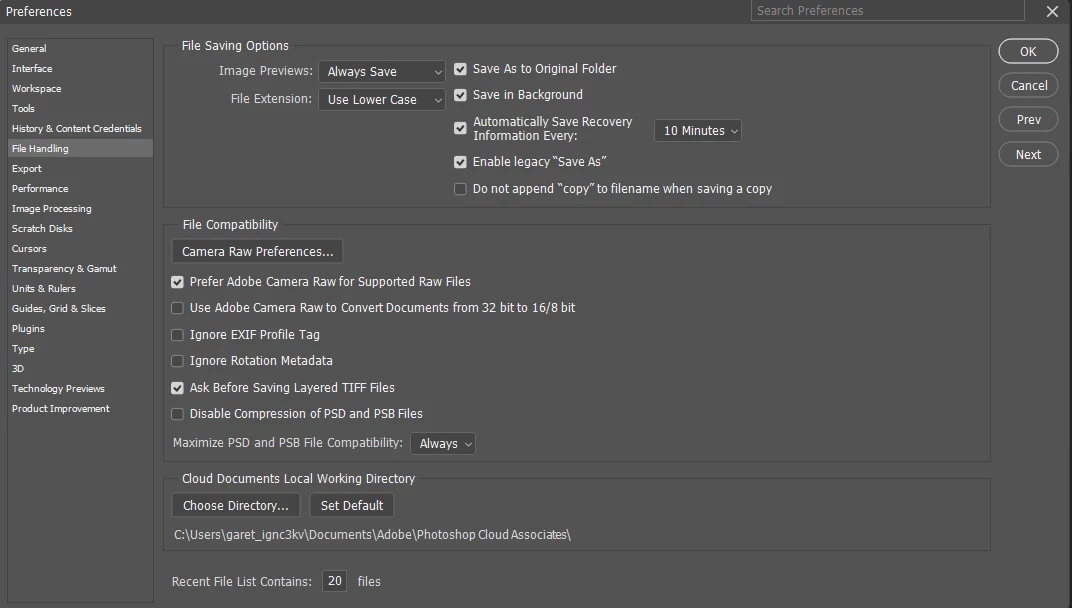


V24.1


How do I disable the cloud dialogue, I dont want it and I am sick to death of companies putting more and more clicks between me and my work?

This topic has been closed for replies.

2 replies

garryg70673208
Inspiring
January 1, 2023

Plus 1 for this. That is, how do you stop Ps saving to the cloud as a default?

PECourtejoie
Community Expert
Community Expert
January 19, 2023

Hi, @garethirwin1234 and @garryg70673208  what kid of license to you have? some Enterprise ones might disable that option to show in preferences, but usually, it also disables the saving to the cloud.

Did you try to update to V 24.1.1, released today. Please do so, restart Photoshop and the computer and report if it fixes your issue. (Garry, did you try to restore your preferences to the default using this manual method?
https://helpx.adobe.com/photoshop/using/preferences.html#Manually it lets you keep a copy on the desktop that you can use to revert the process, or to send to a Photoshop Engineer if they request it.)

Ged_Traynor
Community Expert
Community Expert
December 31, 2022

Hi

Try resetting your Photoshop preferences

If that doesn't help try reinstall Photoshop