

OrvilleSpence
Participant
November 23, 2020
Answered

Photoshop Undo Toggles Everything

  • November 23, 2020
  • 1 reply
  • 513 views

Hi guys, first time posting.

Command+Z toggles ALL ny activity instead of just undoing my last action.
Example, I will heal/clone or add a filter anf the toggle the layer on and off to see the before and after, then I will might want to undo that filter or heal/clone but the shortcut will first go through all my clicks of turning on and off the layer before it gets to undoing my last effect (filter or heal/cloning). 
How do I get it to just undo the action/effect and not evey single clicks I made??
This topic has been closed for replies.
Correct answer OrvilleSpence

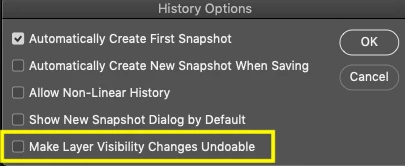
After some lenghty search within Photoshop, I found the answer to my problem in History Options.


Thank you for your help Jane.

1 reply

jane-e
Community Expert
Community Expert
November 24, 2020

Ctrl + Z should undo one step at a time. Ctrl+Alt+Z will Toggle to the previous state and may jump to a state you were working on earlier. A few things I can think of to look at first:

  • Make sure your Alt key isn't stuck
  • See if it works correctly from Edit > Undo without the shortcut
  • Open your History panel (Window menu) and watch to see exactly what is happening
  • If it is going all the way back to the last time you saved, check to see which shortcut is assigned to File > Revert.


Shortcuts can be removed and reassigned in Edit > Keyboard Shortcuts, and you can see the current assignment in the menus. Let us know what you find.


~ Jane


OrvilleSpence
OrvilleSpenceAuthorCorrect answer
Participant
November 24, 2020

After some lenghty search within Photoshop, I found the answer to my problem in History Options.


Thank you for your help Jane.

jane-e
Community Expert
Community Expert
November 24, 2020

You're welcome, Orville, and I've marked your answer correct.

~ Jane