
Participating Frequently
November 5, 2017
Answered

photoshop2018 filters sketch photocopy?

  • November 5, 2017
  • 4 replies
  • 3634 views

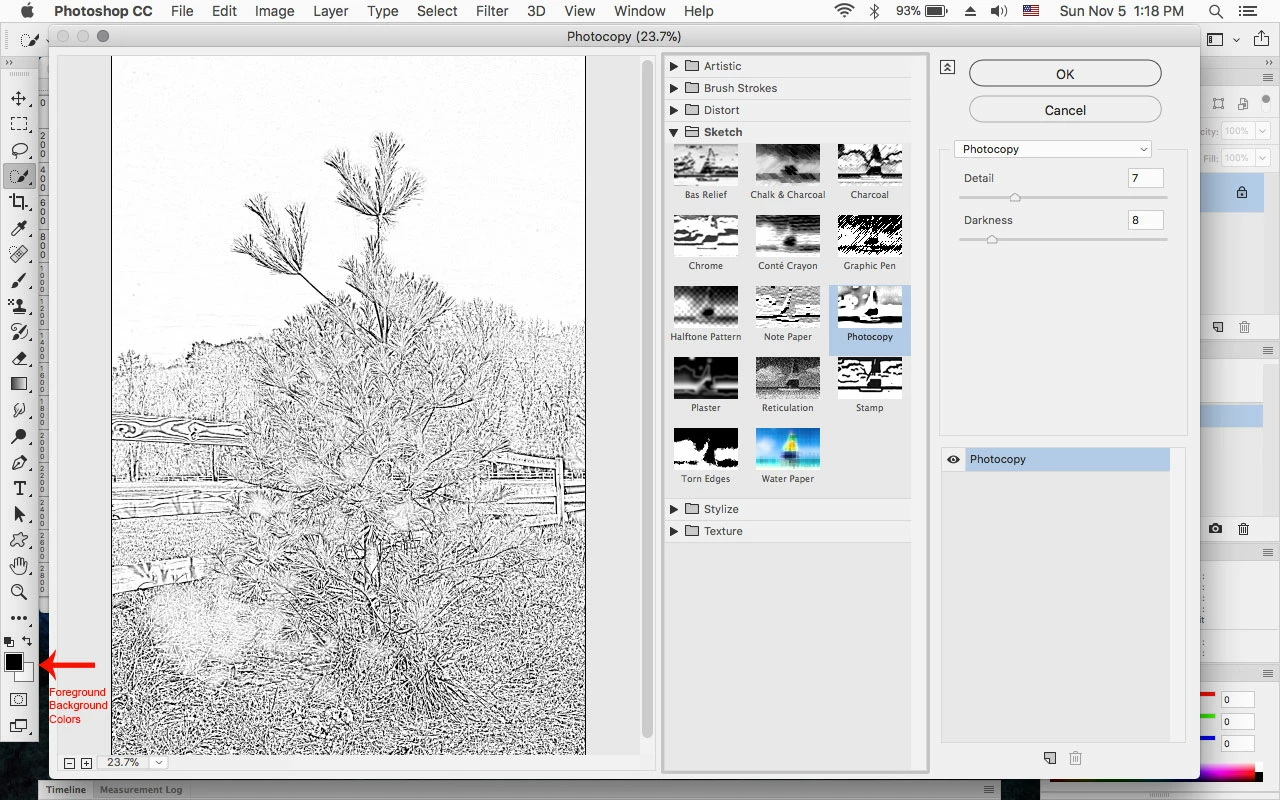
Last evening I used photoshop cc 2018  filters sketch photocopy and it worked fine. This morning when I went to do another photograph it would not work. In fact several in the sketch list would not work. What happened. I've tried everything I can think of.
PHOTOSHOP FILTERS NOT WORKING CORRECTLY

    This topic has been closed for replies.
    Correct answer Jeff Arola

    Debbie​ how do I get in touch with someone who can help me

    @


    The most common problem is having the same Foreground and Background colors in the tool box prior to using the Filter Gallery.

    Press the D key to reset the default tool box colors to Black foreground and White background, then try the Sketch filters.

    4 replies

    Participant
    October 2, 2024

    What happened to this filter/effect in the current version of PS? I have been out of it (Using PS regularly) and used to use this for generating images for the biginnings of my hand drawn portraits. I need this adjustment again!

    Jeff Arola
    Community Expert
    Community Expert
    October 2, 2024

    jediguyblue,


    It's still there under Filter>Filter Gallery

    Participating Frequently
    November 5, 2017

    Hello out there, who do I call?

    Participating Frequently
    November 5, 2017

    This is terrible service

    Participating Frequently
    November 5, 2017

    okay how do I get someone to remotely access my computer to fix this problem

    Participating Frequently
    November 5, 2017

    Still need to know how to get this fixed. Your response was of no help what so ever.

    Participating Frequently
    November 5, 2017

    Debbie​ how do I get in touch with someone who can help me

    @