
Participant
July 27, 2021
Answered

Possible for new artboard to be added below rather than above current layers?

  • July 27, 2021
  • 2 replies
  • 1159 views

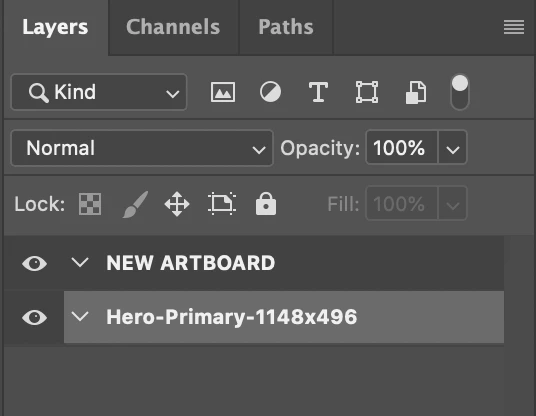
Hoping someone can help with this minor annoyance. I like to use artboards to organize assets like say social images. When I create a new artboard, the new artboard will always be added ABOVE the current artboard. I then have to manually move it below. I'd like to change the behavior to make the new artboard go below the current artboard. Is this possible? See image below for reference. Thanks!
 

This topic has been closed for replies.
Correct answer Kukurykus

Yes it can be triggered automatically, but better if I tell you how to do it manually:

Save the code in belowArtboard.jsx file and copy it to 'Presets/Scripts' of your Photoshop folder. Relaunch Photoshop and from 'File / Scripts' menu select 'belowArtboard' item, but only when you have open document. Surely you can bind some shortcut to item from menu.

2 replies

Kukurykus
Legend
July 27, 2021

When you want to add new artboard while the other artboard is selected and you want it was added below currently selected artbord, make sure the selected artboard is collapsed (so not like on your screenshot where it's expanded). Same for selected layerSet, freely for selected layer. Then use below script:


sTT = stringIDToTypeID; (ref = new ActionReference())
.putClass(sTT('artboardSection')); (dsc = new ActionDescriptor())
.putReference(sTT('null'), ref), dsc.putBoolean(sTT('below'), true)
dsc.putString(sTT('name'), 'Artboard'), executeAction(sTT('make'), dsc)


Participant
July 27, 2021

Thank you! I'm not familiar with using scripts but assuming I figure this out, would I execute this from the File > Scripts menu or would it happen automatically when I create a new artboard?

Kukurykus
KukurykusCorrect answer
Legend
July 27, 2021

Yes it can be triggered automatically, but better if I tell you how to do it manually:

Save the code in belowArtboard.jsx file and copy it to 'Presets/Scripts' of your Photoshop folder. Relaunch Photoshop and from 'File / Scripts' menu select 'belowArtboard' item, but only when you have open document. Surely you can bind some shortcut to item from menu.

Myra Ferguson
Community Expert
Community Expert
July 27, 2021

You could use the keyboard shortcut Ctrl + [ (PC) / Command + [ (macOS) to move the new artboard down. The modifier plus the left bracket moves a layer or artboard down. The modifier plus the right bracket moves a layer or artboard up.

jct_can
Participant
July 27, 2021

Thanks! I wasn't aware of that shortcut. Appreciate your help.