



Mohamed Hameed21513110
Inspiring
August 2, 2023
해결됨

Preserve the size and colors of the letters when changing the font

  • August 2, 2023
  • 2 답변들
  • 2100 조회

Hello guys and experienced people
I really hope you help me

After suffering and searching, I found some lines and modified them until I reached this script, but I only want a slight modification to it

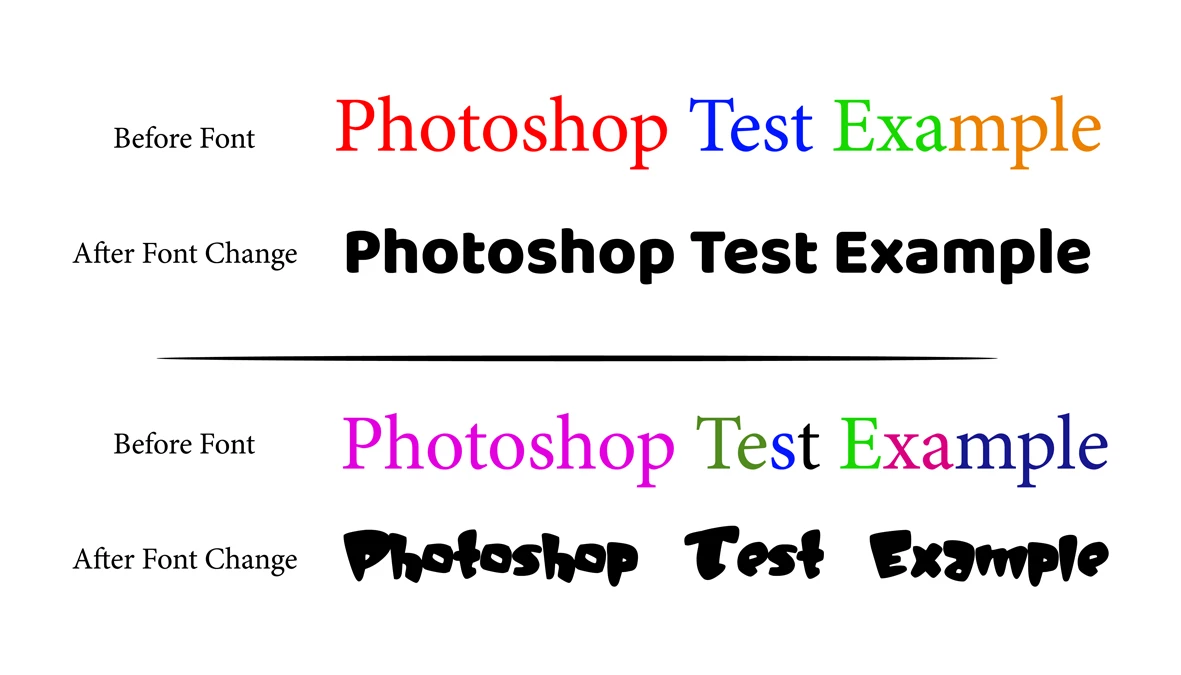
When I change the font of a text layer with colored letters to another font, the color of the entire text is changed to Solid Color

I just want to modify the font to be changed while preserving the color of the letters of the text layer


The problem that appears with me when using the code


try {

var fpsname = "DINNextLTArabic-Heavy";
var fn="DIN Next LT Arabic"
var fnst= "Heavy"

var txt = activeDocument.activeLayer.textItem.contents; // "blablablabla Sport blablablabla sport blablabla Sports";
var AC = activeDocument.activeLayer.textItem.contents;

activeDocument.activeLayer.textItem.contents = activeDocument.activeLayer.textItem.contents; 
    color = activeDocument.activeLayer.textItem.color;  

var domTextSize = activeDocument.activeLayer.textItem.size;
domTextSize = Math.round(domTextSize*100)/100;


var substr = txt
if (substr)
    {
    var idx = [];
    var i = -1;
    while (1)
        {
        i = txt.indexOf(substr, i+1);
        if (i < 0) break;
        idx.push(i);
        }
    var len = substr.length;
    for (var i = 0; i < idx.length; i++)
        set_text_style(idx[i], substr.length,domTextSize , color, fpsname)
    }
function set_text_style(from, len, size, color, fname)
    {
    try {
        var d = new ActionDescriptor();
        var r = new ActionReference();
        r.putEnumerated(stringIDToTypeID("textLayer"), stringIDToTypeID("ordinal"), stringIDToTypeID("targetEnum"));
        d.putReference(stringIDToTypeID("null"), r);
        var d1 = new ActionDescriptor();
        var list1 = new ActionList();
        var d2 = new ActionDescriptor();
        d2.putInteger(stringIDToTypeID("from"), from);
        d2.putInteger(stringIDToTypeID("to"), from+len);
        var d3 = new ActionDescriptor();
            d3.putUnitDouble(stringIDToTypeID("size"), stringIDToTypeID("pointsUnit"), domTextSize);
            d3.putString(stringIDToTypeID("fontPostScriptName"), fpsname);
            d3.putString(stringIDToTypeID("fontName"), fn);
            d3.putString(stringIDToTypeID("fontStyleName"), fnst);
            //d3.putEnumerated(stringIDToTypeID("textLanguage"), stringIDToTypeID("textLanguage"), stringIDToTypeID("englishLanguage"));
            d3.putEnumerated(stringIDToTypeID("textantiAliasMethod"), stringIDToTypeID("textantiAliasMethod"), stringIDToTypeID("SMOOTH"));
            d3.putEnumerated(stringIDToTypeID("digitSet"), stringIDToTypeID("digitSet"), stringIDToTypeID("HindiDigits"));
            
           if (color != undefined)
            {
            var d4 = new ActionDescriptor();
            d4.putDouble(stringIDToTypeID("red"),   color.rgb.red);
            d4.putDouble(stringIDToTypeID("green"), color.rgb.green);
            d4.putDouble(stringIDToTypeID("blue"),  color.rgb.blue);
            d3.putObject(stringIDToTypeID("color"), stringIDToTypeID("RGBColor"), d4);
            }
        d2.putObject(stringIDToTypeID("textStyle"), stringIDToTypeID("textStyle"), d3);
        list1.putObject(stringIDToTypeID("textStyleRange"), d2);
        d1.putList(stringIDToTypeID("textStyleRange"), list1);
        d.putObject(stringIDToTypeID("to"), stringIDToTypeID("textLayer"), d1);
        executeAction(stringIDToTypeID("set"), d, DialogModes.NO);
        }

    catch (e) { throw(e); } 
    }

} catch (e) { alert(e); }


이 주제는 답변이 닫혔습니다.
최고의 답변: c.pfaffenbichler

@c.pfaffenbichler 

Thank you for your interest, sir
- What is the difference between these lines that you added and what I added to the text?
I make a definition

var fpsname = "Traditional Arabic";
var fn="Al-Kharashi 36"
var fnst = "regular"


Then I added them inside the font change script

var desc14 = new ActionDescriptor();
desc14. putInteger(idFrom, m );
desc14. putInteger( idT, m+1 );
var desc15 = new ActionDescriptor();
var desc15 = thisStyleRange;
//var aRandomFont = newFonts[Math. floor(Math. random()*3)];
desc15. putString(stringIDToTypeID("fontPostScriptName"), fpsname);
desc15. putString(stringIDToTypeID("fontName"), fn);
desc15. putString(stringIDToTypeID("fontStyleName"), fnst);
desc15.putEnumerated(stringIDToTypeID("digitSet"), stringIDToTypeID("digitSet"), stringIDToTypeID("HindiDigits"));
// desc15. putString( stringIDToTypeID( "fontPostScriptName") , aRandomFont);
desc14. putObject( idTxtS, idTxtS, desc15 );
list2. putObject( idTxtt, desc14 );
};


Sorry, I hadn’t checked your code fully because it doesn’t do anything here. 

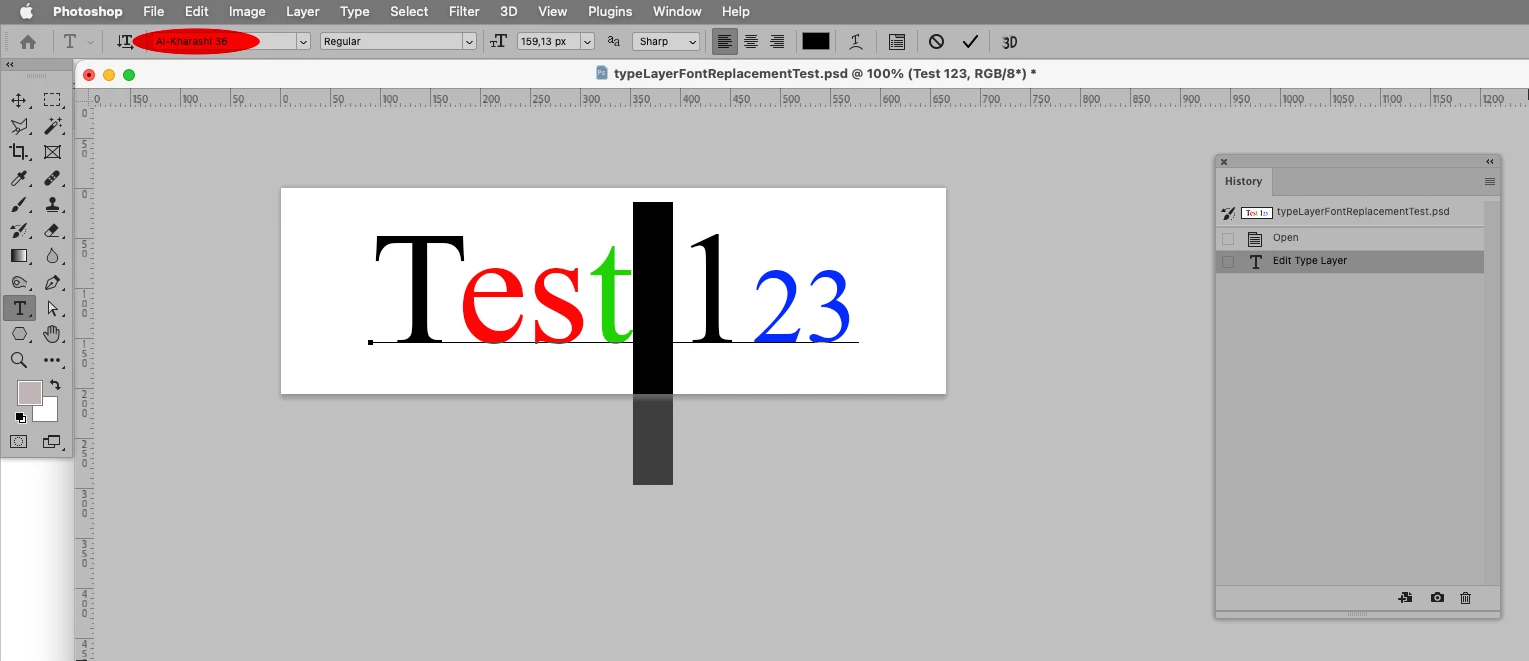
I had reverted to the original code from the other thread, changed that and the font appears to be applied to the space character.

So the issue might be that none of the characters in that type layer (except the space) exist in the new font. 

// 2023, use it at your own risk;
if (app.documents.length > 0) {
//////////////////
try {
var theFonts = new Array;
var theStyleRanges = new Array;
// get font of active layer;
var ref = new ActionReference();
ref.putEnumerated( charIDToTypeID("Lyr "), charIDToTypeID("Ordn"), charIDToTypeID("Trgt") ); 
var layerDesc = executeActionGet(ref);
var layerSet = typeIDToStringID(layerDesc.getEnumerationValue(stringIDToTypeID("layerSection")));
var isBackground = layerDesc.getBoolean(stringIDToTypeID("background"));
var theName = layerDesc.getString(stringIDToTypeID('name'));
// if not layer group collect values;
if (layerSet != "layerSectionEnd" && layerSet != "layerSectionStart" && isBackground != true) {
var hasText = layerDesc.hasKey(stringIDToTypeID("textKey"));
if (hasText == true) {
var textDesc = layerDesc.getObjectValue(stringIDToTypeID('textKey'));
var theText = textDesc.getString(stringIDToTypeID('textKey'));
//var shapeList = textDesc.getList(stringIDToTypeID('textShape'));
var paragraphRangeList = textDesc.getList(stringIDToTypeID('paragraphStyleRange'));
var kernRange = textDesc.getList(stringIDToTypeID('kerningRange'));
var rangeList = textDesc.getList(stringIDToTypeID('textStyleRange'));
// process the list;
for (var o = 0; o < rangeList.count; o++) {
var thisList = rangeList.getObjectValue(o);
var theFrom = thisList.getInteger(stringIDToTypeID('from'));
var theTo = thisList.getInteger(stringIDToTypeID('to'));
var styleDesc = thisList.getObjectValue(stringIDToTypeID('textStyle'));
var aSize = styleDesc.getUnitDoubleValue(charIDToTypeID( "Sz  " ));
// check for default font;
if (styleDesc.hasKey(stringIDToTypeID('fontPostScriptName')) == true) {var aFont = styleDesc.getString(stringIDToTypeID('fontPostScriptName'))}
else {
	var theDefault = styleDesc.getObjectValue(stringIDToTypeID('baseParentStyle'));	
	var aFont = theDefault.getString(stringIDToTypeID('fontPostScriptName'));
	};
if (styleDesc.hasKey(stringIDToTypeID('impliedFontSize')) == true) {var aFont = styleDesc.getString(stringIDToTypeID('fontPostScriptName'))}
// add to array;
//////////////////
if (o == 0) {
    theFonts.push([aFont, aSize, theFrom, theTo]);
    theStyleRanges.push(thisList.getObjectValue(stringIDToTypeID('textStyle')));
    };
if (o > 0 && theFrom != theFonts[theFonts.length - 1][2] /*&& theTo != theFonts[theFonts.length - 1][3]*/) {
theFonts.push([aFont, aSize, theFrom, theTo]);
theStyleRanges.push(thisList.getObjectValue(stringIDToTypeID('textStyle')));
};
//////////////////
}
}
};
//alert (theFonts.length+"\n"+theFonts.join("\n"));
// the replacement-fonts array;
var anIndex = 0;
// change text;
// =======================================================
var idPxl = charIDToTypeID( "#Pxl" );
var idTxtt = charIDToTypeID( "Txtt" );
var idFrom = charIDToTypeID( "From" );
var idT = charIDToTypeID( "T   " );
var idTxtS = charIDToTypeID( "TxtS" );
var idTxLr = charIDToTypeID( "TxLr" );
var idTxt = charIDToTypeID( "Txt " );
var idsetd = charIDToTypeID( "setd" );
    var desc6 = new ActionDescriptor();
    var idnull = charIDToTypeID( "null" );
        var ref1 = new ActionReference();
        ref1.putEnumerated( idTxLr, charIDToTypeID( "Ordn" ), charIDToTypeID( "Trgt"  ));
    desc6.putReference( idnull, ref1 );
        var desc7 = new ActionDescriptor();
        desc7.putString( idTxt, theText );
            var list2 = new ActionList();
//////////////////
// define each letter individually;
var theIndex = 0;
var thisStyleRange = theStyleRanges[theIndex];
var thisFont = theFonts[theIndex];
for (var m = 0; m < theText.length; m++) {
// check for relevant style range;
    if (m == thisFont[3]) {
        theIndex++;
        var thisStyleRange = theStyleRanges[theIndex];
        var thisFont = theFonts[theIndex];
        };
// apply style range but change font;
    var desc14 = new ActionDescriptor();
    desc14.putInteger( idFrom, m );
    desc14.putInteger( idT, m+1 );
        var desc15 = new ActionDescriptor();
        var desc15 = thisStyleRange;
        desc15.putString( stringIDToTypeID( "fontPostScriptName" ), "Traditional-Arabic");
        desc15.putString( stringIDToTypeID( "fontName" ), "Al-Kharashi 36");
    desc14.putObject( idTxtS, idTxtS, desc15 );
    list2.putObject( idTxtt, desc14 );
    };
//////////////////
var desc7 = new ActionDescriptor();
var list3 = new ActionList();
    for (var n = kernRange.count-1; n >= 0; n--) {
        var thisOne = kernRange.getObjectValue(n);
        var desc15 = new ActionDescriptor();
        desc15.putInteger( idFrom, thisOne.getInteger(charIDToTypeID("From")) );
        desc15.putInteger( idT, thisOne.getInteger(charIDToTypeID( "T   " )) );
        desc15.putInteger( charIDToTypeID( "Krng" ), thisOne.getInteger(stringIDToTypeID("kerning")));
        list3.putObject( stringIDToTypeID( "kerningRange"),  desc15);
        };
        desc7.putList( idTxtt, list2 );
        desc7.putList( stringIDToTypeID( "kerningRange"), list3);
    desc6.putObject( idT, idTxLr, desc7 );
executeAction( idsetd, desc6, DialogModes.NO );
}
catch (e) {};
};


2 답변

c.pfaffenbichler
Community Expert
Community Expert
August 3, 2023

The Script in this thread

https://community.adobe.com/t5/photoshop-ecosystem-discussions/change-each-letter-in-a-text-layer-to-have-a-random-font-from-set-list-with-a-script/m-p/12926386#M641937

would apply a random one from an Array of fonts to a Type Layer; if you are willing to do the work it should be able to serve as an example for changing one property of individual letters while maintaining some other. 

Mohamed Hameed21513110
Inspiring
August 3, 2023

@c.pfaffenbichler 

Forgive me sir for this request
The code works well, but I discovered that in some fonts it does not work well

I have added (font name / font style / postscript name)
But it works on some fonts and other fonts it doesn't
I don't know where is the problem??

The addition that I made in the lines (53/54/55)
And in lines (97/98/99/100)

This code after adding lines to it

if (app.documents.length > 0) {
//////////////////
try {
var theFonts = new Array;
var theStyleRanges = new Array;
// get font of active layer;
var ref = new ActionReference();
ref.putEnumerated( charIDToTypeID("Lyr "), charIDToTypeID("Ordn"), charIDToTypeID("Trgt") ); 
var layerDesc = executeActionGet(ref);
var layerSet = typeIDToStringID(layerDesc.getEnumerationValue(stringIDToTypeID("layerSection")));
var isBackground = layerDesc.getBoolean(stringIDToTypeID("background"));
var theName = layerDesc.getString(stringIDToTypeID('name'));
// if not layer group collect values;
if (layerSet != "layerSectionEnd" && layerSet != "layerSectionStart" && isBackground != true) {
var hasText = layerDesc.hasKey(stringIDToTypeID("textKey"));
if (hasText == true) {
var textDesc = layerDesc.getObjectValue(stringIDToTypeID('textKey'));
var theText = textDesc.getString(stringIDToTypeID('textKey'));
//var shapeList = textDesc.getList(stringIDToTypeID('textShape'));
var paragraphRangeList = textDesc.getList(stringIDToTypeID('paragraphStyleRange'));
var kernRange = textDesc.getList(stringIDToTypeID('kerningRange'));
var rangeList = textDesc.getList(stringIDToTypeID('textStyleRange'));
// process the list;
for (var o = 0; o < rangeList.count; o++) {
var thisList = rangeList.getObjectValue(o);
var theFrom = thisList.getInteger(stringIDToTypeID('from'));
var theTo = thisList.getInteger(stringIDToTypeID('to'));
var styleDesc = thisList.getObjectValue(stringIDToTypeID('textStyle'));
var aSize = styleDesc.getUnitDoubleValue(charIDToTypeID( "Sz  " ));
// check for default font;
if (styleDesc.hasKey(stringIDToTypeID('fontPostScriptName')) == true) {var aFont = styleDesc.getString(stringIDToTypeID('fontPostScriptName'))}
else {
	var theDefault = styleDesc.getObjectValue(stringIDToTypeID('baseParentStyle'));	
	var aFont = theDefault.getString(stringIDToTypeID('fontPostScriptName'));
	};
if (styleDesc.hasKey(stringIDToTypeID('impliedFontSize')) == true) {var aFont = styleDesc.getString(stringIDToTypeID('fontPostScriptName'))}
// add to array;
//////////////////
if (o == 0) {
    theFonts.push([aFont, aSize, theFrom, theTo]);
    theStyleRanges.push(thisList.getObjectValue(stringIDToTypeID('textStyle')));
    };
if (o > 0 && theFrom != theFonts[theFonts.length - 1][2] /*&& theTo != theFonts[theFonts.length - 1][3]*/) {
theFonts.push([aFont, aSize, theFrom, theTo]);
theStyleRanges.push(thisList.getObjectValue(stringIDToTypeID('textStyle')));
};
//////////////////
}
}
};
//alert (theFonts.length+"\n"+theFonts.join("\n"));
// the replacement-fonts array;
var fpsname = "Traditional-Arabic";
var fn="Al-Kharashi 36"
var fnst= "Regular"

//var newFonts = ["MyriadPro-Regular", "MyriadPro-Bold", "Times-BoldItalic"];
var anIndex = 0;
var theFontsNumber = newFonts.length;
// change text;
// =======================================================
var idPxl = charIDToTypeID( "#Pxl" );
var idTxtt = charIDToTypeID( "Txtt" );
var idFrom = charIDToTypeID( "From" );
var idT = charIDToTypeID( "T   " );
var idTxtS = charIDToTypeID( "TxtS" );
var idTxLr = charIDToTypeID( "TxLr" );
var idTxt = charIDToTypeID( "Txt " );
var idsetd = charIDToTypeID( "setd" );
    var desc6 = new ActionDescriptor();
    var idnull = charIDToTypeID( "null" );
        var ref1 = new ActionReference();
        ref1.putEnumerated( idTxLr, charIDToTypeID( "Ordn" ), charIDToTypeID( "Trgt"  ));
    desc6.putReference( idnull, ref1 );
        var desc7 = new ActionDescriptor();
        desc7.putString( idTxt, theText );
            var list2 = new ActionList();
//////////////////
// define each letter individually;
var theIndex = 0;
var thisStyleRange = theStyleRanges[theIndex];
var thisFont = theFonts[theIndex];
for (var m = 0; m < theText.length; m++) {
// check for relevant style range;
    if (m == thisFont[3]) {
        theIndex++;
        var thisStyleRange = theStyleRanges[theIndex];
        var thisFont = theFonts[theIndex];
        };
// apply style range but change font;
    var desc14 = new ActionDescriptor();
    desc14.putInteger( idFrom, m );
    desc14.putInteger( idT, m+1 );
        var desc15 = new ActionDescriptor();
        var desc15 = thisStyleRange;
        //var aRandomFont = newFonts[Math.floor(Math.random()*3)];
        desc15.putString(stringIDToTypeID("fontPostScriptName"), fpsname);
         desc15.putString(stringIDToTypeID("fontName"), fn);
         desc15.putString(stringIDToTypeID("fontStyleName"), fnst);
         desc15.putEnumerated(stringIDToTypeID("digitSet"), stringIDToTypeID("digitSet"), stringIDToTypeID("HindiDigits"));
       // desc15.putString( stringIDToTypeID( "fontPostScriptName" ), aRandomFont);
    desc14.putObject( idTxtS, idTxtS, desc15 );
    list2.putObject( idTxtt, desc14 );
    };
//////////////////
var desc7 = new ActionDescriptor();
var list3 = new ActionList();
    for (var n = kernRange.count-1; n >= 0; n--) {
        var thisOne = kernRange.getObjectValue(n);
        var desc15 = new ActionDescriptor();
        desc15.putInteger( idFrom, thisOne.getInteger(charIDToTypeID("From")) );
        desc15.putInteger( idT, thisOne.getInteger(charIDToTypeID( "T   " )) );
        desc15.putInteger( charIDToTypeID( "Krng" ), thisOne.getInteger(stringIDToTypeID("kerning")));
        list3.putObject( stringIDToTypeID( "kerningRange"),  desc15);
        };
        desc7.putList( idTxtt, list2 );
        desc7.putList( stringIDToTypeID( "kerningRange"), list3);
    desc6.putObject( idT, idTxLr, desc7 );
executeAction( idsetd, desc6, DialogModes.NO );
}
catch (e) {};
};

I attached the name of the font shown inside the code and also a file with text

Mohamed Hameed21513110
Inspiring
August 3, 2023

First it appears one needs to use fontName and fontPostScriptName. 


        desc15.putString( stringIDToTypeID( "fontPostScriptName" ), "Traditional-Arabic");
        desc15.putString( stringIDToTypeID( "fontName" ), "Al-Kharashi 36");


Secondly: If the text is not arabic changing the font to an arabic font seems pointless. 


@c.pfaffenbichler 

Thank you for your interest, sir
- What is the difference between these lines that you added and what I added to the text?
I make a definition

var fpsname = "Traditional Arabic";
var fn="Al-Kharashi 36"
var fnst = "regular"


Then I added them inside the font change script

var desc14 = new ActionDescriptor();
desc14. putInteger(idFrom, m );
desc14. putInteger( idT, m+1 );
var desc15 = new ActionDescriptor();
var desc15 = thisStyleRange;
//var aRandomFont = newFonts[Math. floor(Math. random()*3)];
desc15. putString(stringIDToTypeID("fontPostScriptName"), fpsname);
desc15. putString(stringIDToTypeID("fontName"), fn);
desc15. putString(stringIDToTypeID("fontStyleName"), fnst);
desc15.putEnumerated(stringIDToTypeID("digitSet"), stringIDToTypeID("digitSet"), stringIDToTypeID("HindiDigits"));
// desc15. putString( stringIDToTypeID( "fontPostScriptName") , aRandomFont);
desc14. putObject( idTxtS, idTxtS, desc15 );
list2. putObject( idTxtt, desc14 );
};


Derek Cross
Community Expert
Community Expert
August 2, 2023

Create a Character Style.

Mohamed Hameed21513110
Inspiring
August 2, 2023

@Derek Cross 

How can I do that
I do not understand very well the language of codes
I rely on simple knowledge to take some lines and modify them to suit me in my personal work

Derek Cross
Community Expert
Community Expert
August 2, 2023

Actually, you just need to create the text once then duplicate it, then you can change the font and it still retains the colours.