Answered
Problem with shortcut, wont work
I have a longtime shortcut for Arrange, Float all in Windows, and it's not working now. I'm created a new shortcut set, changed the keyword, nothing works. Very frustrating, thanks.

I have a longtime shortcut for Arrange, Float all in Windows, and it's not working now. I'm created a new shortcut set, changed the keyword, nothing works. Very frustrating, thanks.
larry4545 wrote
I have a longtime shortcut for Arrange, Float all in Windows, and it's not working now. I'm created a new shortcut set, changed the keyword, nothing works. Very frustrating, thanks.
There are no standard shortcuts for Window > Arrange... but there are two suggestions for such shortcuts that I know of.
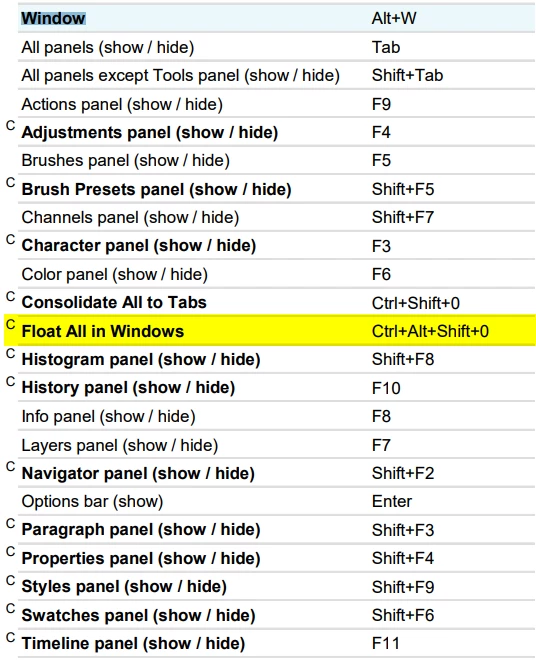
The first is the Trevor Morris Windows CC Shortcut list. All those preceded with the letter C are suggested custom shortcuts
The other is the Michael Ninness Power Shortcuts from MAX in 2013
To save you time, I use these, as detailed below
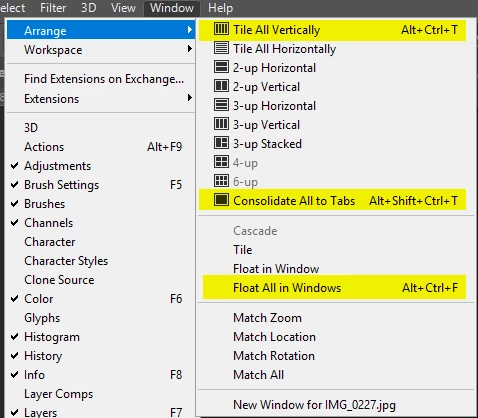
So you need to go into Edit > Shortcuts and set up the custom shortcuts that suit you. You can save them custom workspaces to keep things tidy.
Already have an account? Login
Enter your E-mail address. We'll send you an e-mail with instructions to reset your password.
 AdChoices