
daniellek15369243
Participant
December 30, 2020
Answered

Program error - Can't save

  • December 30, 2020
  • 2 replies
  • 618 views

Hi, I've had this problem ever since I updated to Photoshop 2021. I can't do a whole lot of things in photoshop due to a message that comes up saying "Could not complete your request due to program error". 
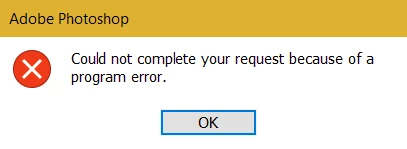
 

I can't save any files. I can't copy and paste. I can't export. I can't merge any layers/groups. I can't convert things to smart layers. I can't do anything!!!! I've been working on a project and I can't save it or export it. 


HELP ME PLEASE


This topic has been closed for replies.
Correct answer PECourtejoie

Hello, affected users should update to Photoshop 22.1.1 as it fixes the issue: https://helpx.adobe.com/photoshop/kb/fixed-issues.html

If the update does not appear in the CC app, go to help>check for updates.

2 replies

Participating Frequently
December 30, 2020

ME TOO. AND IT'S AWWWWWFUL!!!!! PLEASE PLEASE PLEASE ADOBE FIX THIS ASAP.

Participant
December 30, 2020

Argl ! I've got the same problem !!!! I cant' save, copy and paste....... since I updated Photoshop.

Help !

PECourtejoie
Community Expert
PECourtejoieCommunity ExpertCorrect answer
Community Expert
January 19, 2021

Hello, affected users should update to Photoshop 22.1.1 as it fixes the issue: https://helpx.adobe.com/photoshop/kb/fixed-issues.html

If the update does not appear in the CC app, go to help>check for updates.

Community Expert
December 30, 2020
My System: Intel i7-8700K - 64GB RAM - NVidia Geforce RTX 3060 - Windows 11 Pro 25H2 -- LR-Classic 15 - Photoshop 27 - Nik Collection 9 - PureRAW 6 - Topaz Photo AI
daniellek15369243
Participant
December 30, 2020

Thanks, still doesn't work. Still can't save or export or merge layers, etc.