


Inspiring
June 26, 2021
해결됨

Prompt alert dialog font styling

  • June 26, 2021
  • 4 답변들
  • 3908 조회

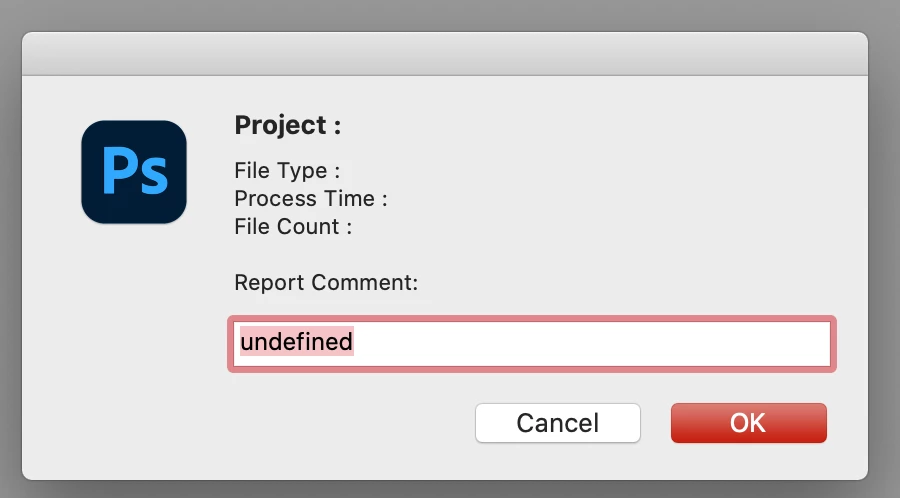
Is it possible to edit the font weight and font size from a PS prompt alert dialog?  

For example in the following example can, the Report Comment heading display in bold letters?


prompt ("Project : "
+ "\rFile Type : "
+ "\rProcess Time : "
+ "\rFile Count : "
+ "\r"
+ "\rReport Comment:");


이 주제는 답변이 닫혔습니다.
최고의 답변: Kukurykus

No. Use ScriptUI.

4 답변

Stephen Marsh
Community Expert
Community Expert
June 27, 2021

As a learning exercise and to give new scripters such as myself a headstart, I have been making Script UI configurable versions of the standard "user notification dialogs" (Alert, Prompt, Confirmation).


What do I mean by configurable? Simply that I have put the UI into a function, replaced statictext.text with variables, then one can replace the variables as needed when calling the function with parameters. This makes the code reusable as one may use these features multiple times in a larger script.


Script UI - Alert:


Script UI - Confirmation:


Script UI - Prompt:


Although an icon/picture could be included, I decided against this to keep the code concise

Stephen Marsh
Community Expert
Community Expert
June 27, 2021

Using ScriptUI, one has more control and at least the result is more consistent between different operating systems and versions of the same operating system.


Here is the same code on the Mac, then Windows:


Stephen Marsh
Community Expert
Community Expert
June 27, 2021

Haha, same code – two different results!


Looks like on Windows, it is truncating the text from "string" to "strin"...


Edit: OK, I just had to add a line of code to set the preferredSize.width as Windows appears to need this, when the Mac does not.

Polycontrast작성자
Inspiring
June 27, 2021

Thank you for the explanation. That is a big difference between the OS prompt dialogs. The script UI has an advantage over the default OS dialogs in terms of uniformity.  A better solution is to create the dialog using the script UI. I am unsure how to call the script UI instead of the prompt alert.  

Does this make sense?

1. Create the dialog using the scriptUI.

2. Wrap the UI in a function.

3. Call the UI function instead of the prompt alert, 

4. Pass the parameters to the UI function 

5. Get the user input


Stephen Marsh
Community Expert
Community Expert
June 27, 2021

@Polycontrast – Using the default system alert, prompt and confirmation windows is convenient, however, they are dependent on the OS in use. On the Mac, prior to Big Sur, the dialog widows presented the information in a serviceable fashion and they also looked clean, as your screenshot above illustrates.


Now, take a look at the same code in Big Sur:


As one is using the default OS style, you are at the mercy of either Apple or Microsoft's styling decisions:


Kukurykus
Kukurykus답변
Legend
June 26, 2021

No. Use ScriptUI.