Naoki-Hada
Known Participant
November 13, 2017
Answered

[Q] Is accessible (get/set) for Brush Settings' Lock features?

  • November 13, 2017
  • 3 replies
  • 2847 views

Hi all,

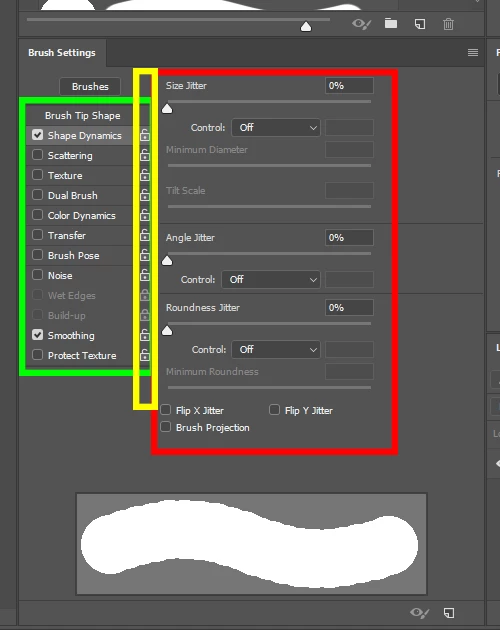
I'm trying to access (get/set) for Brush Settings' Lock features as following yellow rectangle part.

Are these accessible (get/set) from script?

The reason I'd like to access is protecting value changes on Opacity, Flow, Smoothing, Strength, Exposure on brush value by script.

Current code is get and reset following green part. But red part gets reset and I'll need work on.

It seems when yellow part are "protected", it seems no get reset by above (opacity, flow, ...) changes.

#original purpose was just changing opacity, etc, but got reset issue and trying to avoid.

There seems not recorded by ScriptListner and regular Actions.

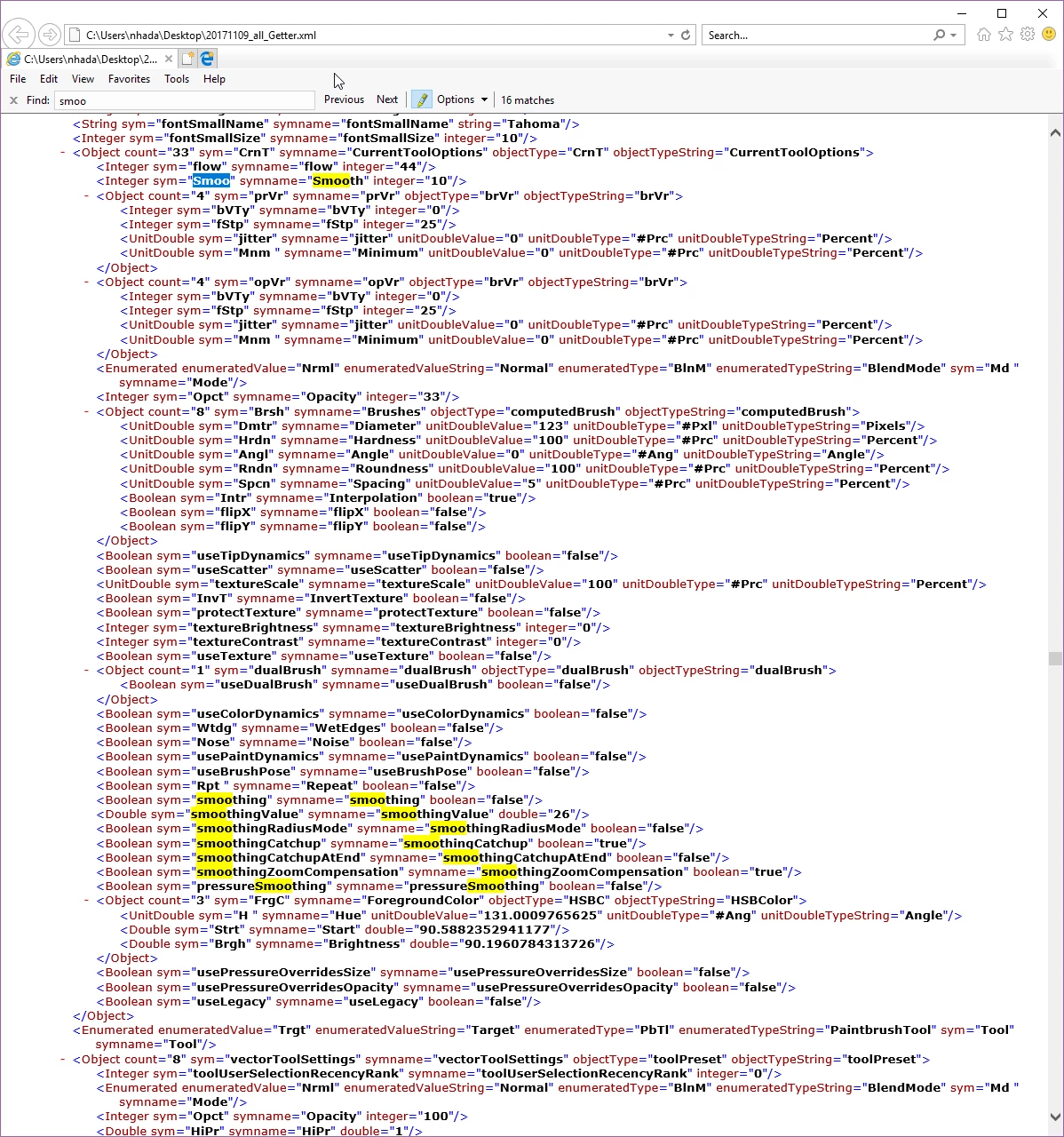
I also searched around exported getter.xml from Xtools' GetterDemo.jsx file.

xtools

But I could not find related properties.

This topic has been closed for replies.
Correct answer r-bin

OK. I seem to understand what you want. Try this function which can set 6 parameters, if given, without resetting any others.
What is Strength, Exposure and did not understand.

////////////////////////////////////////////////////////////////////////////////////////

function set_brush(sz, hd, sp, op, fl, sm)

    {

    try

        {

        var r = new ActionReference();

        r.putProperty( charIDToTypeID( "Prpr" ), stringIDToTypeID( "tool" ) );

        r.putEnumerated( charIDToTypeID("capp"), charIDToTypeID("Ordn"), charIDToTypeID("Trgt") );

        var ret = executeActionGet(r);

        var options = ret.getObjectValue(stringIDToTypeID("currentToolOptions"));           

        var tool = ret.getEnumerationType(stringIDToTypeID("tool"));

        var brush = options.getObjectValue(stringIDToTypeID("brush"));           

        if (op != undefined) options.putInteger(stringIDToTypeID("opacity"), op);

        if (fl != undefined) options.putInteger(stringIDToTypeID("flow"), fl);

        if (sm != undefined && sp != 0)

            {                 

            options.putInteger( stringIDToTypeID ("smooth"), sm );

            options.putDouble( stringIDToTypeID ("smoothingValue"), Math.round (sm/100*255) );

            }

        if (sz != undefined) brush.putUnitDouble( charIDToTypeID( "Dmtr" ), charIDToTypeID( "#Pxl" ), sz );

        if (hd != undefined) brush.putUnitDouble( charIDToTypeID( "Hrdn" ), charIDToTypeID( "#Prc" ), hd );

        if (sp == 0)

            {

            brush.putBoolean( stringIDToTypeID( "interfaceIconFrameDimmed" ), false);

            }

        else if (sp != undefined)

            {

            brush.putBoolean( stringIDToTypeID( "interfaceIconFrameDimmed" ), true);

            brush.putUnitDouble( charIDToTypeID( "Spcn" ), charIDToTypeID( "#Prc" ), sp );

            }

        options.putObject( stringIDToTypeID( "brush" ), stringIDToTypeID( "null" ), brush );

        var r = new ActionReference();

        r.putClass( tool );

        var desc = new ActionDescriptor();

        desc.putReference( stringIDToTypeID( "null" ), r );

        desc.putObject( stringIDToTypeID( "to" ), stringIDToTypeID( "null" ), options );

        executeAction( stringIDToTypeID( "set" ), desc, DialogModes.NO );

        }

    catch (e) { alert(e)  }

    }

////////////////////////////////////////////////////////////////////////////////////////


Actually, I have CS6 and I can only change the parameters of the Brush object, and I can not change the opacity and other parameters due to an error in Photoshop.

With the locks, the question is open. If there is a lock, then the parameter through the script can not be changed. I found several identifiers that the photoshop understands:

stringIDToTypeID("smoothingLock")

stringIDToTypeID("brushTipDynamicsLock")

stringIDToTypeID("scatterDynamicsLock")

stringIDToTypeID("textureInteractionLock")

stringIDToTypeID("dualBrushLock")

stringIDToTypeID("colorDynamicsLock")

stringIDToTypeID("brushPoseLock")

stringIDToTypeID("noiseLock")

stringIDToTypeID("wetEdgesLock")

stringIDToTypeID("paintDynamicsLock")

stringIDToTypeID("repeatLock")

stringIDToTypeID("strokeStyleScaleLock")

stringIDToTypeID("protectTextureLock")

But I do not know where and how they can be applied so far.

p.s. How do you insert code with line numbering?

3 replies

Jarda Bereza
Inspiring
November 15, 2017

My observations are that you probably can set everything except locking. I am unable to even read data about locking.

#include Humanizer-0.2.jsx

//https://github.com/jardicc/ActionManagerHumanizer 

var referenceObject = {

    "null": {

        "_ref": [

            {

                "_property": "tool",

                "_ref": "property"

            }

            ,{

                "_enum": "ordinal",

                "_ref": "application",

                "_value": "targetEnum"

            }

        ]

    }

};

var toolSettings = Humanizer.getObject(referenceObject).currentToolOptions;

toolSettings.mode._value = "screen";

toolSettings.brush.roundness._value = 50;

toolSettings.flow = 22;

toolSettings.opacity = 33;

toolSettings.smoothing = true;

toolSettings.smooth = 11;

toolSettings.noise = true;

toolSettings.useTipDynamics = true;

// Shape Dynamics must be turned before. Otherwise shape dynamics properties doesn't exists here so you should define all of them

// So maybe you would like to divide set brush in two steps if dynamics is turned off.

toolSettings.$szVr.jitter._value = 88; // Shape dynamics - size Jitter

toolSettings.$szVr.$bVTy = 2; // Shape dynamics - size Jitter controled by Pen pressure

var r = new ActionReference();

r.putClass( stringIDToTypeID("paintbrushTool")); // I think you need change this for different tool

var desc = new ActionDescriptor();

desc.putReference( stringIDToTypeID( "null" ), r );

desc.putObject( stringIDToTypeID( "to" ), stringIDToTypeID( "null" ), Humanizer.objectToDescriptor(toolSettings)[1] );

executeAction( stringIDToTypeID( "set" ), desc, DialogModes.NO );

Legend
November 15, 2017

What do I think about locks. You can use the "reset_tool ()" function after you receive the "currentToolOptions" descriptor. It will reset all locks. After that you can change only the necessary required parameters and call the "set" command as usual.

function reset_tool()

    {

    try {

        var desc = new ActionDescriptor();

        var ref = new ActionReference();

        ref.putProperty( charIDToTypeID( "Prpr" ), charIDToTypeID( "CrnT" ) );

        ref.putEnumerated( charIDToTypeID( "capp" ), charIDToTypeID( "Ordn" ), charIDToTypeID( "Trgt" ) );

        desc.putReference( charIDToTypeID( "null" ), ref );

        executeAction( charIDToTypeID( "Rset" ), desc, DialogModes.NO );

        }

    catch (e) {}

    }

Legend
November 16, 2017

I was wrong. (

The reset_tool () function does not clear locks.

So far I've found that

executeAction (stringIDToTypeID ("clearBrushControls"), undefined, DialogModes.NO)


clears the checkboxes of the brush, but not locks (

Jarda Bereza
Inspiring
November 14, 2017

Check this:

Legend
November 13, 2017

It's not entirely clear what you are looking for.
Look at the objects with identifiers

charIDToTypeID("prVr")

charIDToTypeID("opVr")

charIDToTypeID("szVr")

stringIDToTypeID("angleDynamics")

stringIDToTypeID("roundnessDynamics")

Maybe it will help

Naoki-Hada
Known Participant
November 14, 2017

r-bin

Thank you very much for tips.

> It's not entirely clear what you are looking for.

Main purpose is increment/decrements brush values on UI for Opacity, Flow, Exposure, and Strength as similar the code you provided on following thread for Brush's Hardness.

I tried to apply similar way to Opacity, Flow, Exposure, and Strength.

But it did not work well with 2 following issues.

1) Brush Settings' Checkboxes get reset (green rectangle area of original post above)

2) Brush Settings Details get reset (red rectangle area of original post above)

I think this is descriptors structure is different and reset unset properties to default.

One finding is that if the Brush Setting's Lock Icon is locked (yellow area on original post) , it does not get effected by resetting.

But Opacity, Flow, Exposure setting get effected.

So I tried to lock the setting before set Opacity etc values.

The object properties seems not contain the Lock icon values.

#include Humanizer-0.2.jsx

//https://github.com/jardicc/ActionManagerHumanizer

// modefied code from https://forums.adobe.com/thread/2406614

function test(value) {

    try {

        var ar = new ActionReference();

        ar.putProperty( charIDToTypeID( "Prpr" ), stringIDToTypeID( "tool" ) );

        ar.putEnumerated( charIDToTypeID("capp"), charIDToTypeID("Ordn"), charIDToTypeID("Trgt") );


        var desc1 = executeActionGet(ar);

        //$.writeln(Humanizer.descriptorToJsonString (desc1));

        var desc2 = desc1.getObjectValue(stringIDToTypeID("currentToolOptions"));

        //$.writeln(Humanizer.descriptorToJsonString (desc2));


        var desc3 = desc2.getObjectValue(charIDToTypeID("prVr"));

        $.writeln("prVr");

        $.writeln(Humanizer.descriptorToJsonString(desc3));

        var desc4 = desc2.getObjectValue(charIDToTypeID("opVr"));

        $.writeln("opVr");

        $.writeln(Humanizer.descriptorToJsonString(desc4));

        var desc5 = desc2.getObjectValue(charIDToTypeID("szVr"));

        $.writeln("szVr");

        $.writeln(Humanizer.descriptorToJsonString(desc5));

        var desc6 = desc2.getObjectValue(stringIDToTypeID("angleDynamics"));

        $.writeln("angleDynamics");

        $.writeln(Humanizer.descriptorToJsonString(desc6));

        var desc7 = desc2.getObjectValue(stringIDToTypeID("roundnessDynamics"));

        $.writeln("roundnessDynamics");

        $.writeln(Humanizer.descriptorToJsonString(desc7));

} catch (e) {

        alert("EXCEPTION: " + arguments.callee.name + "(): " + e);

    }

}

test(88);

Result

prVr

{"$bVTy":0.0,"$fStp":25.0,"_obj":"$brVr","jitter":{"_unit":"percentUnit","_value":0.0},"minimum":{"_unit":"percentUnit","_value":0.0}}

opVr

{"$bVTy":0.0,"$fStp":25.0,"_obj":"$brVr","jitter":{"_unit":"percentUnit","_value":0.0},"minimum":{"_unit":"percentUnit","_value":0.0}}

szVr

{"$bVTy":0.0,"$fStp":25.0,"_obj":"$brVr","jitter":{"_unit":"percentUnit","_value":44.0},"minimum":{"_unit":"percentUnit","_value":0.0}}

angleDynamics

{"$bVTy":0.0,"$fStp":25.0,"_obj":"$brVr","jitter":{"_unit":"percentUnit","_value":42.0},"minimum":{"_unit":"percentUnit","_value":0.0}}

roundnessDynamics

{"$bVTy":0.0,"$fStp":25.0,"_obj":"$brVr","jitter":{"_unit":"percentUnit","_value":39.0},"minimum":{"_unit":"percentUnit","_value":0.0}}

Thank you,

Naoki

r-binCorrect answer
Legend
November 15, 2017

OK. I seem to understand what you want. Try this function which can set 6 parameters, if given, without resetting any others.
What is Strength, Exposure and did not understand.

////////////////////////////////////////////////////////////////////////////////////////

function set_brush(sz, hd, sp, op, fl, sm)

    {

    try

        {

        var r = new ActionReference();

        r.putProperty( charIDToTypeID( "Prpr" ), stringIDToTypeID( "tool" ) );

        r.putEnumerated( charIDToTypeID("capp"), charIDToTypeID("Ordn"), charIDToTypeID("Trgt") );

        var ret = executeActionGet(r);

        var options = ret.getObjectValue(stringIDToTypeID("currentToolOptions"));           

        var tool = ret.getEnumerationType(stringIDToTypeID("tool"));

        var brush = options.getObjectValue(stringIDToTypeID("brush"));           

        if (op != undefined) options.putInteger(stringIDToTypeID("opacity"), op);

        if (fl != undefined) options.putInteger(stringIDToTypeID("flow"), fl);

        if (sm != undefined && sp != 0)

            {                 

            options.putInteger( stringIDToTypeID ("smooth"), sm );

            options.putDouble( stringIDToTypeID ("smoothingValue"), Math.round (sm/100*255) );

            }

        if (sz != undefined) brush.putUnitDouble( charIDToTypeID( "Dmtr" ), charIDToTypeID( "#Pxl" ), sz );

        if (hd != undefined) brush.putUnitDouble( charIDToTypeID( "Hrdn" ), charIDToTypeID( "#Prc" ), hd );

        if (sp == 0)

            {

            brush.putBoolean( stringIDToTypeID( "interfaceIconFrameDimmed" ), false);

            }

        else if (sp != undefined)

            {

            brush.putBoolean( stringIDToTypeID( "interfaceIconFrameDimmed" ), true);

            brush.putUnitDouble( charIDToTypeID( "Spcn" ), charIDToTypeID( "#Prc" ), sp );

            }

        options.putObject( stringIDToTypeID( "brush" ), stringIDToTypeID( "null" ), brush );

        var r = new ActionReference();

        r.putClass( tool );

        var desc = new ActionDescriptor();

        desc.putReference( stringIDToTypeID( "null" ), r );

        desc.putObject( stringIDToTypeID( "to" ), stringIDToTypeID( "null" ), options );

        executeAction( stringIDToTypeID( "set" ), desc, DialogModes.NO );

        }

    catch (e) { alert(e)  }

    }

////////////////////////////////////////////////////////////////////////////////////////


Actually, I have CS6 and I can only change the parameters of the Brush object, and I can not change the opacity and other parameters due to an error in Photoshop.

With the locks, the question is open. If there is a lock, then the parameter through the script can not be changed. I found several identifiers that the photoshop understands:

stringIDToTypeID("smoothingLock")

stringIDToTypeID("brushTipDynamicsLock")

stringIDToTypeID("scatterDynamicsLock")

stringIDToTypeID("textureInteractionLock")

stringIDToTypeID("dualBrushLock")

stringIDToTypeID("colorDynamicsLock")

stringIDToTypeID("brushPoseLock")

stringIDToTypeID("noiseLock")

stringIDToTypeID("wetEdgesLock")

stringIDToTypeID("paintDynamicsLock")

stringIDToTypeID("repeatLock")

stringIDToTypeID("strokeStyleScaleLock")

stringIDToTypeID("protectTextureLock")

But I do not know where and how they can be applied so far.

p.s. How do you insert code with line numbering?