

[Q] Is Magnetic Lasso Tool's Frequency property available to access?
Description:
Following might be wrong, but my understanding is that Magnetic Lasso Tool's Frequency property is not available from scripting.
Is there way to access? or defined any other place?
Other properties (Feather, Width, Contrast) are available.
Steps:
1. Launch Photoshop
2. Open new doc
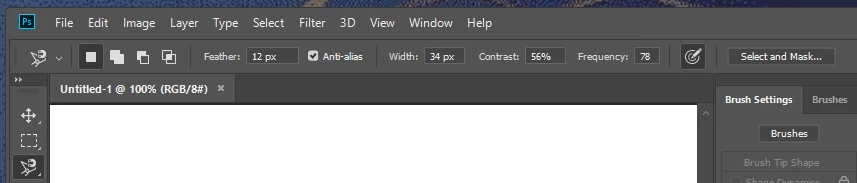
3. Select Magnetic Lasso tool and set property value for easy to find
ex) 12, 34, 56, 78
4. Menu: File -> Scripts -> Browse .... -> Select "Getter Demo.jsx" file from xtools
http://ps-scripts.sourceforge.net/xtools.html
5. Select Application only from the dialog and click "Process"
then Getter.xml file will be created on desktop
6. Open Getter.xml
7. Search string "CurrentToolOptions" and look around the property to match "Frequency"
Expected:
Found property for "Frequency"
Actual Result:
Not found property for "Frequency"
=== sample out put ==
<Object symname="CurrentToolOptions" sym="CrnT" objectTypeString="CurrentToolOptions" objectType="CrnT" count="10">
<Boolean symname="Contiguous" sym="Cntg" boolean="true"/>
<Integer symname="Selection" sym="Slct" integer="0"/>
<UnitDouble symname="DrwR" sym="DrwR" unitDoubleTypeString="Pixels" unitDoubleType="#Pxl" unitDoubleValue="12"/>
<Boolean symname="DrwA" sym="DrwA" boolean="true"/>
<Boolean symname="MgLP" sym="MgLP" boolean="true"/>
<Integer symname="MgEd" sym="MgEd" integer="56"/>
<Integer symname="MgCl" sym="MgCl" integer="12"/>
<Integer symname="MgWd" sym="MgWd" integer="34"/>
<Integer symname="MgSS" sym="MgSS" integer="2"/>
<Integer symname="MgSn" sym="MgSn" integer="600"/>
</Object>
<Enumerated symname="Tool" sym="Tool" enumeratedTypeString="magneticLassoTool" enumeratedType="magneticLassoTool" enumeratedValueString="Target" enumeratedValue="Trgt"/>
=================
 AdChoices