Exit
  • Global community
    • Language:
      • Deutsch
      • English
      • Español
      • Français
      • Português
  • 日本語コミュニティ
  • 한국 커뮤니티
0

Question about masking

New Here ,
Dec 09, 2020 Dec 09, 2020

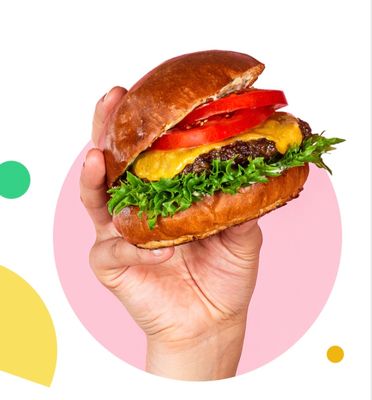
Hi everyone! I need to create an image similar to attached one. 
I have a cutout of the hand (layer with layer mask, which I converted to smart object not to loose quality when resizing) and a shape (as vector smart object).

How to create similar effect (hand coming out of the shape on top, but clipped by the shape at the bottom) with these shapes?

I have been trying masks but nothing really works.

F0179FDA-DC7D-471F-B8EE-1A119951441C.jpeg

326
Translate
Report
Community guidelines
Be kind and respectful, give credit to the original source of content, and search for duplicates before posting. Learn more
community guidelines

correct answers 1 Correct answer

Community Expert , Dec 23, 2020 Dec 23, 2020

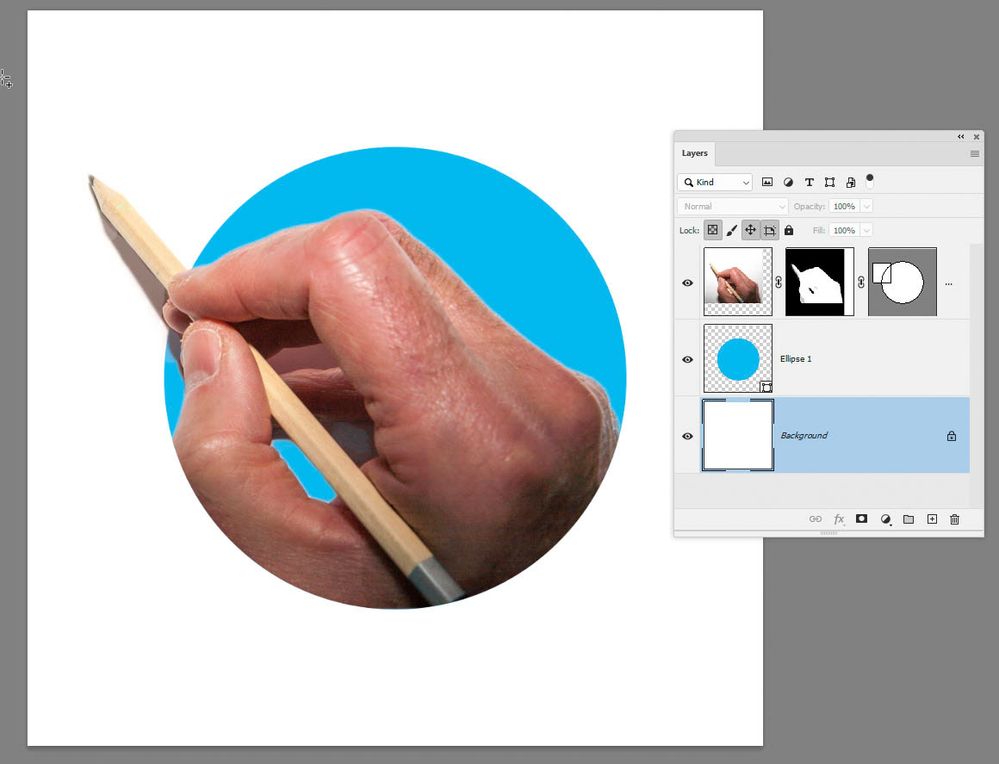
A layer can have both a pixel mask and a vector mask. See the example below.

Save the ellipse as a path, in the paths panel, then use that path to add a vector mask to the, already masked hand. That will constrain the hand within the ellipse. Now add a rectangle path to that elliptical path (with path operations set to combine shapes) to extend the vector mask outside of the circle.

2020-12-23_21-26-30.jpg


Dave

Translate
Adobe
LEGEND ,
Dec 09, 2020 Dec 09, 2020

Put the stuff in a group, apply a mask or vector path at the group level to match the circle.


Mylenium

Translate
Report
Community guidelines
Be kind and respectful, give credit to the original source of content, and search for duplicates before posting. Learn more
community guidelines
New Here ,
Dec 23, 2020 Dec 23, 2020

Thanks for reply!


But I am not really sure what do you exactly mean unfortunately. In addition, the shape I use is not a circle, it is more complex one, so doing a vector mask separately would not probably work. 


Below is better example of what I need. Those guys did this effect with the logo and knight figure, and my project is very similar, I have multiple shapes and need to create such effect. 

IMG_6272.jpg

Translate
Report
Community guidelines
Be kind and respectful, give credit to the original source of content, and search for duplicates before posting. Learn more
community guidelines
Community Expert ,
Dec 23, 2020 Dec 23, 2020

A layer can have both a pixel mask and a vector mask. See the example below.

Save the ellipse as a path, in the paths panel, then use that path to add a vector mask to the, already masked hand. That will constrain the hand within the ellipse. Now add a rectangle path to that elliptical path (with path operations set to combine shapes) to extend the vector mask outside of the circle.

2020-12-23_21-26-30.jpg


Dave

Translate
Report
Community guidelines
Be kind and respectful, give credit to the original source of content, and search for duplicates before posting. Learn more
community guidelines
New Here ,
Dec 26, 2020 Dec 26, 2020
LATEST

Thanks a lot Dave! Worked for me! 🙂


I need to train a bit more on correcting the paths created from comlex shapes, as Photoshop itself makes them a bit off, but now it is super clear for me how to do such collages 🙂

Translate
Report
Community guidelines
Be kind and respectful, give credit to the original source of content, and search for duplicates before posting. Learn more
community guidelines