


Inspiring
January 1, 2026
Answered

"Layer is not directly editable" error message

  • January 1, 2026
  • 1 reply
  • 178 views

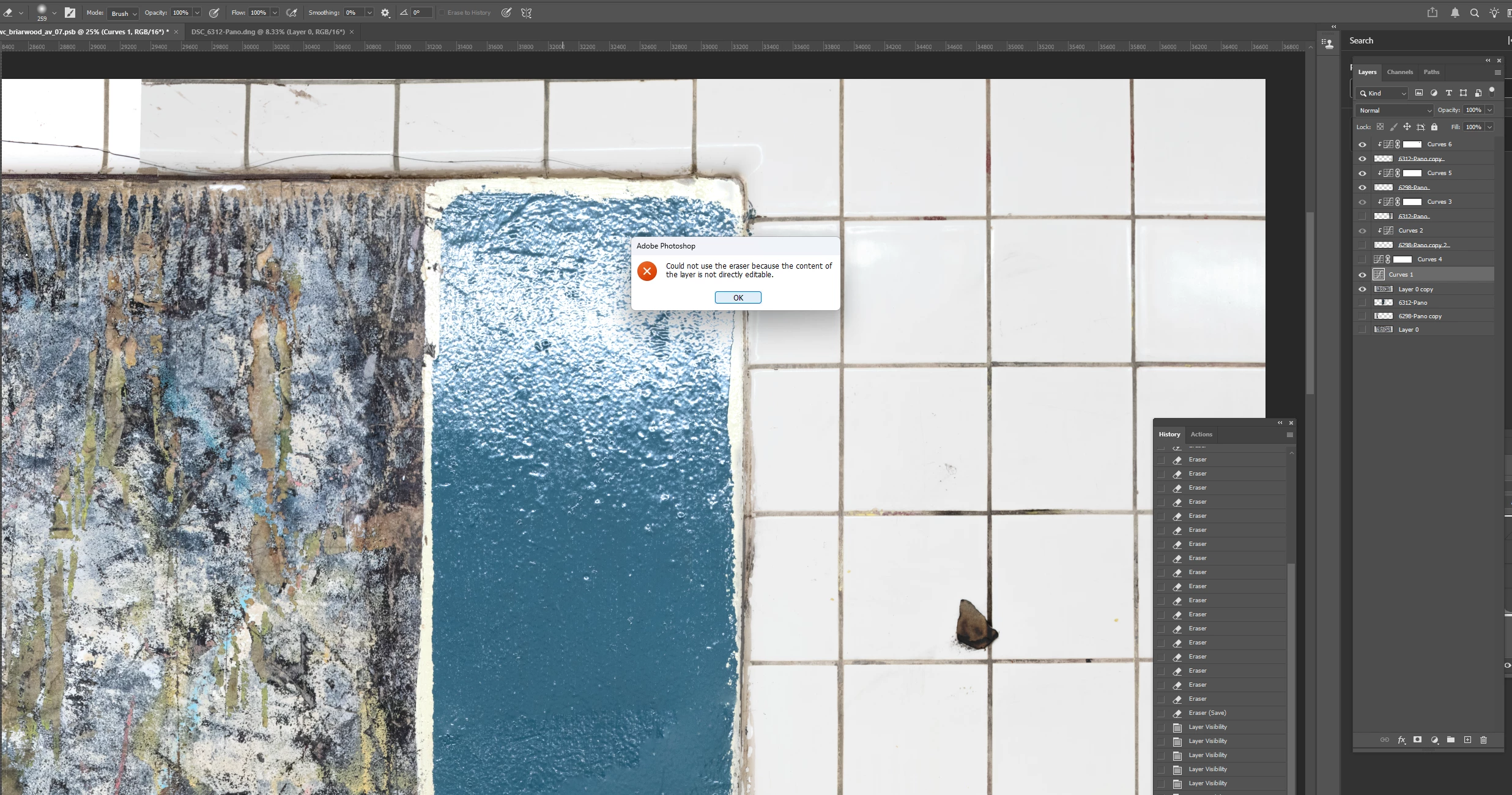
I created a Curves Adjustment Layer (Curves 1) to lighten a layer (Layer 0 copy).  Part of the Layer is blown out and I want to remove the adjustment for that area (the green panel where the error message is in the screenshot).  When I try to erase on Curves 1 I get the message "could not use the eraser because the content of the layer is not directly editable."  I'm pretty sure I have used the eraser to remove an adjustment from an Adjustment Layer.  Am I wrong?  


There is an upper layer (6312-Pano copy) but I erased the overlapping content in that area.  The only active layers are Layer 0 copy and Curves 1.  Why can't I erase on the adjustment layer to remove the adjustment for this area?
 

Barton5C39_0-1767239213159.png


Correct answer Jeff Arola

The reason the Eraser is not working is your Curves 1 adjustment layer does not have a layer mask to use the Eraser on.

If you look at the other Curves Adjustment Layers in the layer stack, they all have a layer mask.


1 reply

Jeff Arola
Community Expert
Jeff ArolaCommunity ExpertCorrect answer
Community Expert
January 1, 2026

The reason the Eraser is not working is your Curves 1 adjustment layer does not have a layer mask to use the Eraser on.

If you look at the other Curves Adjustment Layers in the layer stack, they all have a layer mask.


Inspiring
January 1, 2026

Thanks.  I don't remember what happened when I created this adjustment layer.  It seems like a mask is added when you create an Adjustment Layer.  How would it happen that a mask would not have been added as in this case for Curves 1, or would I have had to delete it somehow?  Thank you.
