


- Home
- Photoshop ecosystem
- Discussions
- Re: "Textebene muss gerastert werden " - text laye...
- Re: "Textebene muss gerastert werden " - text laye...
"Textebene muss gerastert werden " - text layer needs to be rasterized

Copy link to clipboard
Copied
(English below)
Ganz plötzlich erscheint die folgende Fehlermeldung bei mir. Ich kann überhaupt nicht mehr auf die Grafik zugreifen.
Kann mir jemand helfen?
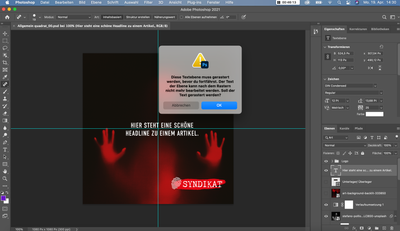
Diese Textebene muss gerastert werden, bevor du fortfährst. Der Text der Ebene kann nach dem Rastern nicht mehr bearbeitet werden. Soll der Text gerastert werden?
_______
All of a sudden I got the following error message. I can no longer access the graphics at all.
Can someone help me?

This text layer needs to be rasterized before proceeding. The text of the layer cannot be edited after rasterization. Should the text be rasterized?



Explore related tutorials & articles
 10
Replies
10
10
Replies
10




Copy link to clipboard
Copied
Could you please post screenshots with the pertinent Panels (Toolbar, Layers, Options Bar, …) visible?
Copy link to clipboard
Copied
Gerne!
Copy link to clipboard
Copied
Was versuchen Sie mit der Type Layer zu machen? Bewegen, Transformieren, Filter anwenden, …?
Copy link to clipboard
Copied
Gar nichts. 🙂
Ich rufe einfach nur die Grafik auf (mit der ich immer arbeite), möchte sie bearbeiten, also in Bild und Texte gehen. Aber ich kann nichts mehr tun, nicht mehr auf die Grafik zugreifen.
Copy link to clipboard
Copied
Eine Type Layer kann nicht mit den malerischen Tools bearbeitet werden.
Können Sie genauer beschreiben, was Sie tun?
Wenn Sie »Abbrechen« klicken, koennen Sie die Layer »stefano…« auswaehlen?
Copy link to clipboard
Copied
Ich will ja gar keinen "Type Layer" (weiß gar nicht, was das ist. 🙂 ) - ich möchte einfach nur Zugriff auf meine bestehende Grafik haben. In die Text felder hineinschreiben. Andere Fotos einfügen, etc.
Drücke ich auf "Abbrechen" habe ich weiterhin keinen Zugriff auf die Grafik.
Habe ich vielleicht irgendwo versehentlich diesen "Layer" aktiviert? Wie könnte ich ihn dann wieder deaktivieren?
Copy link to clipboard
Copied
Sie haben den Spot Healing Brush ausgewählt, versuchen Sie die Type Layer damit zu bearbeiten?
Copy link to clipboard
Copied
Vielleicht ist es das! - Wo ist der Spot Healing Brush? Wie kann ich den deaktivieren?
Copy link to clipboard
Copied
Der Spot Healing Brush Tool ist das Werkzeug, das in dem Screenshot in der Toolbox ausgewaehlt ist.
»Type Layer« ist der Name für Ebenen mit editierbarem Text.
Ich bin mir nicht sicher, ob ich Ihre Beschreibung vestehe, darum empfehle ich, die Preferences zurzeckzusetzen, nachdem Sie sichergestellt haben, dass alle Ihre Presets (Brushes, Actions, Styles, …) gesichert sind.
https://helpx.adobe.com/de/photoshop//using/preferences.html#reset_preferences
Copy link to clipboard
Copied
Okay, versuche ich! Soweit ertmal vielen, vielen Dank!!!


Find more inspiration, events, and resources on the new Adobe Community
Explore Now
 AdChoices