
sarar27324216
Participant
February 7, 2023
Question

Re: Transparent Artboard not working

  • February 7, 2023
  • 3 replies
  • 1572 views


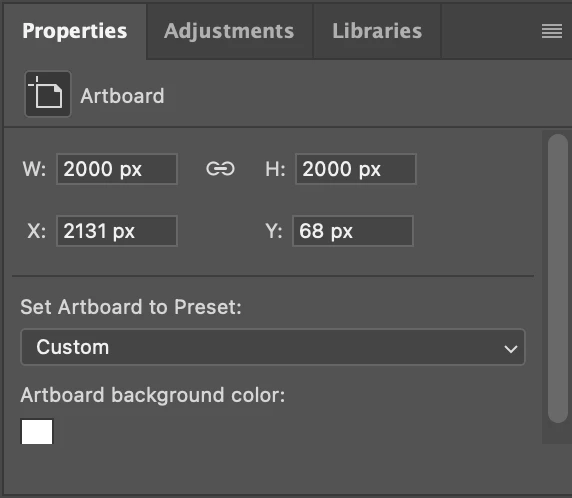
I am having this same issue on the latest PS (Feb 2023). There is no option to make artboard backgrounds transparent, only to chose a colour. The only work around I can find is opening a new file and making a new artboard, selecting transparent background from the start. I just don't know why this option is not in the properties panel for the artboard.
 

    This topic has been closed for replies.

    3 replies

    Participant
    October 3, 2024

    I have had the same issue. However, the drop down menu suddenly appeared when I scrolled down in the properties panel.

    Participant
    October 3, 2024
    Screenshot_2024-10-03_at_10-11-13 PM.png
    Stephen Marsh
    Community Expert
    Community Expert
    March 31, 2023

    @sarar27324216 – Have you tried resetting preferences, changing workspaces, moving the panel etc?


    The following JavaScript may provide a workaround:


    /*
    Artboard Background Setter scriptUI GUI.jsx
    Stephen Marsh
    https://community.adobe.com/t5/photoshop-ecosystem-discussions/re-transparent-artboard-not-working/m-p/14896664#M832570
    */
    
    #target photoshop
    
    var win = new Window("dialog", "Artboard Background Setter");
    win.orientation = "column";
    win.alignChildren = ["center", "top"];
    win.spacing = 10;
    win.margins = 16;
    
    var dropdown = win.add("dropdownlist", undefined, ["White", "Black", "Transparent", "Other"]);
    dropdown.selection = 2; // Default to Transparent
    
    var btnGroup = win.add("group");
    btnGroup.orientation = "row";
    var okBtn = btnGroup.add("button", undefined, "OK");
    var cancelBtn = btnGroup.add("button", undefined, "Cancel");
    
    okBtn.onClick = function() {
        win.close();
        main(dropdown.selection.index + 1);
    }
    
    cancelBtn.onClick = function() {
        win.close();
    }
    
    win.show();
    
    function main(option) {
        if (activeDocument.activeLayer.typename === "LayerSet" && isArtboard() === true) {
            abTrans(option);
        } else {
            alert("The active layer isn't an Artboard...");
        }
    }
    
    function isArtboard() {
        try {
            var d = new ActionDescriptor();
            var r = new ActionReference();
            r.putEnumerated(stringIDToTypeID('layer'), stringIDToTypeID('ordinal'), stringIDToTypeID('targetEnum'));
            var options = executeActionGet(r);
            return options.hasKey(stringIDToTypeID('artboard'));
        } catch (e) {
            //alert(e);
        }
    }
    
    function abTrans(option) {
        var ideditArtboardEvent = stringIDToTypeID("editArtboardEvent");
        var desc520 = new ActionDescriptor();
        var idnull = stringIDToTypeID("null");
        var ref129 = new ActionReference();
        var idlayer = stringIDToTypeID("layer");
        var idordinal = stringIDToTypeID("ordinal");
        var idtargetEnum = stringIDToTypeID("targetEnum");
        var desc521 = new ActionDescriptor();
        var idartboard = stringIDToTypeID("artboard");
        var idchangeBackground = stringIDToTypeID("changeBackground");
        ref129.putEnumerated(idlayer, idordinal, idtargetEnum);
        desc520.putReference(idnull, ref129);
        
        if (option === 4) {
            var idcolor = stringIDToTypeID("color");
            var desc523 = new ActionDescriptor();
            var idred = stringIDToTypeID("red");
            desc523.putDouble(idred, 128.000000);
            var idgrain = stringIDToTypeID("grain");
            desc523.putDouble(idgrain, 128.000000);
            var idblue = stringIDToTypeID("blue");
            desc523.putDouble(idblue, 128.000000);
            var idRGBColor = stringIDToTypeID("RGBColor");
            desc521.putObject(idcolor, idRGBColor, desc523);
        }
        
        var idartboardBackgroundType = stringIDToTypeID("artboardBackgroundType");
        desc521.putInteger(idartboardBackgroundType, option);
        desc520.putObject(idartboard, idartboard, desc521);
        desc520.putInteger(idchangeBackground, 1);
        executeAction(ideditArtboardEvent, desc520, DialogModes.NO);
    }


    1. Copy the code text to the clipboard
    2. Open a new blank file in a plain-text editor (not in a word processor)
    3. Paste the code in
    4. Save as a plain text format file – .txt
    5. Rename the saved file extension from .txt to .jsx
    6. Install or browse to the .jsx file to run (see below)

    https://prepression.blogspot.com/2017/11/downloading-and-installing-adobe-scripts.html#Photoshop


    Ranjisha Sengupta
    Legend
    February 8, 2023

    Hi there,

    Thanks for reaching out.

    When you select the Artboard background color do you see the drop downs? What type of file are you working with?

    Please try the steps suggested here: https://community.adobe.com/t5/photoshop-ecosystem-discussions/why-is-there-no-artboard-transparency-in-version-photoshop-2021/td-p/11533286


    Let us know how it goes.

    Regards,

    Ranjisha

    sarar27324216
    Participant
    March 31, 2023

    Thanks Ranjisha, 
    Sorry for the slow reply but the problem is there are no drop downs, just a colour box as in the screenshot above under 'artboard background colour'. When I click on the white box it takes me to a colour picker but again there are no options for transparent. I have read through other discussions on this but the fact that there is just no option for transparency in the properties menu is frustrating. Even if I chose any different artboard preset, it makes no difference.

    mglush
    Community Expert
    Community Expert
    March 31, 2023

    Hi!

    I thought of a work around for you until this issue gets fixed. If you double click on the background layer, It will bring up the New Layer Dialog box which will turn the Background layer into a normal layer and you can create transparency on that layer. As I said, it doesn't fix the issue, but it could be useful in the meantime.

    Michelle