


kevinu
Participant
October 6, 2017
Answered

Remove number sequence when "Export layers to files" in CC

When I want to use the "export layers to files" function in Photoshop, there's always a prefix of the layer number sequence. For example, I'll export a number of layers (to pngs) and the prefix is _0001, _0002, _0003... I don't think this feature necessary in most cases. I already removed the standard 'File Name Prefix' in this dialog box. But, that doesn't hold true after export. Is there a way to quickly remove this default script?
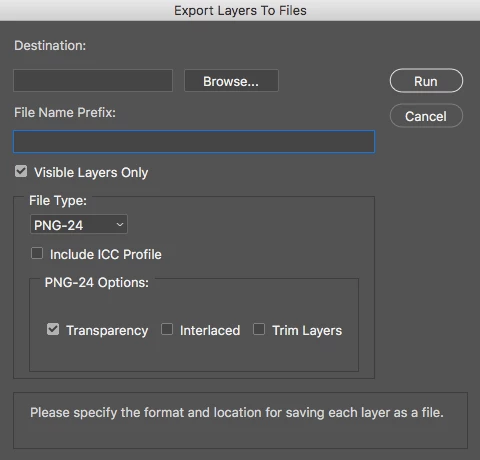
 

Or if not possible, is there any recommendations on advance 'file renaming tools' like GREP in InDesign?

FrankDrawsCorrect answer
Participant
December 8, 2017

For Photoshop CC 2018 go to:

Applications/Adobe Photoshop CC 2018/Presets/Scripts/Layer Comps To Files.jsx

Once you open the file, go to line 209 and comment it out.

I've attached an image for reference.

Once I did this, Photoshop stopped adding the sequence number prefix to when I export Layer Comps To Files.

13 replies

Participating Frequently
October 20, 2026

Has anyone updated this lately? I keep having to comment out lines with every new Photoshop update and now our IT team has locked down our machines so we have to get in touch with them (they’re remote) in order to simply update the .jsx file. Come on Adobe, are you ever going to fix this??

Translate
Stephen Marsh
Community Expert
Community Expert
September 5, 2026

​@sebastianl63520835 


Simply add two forwards slash characters to “comment out” a single line of code:

//

Translate
willcampbell7
Legend
May 9, 2024
William Campbell
aReuhl
Participating Frequently
May 7, 2024

On windows machines in powershell after some trial and error I found the following command running in the same folder as the files I want to rename did the trick regardless of whether you specify a prefix or not. change the file type extension accordingly after the *

Get-ChildItem -Filter '*.png' | 
    Rename-Item -NewName { $_.Name -replace '_\d+s+_\d+_', '_' } 

 Tip of the hat to this thread  with a little extra help from ai

Translate
Inspiring
September 4, 2026

Nothing like finding the answer in an ancient thread! Thanks so much! However, it’d be wonderful if they actually corrected this and allowed you to set the actual parameters in the initial dialog box.

Translate
Stephen Marsh
Community Expert
Community Expert
September 5, 2026

Nothing like finding the answer in an ancient thread! Thanks so much! However, it’d be wonderful if they actually corrected this and allowed you to set the actual parameters in the initial dialog box.


This is just a batch rename using Windows OS, the same can be done using the cross platform Adobe Bridge Batch Rename command.

Translate
Known Participant
July 30, 2018

Thank you!

Randy

Translate
FrankDrawsCorrect answer
Participant
December 8, 2017

For Photoshop CC 2018 go to:

Applications/Adobe Photoshop CC 2018/Presets/Scripts/Layer Comps To Files.jsx

Once you open the file, go to line 209 and comment it out.

I've attached an image for reference.

Once I did this, Photoshop stopped adding the sequence number prefix to when I export Layer Comps To Files.

Translate
Participant
May 7, 2020

This is great, thanks for the tip! Was able to apply this same method on 'Export Files to Layers' removing the starting has marks.

Here is the code to remove the hash for that jsx file. Change 'fileNamePrefix' to layerName, see attached CC 19


Translate
Bojan Živković11378569
Community Expert
Community Expert
October 6, 2017
Silkrooster
Legend
October 6, 2017

Both Bridge and Lightroom can quickly rename the files for you. As long as all the files are not the same name, you should be fine.

If they are the same name, you could use a date for a unique name, or change the sequence format. Ex. number of 0's before or after the actual number.

Translate