Whatevermajorloser
Inspiring
October 2, 2016
Answered

Remove ScriptUI Image Data?

  • October 2, 2016
  • 1 reply
  • 2059 views

I've got a customisable section in one of my scripts that displays a window allowing users to assign images to tasks, which are then presented to them depending on what kind of file they run the script on. Now, if they select that they want to create a new task, I'd like to remove the image for the currently selected task in the window whilst still keeping the image element so that they can add their new image to it. To give you an example:

  1. var w = new Window('dialog'
  2. w.taskImage = w.add('image'
  3. w.taskImage.image = 'link/to/image.png' 
  4. w.show()

When this displays and the users specifies that they want to add a new task, I was hoping to be able to clear the current image from taskImage by using something like this:

w.taskImage.image = undefined  

However, this doesn't work and just returns a Bad argument error.

Is there a way to do this?

This topic has been closed for replies.
Correct answer Tomas Sinkunas

Hey pixxxel schubser, thanks for the reply! I appreciate you going into detail about removing and hiding elements, but I already know how to do this

Here's a screenshot of the part of my dialog that I'm referring to:
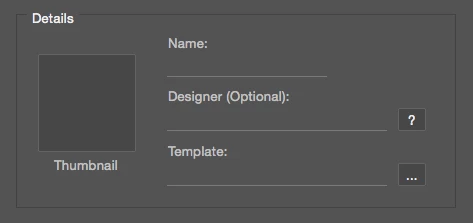
The iconbutton element has an onClick function attached to it which opens up a dialog for the user to select their image, so I don't want to remove or hide it. If a user chooses to add a new task (template) for a particular file, it clears all the info in the fields and I want to be able to clear the image that is currently in there too without actually removing/hiding the element.

Chuck Uebele hinted at the possibility of being able to do this by leaving a blank space along with using layout.layout, but I can't get it to do it without it returning a File or Folder does not exist error (see my reply above).


If there's a will - there's a way. Hope this is something you might find useful.

What I did is I created a fixed size group and assigned eventListener. Once event is triggered, it prompts to select image.

// Create UI

var win = new Window("dialog");

var grp = win.add("group");

  grp.preferredSize = [200, 200];

  grp.addEventListener("mousedown", function() { toggleImage(grp) });

win.show();

function toggleImage(container) {

  // Select new image

  var newImage = selectFiles(false, "png");

  if (!newImage) return;

  // Remove old image

  while(container.children[0])

  container.remove(container.children[0]);

  // Add new image to UI

  container.add("image", undefined, newImage);

  // Refresh UI

  container.layout.layout(true);

}

function selectFiles (multiSelect, extension) {

  var theString = "Please select files";

  if ($.os.search(/windows/i) != -1)

  var theFiles = File.openDialog (theString, "*." + extension, multiSelect);

  else

  var theFiles = File.openDialog (theString, getFiles, multiSelect);

  function getFiles(theFiles) {

  var re = new RegExp("\.(" + extension + ")$","i");

  if (theFiles.name.match(re) || theFiles.constructor.name == "Folder") {

  return true

  }

  }

  return theFiles;

}

1 reply

Chuck Uebele
Community Expert
Community Expert
October 2, 2016

You need to change the variables then use a command to redraw the ui:

  w.layout.layout(true);

Whatevermajorloser
Inspiring
October 3, 2016

Thanks for the reply, Chuck! Unfortunately when I include the layout command it completely messes up the layout of my dialog..

Also, when you say change the variables, do you just mean changing the image path to undefined?

Whatevermajorloser
Inspiring
October 14, 2016

Interesting. Seems as if Panel has a bug with eventListeners.

Oh, it's so Adobe:)

Anyways, what if you had group element but with some background color? Check it out.

// Create UI

var win = new Window("dialog");

var grp = win.add("group");

  grp.preferredSize = [200, 200];

  grp.graphics.backgroundColor = win.graphics.newBrush(win.graphics.BrushType.SOLID_COLOR, [0.5,0.5,0.5], 1);

  grp.addEventListener("mousedown", function() { toggleImage(grp) });

win.show();

function toggleImage(container) {

  // Select new image

  var newImage = selectFiles(false, "png");

  if (!newImage) return;

  // Remove old image

  while(container.children[0])

  container.remove(container.children[0]);

  // Add new image to UI

  container.add("image", undefined, newImage);

  // Refresh UI

  container.layout.layout(true);

}

function selectFiles (multiSelect, extension) {

  var theString = "Please select files";

  if ($.os.search(/windows/i) != -1)

  var theFiles = File.openDialog (theString, "*." + extension, multiSelect);

  else

  var theFiles = File.openDialog (theString, getFiles, multiSelect);

  function getFiles(theFiles) {

  var re = new RegExp("\.(" + extension + ")$","i");

  if (theFiles.name.match(re) || theFiles.constructor.name == "Folder") {

  return true

  }

  }

  return theFiles;

}


Good thinking. I might try a combination of that and maybe wrapping a panel around the group, all depends on how it looks Thank you again for your help!