
GrafiskWingman
Known Participant
November 24, 2021
Answered

Resizing issue

  • November 24, 2021
  • 1 reply
  • 565 views

When I resize an image (Ctrl + I) and make it smaller, it moves it up to upper left corner of my workspace, rather than centering the image on my workspace. 

It's been like this since the new version. 
I can't find where to change this and it drives me nuts, that the images do that. 

Anyone know what to do? 
This topic has been closed for replies.
Correct answer Ged_Traynor

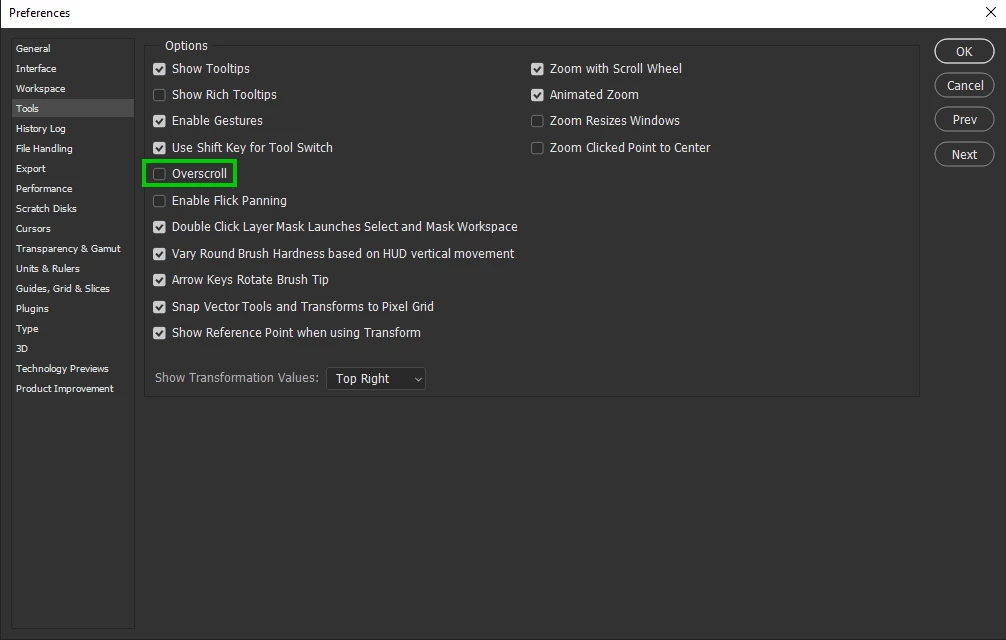
My bad, you are correct, it happens with overscroll enabled, when it's disabled the image centres


1 reply

Ged_Traynor
Community Expert
Community Expert
November 24, 2021

Hi

Do you mean Alt + Ctrl + I to bring up the image size dialog, Ctrl + I is for inverting

I just tested on version 22.5.3 and 23.0.2 and it does the same thing, image moves to the upper left so it's not just with version 23.0.2

Can't say it's ever bothered me or how long it's been like this, I just hit Ctrl + 0 to centre the image


GrafiskWingman
Known Participant
November 24, 2021

Yes, Alt + Ctrl + I is what I meant. 
I know it's a setting, because I've tried on another pc with the most recent version and it doesn't do it there. 

Ged_Traynor
Community Expert
Ged_TraynorCommunity ExpertCorrect answer
Community Expert
November 24, 2021

My bad, you are correct, it happens with overscroll enabled, when it's disabled the image centres