
SanDiegoCasey
New Participant
June 13, 2022
Answered

Revert back to previous selection tool functionality? (move selections)

  • June 13, 2022
  • 3 replies
  • 1799 views

I'm not sure which version this changed in as I've been dealing with it for a while, but thought I would finally break down and ask. 

When I draw a selection around part of an image, and then I want to move that marque, not the actual pixels, just my selection,  I'm not able to do it anymore?  I used to be able to just click within the selection and move it to another section.  

I would use this frequently for things like copying buttons, or areas of a picture I don't want to redraw my marquee every time.  

Also,  I have to DE-select now when I want to draw a different selection as opposed to just drawing a new one? 

Anyone know how to revert to previous functionality? 
This topic has been closed for replies.
Correct answer D Fosse

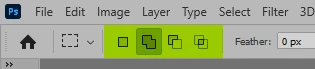
It's up here in the options:

New selection, add to selection, subtract from selection, intersect with selection.


Only the first lets you move the selection by click-drag.

3 replies

Zesty_wanderlust15A7
Known Participant
June 14, 2022

You can even drag selections to another document, but not if you use the Move Tool. You have to use a selection tool, like the Lasso, for example.

Select > Reselect can also be useful, or temporarily saving your selection to a mask or channel.

Jeff Arola
Adobe Expert
June 13, 2022

In the tool options bar you want New selection enabled before making any selections.


D Fosse
D FosseCorrect answer
Adobe Expert
June 13, 2022

It's up here in the options:

New selection, add to selection, subtract from selection, intersect with selection.


Only the first lets you move the selection by click-drag.

SanDiegoCasey
New Participant
June 13, 2022

Thank You!