Alen Ruby
Participating Frequently
March 19, 2024
Question

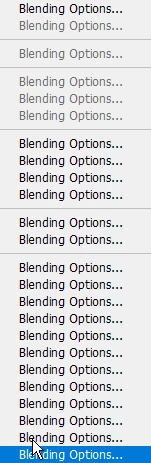
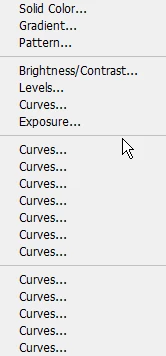
Right click layer menues are broken

  • March 19, 2024
  • 3 replies
  • 122 views

PS 25.5.1.

W10 latest

I just uninstalled Beta since all the new bloated changes were annoying me.

Now when I right click on a layer sometimes it's broken. 

Right clicking on a folder is especially bad and the entire list is the same word.


This topic has been closed for replies.

3 replies

Alen Ruby
Alen RubyAuthor
Participating Frequently
March 19, 2024

Reset preferences, so far works better now. Waiting to see if it happens again otherwise it's fixed for now.

AxelMatt
Community Expert
Community Expert
March 19, 2024

Please try to reset the preferences of Photoshop first using the steps described here:

https://helpx.adobe.com/photoshop/using/preferences.html#reset-preferences

Please backup your settings before resetting the preferences. You can check:

https://helpx.adobe.com/photoshop/using/preferences.html#backup-photoshop-preferences


If this doesn't help reinstall Photoshop 25.5.1. 


My System: Intel i7-8700K - 64GB RAM - NVidia Geforce RTX 3060 - Windows 11 Pro 25H2 -- LR-Classic 15 - Photoshop 27 - Nik Collection 8 - PureRAW 6 - Topaz Photo AI
Ged_Traynor
Community Expert
Community Expert
March 19, 2024

@Alen Ruby try manually resetting your Photoshop preferences
https://helpx.adobe.com/ie/photoshop/using/preferences.html#Manually
Remember to backup your settings before doing the preference reset
https://helpx.adobe.com/ie/photoshop/using/preset-migration.html