
Participant
May 31, 2022
Question

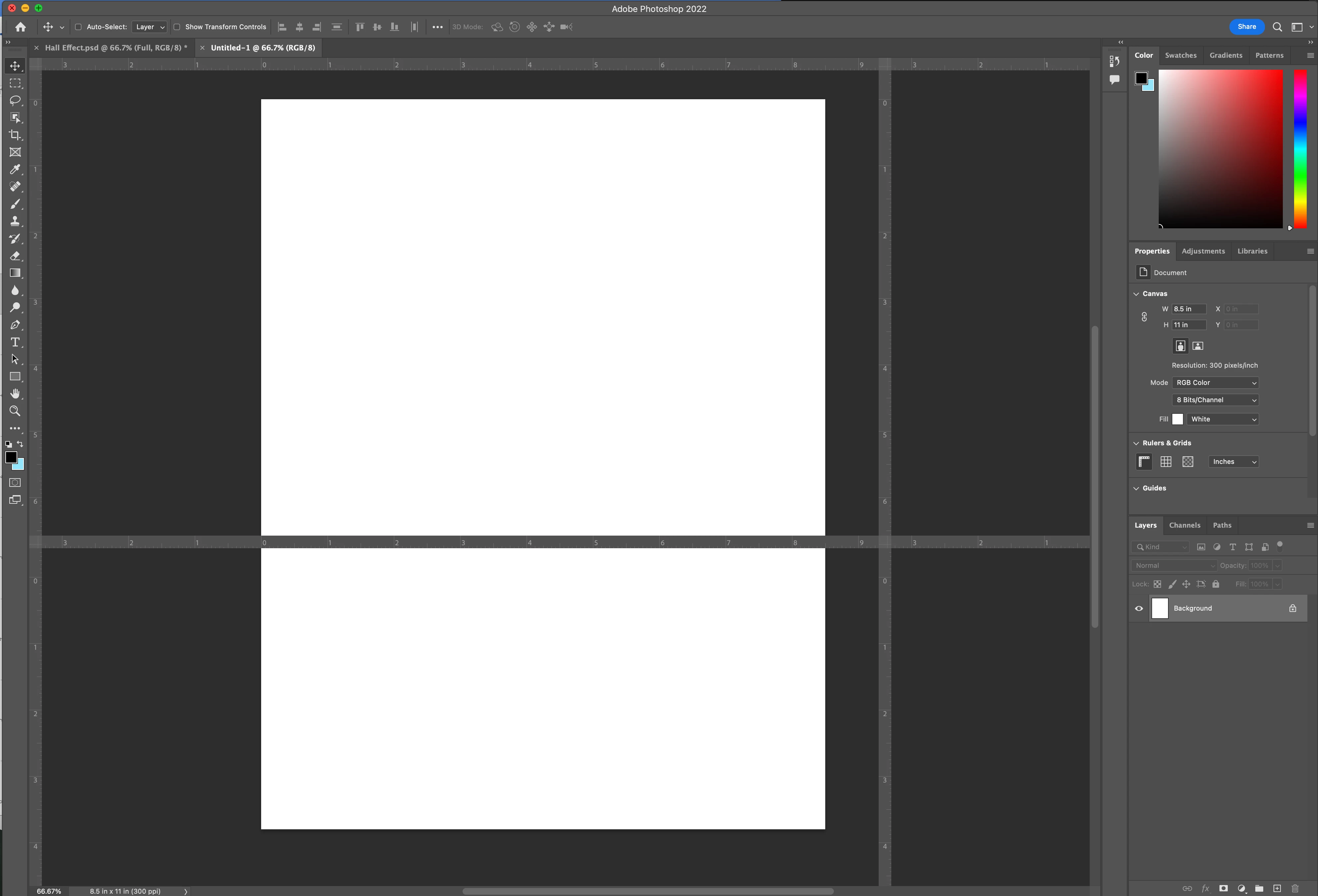
Rulers appearing over canvas

  • May 31, 2022
  • 2 replies
  • 375 views

How do I remove these extra rulers, without turning off ALL rulters? I know how to turn off rulers, but I still want the standard X,Y rulers. These new ones are appearing across my canvas and I can't seem to move them or remove them.
 

This topic has been closed for replies.

2 replies

Participant
May 18, 2023

I was having this same issue. It seems to be solved with the 24.4.1 update.

jane-e
Community Expert
Community Expert
May 31, 2022

@William24675973taws wrote:

How do I remove these extra rulers, without turning off ALL rulters?


Try going to Photoshop menu > Preferences > Technology Previews > Enable Native Canvas Rulers.


Jane


Participant
May 31, 2022

Great idea... doesn't make a difference though.

jane-e
Community Expert
Community Expert
June 1, 2022

@William24675973taws 


This is a known issue. See this thread:

https://community.adobe.com/t5/photoshop-ecosystem-bugs/p-23-2-issue-previously-saved-files-with-adjustment-layers-open-with-strange-colors/idi-p/12757757


Solutions have also included Deactivating Native Canvas, upgrading, resetting preferences, and restarting.


Jane