
bojanp66203338
Participant
May 28, 2024
Answered

Run actions with script

  • May 28, 2024
  • 2 replies
  • 480 views

Hi,

can someone please help me with a simple script;

I would like to run a script on multiple opened files (jpegs).

I am alredy working with actions, but there are two different actions, depending of the image orientation.

So the script should be simple, something like this:

- if opened image width>height - run action1

- if not, run action2


Actions alredy close images after execution so this script shod go through all opened files.


This would save me a lot of time..

Thanks!
B.
    This topic has been closed for replies.
    Correct answer Stephen Marsh

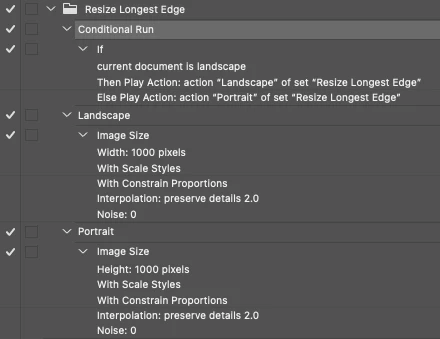
    @bojanp66203338 – Photoshop offers a limited set of Conditional Actions and Landscape Orientation is one of the options. In this example image taken from another discussion, the content of the Landscape or Portrait action is for image size, but it could be anything:


    You can then use Batch to run the conditional action over all open documents.


    A similar recent topic here:


    https://community.adobe.com/t5/photoshop-ecosystem-ideas/ability-to-give-photoshop-two-sets-of-batch-resize-criteria-at-one-time/idi-p/14604996


    You could create/use a script, however, the insert conditional action command will do the job.


    EDIT: Here it is in legacy ExtendScript –


    if (app.activeDocument.width > app.activeDocument.height)
    	{
    	app.doAction("Action1","Set1");
    	}
    else
    	{
    	app.doAction("Action2","Set1");
    	}


    2 replies

    Stephen Marsh
    Community Expert
    Stephen MarshCommunity ExpertCorrect answer
    Community Expert
    May 28, 2024

    @bojanp66203338 – Photoshop offers a limited set of Conditional Actions and Landscape Orientation is one of the options. In this example image taken from another discussion, the content of the Landscape or Portrait action is for image size, but it could be anything:


    You can then use Batch to run the conditional action over all open documents.


    A similar recent topic here:


    https://community.adobe.com/t5/photoshop-ecosystem-ideas/ability-to-give-photoshop-two-sets-of-batch-resize-criteria-at-one-time/idi-p/14604996


    You could create/use a script, however, the insert conditional action command will do the job.


    EDIT: Here it is in legacy ExtendScript –


    if (app.activeDocument.width > app.activeDocument.height)
    	{
    	app.doAction("Action1","Set1");
    	}
    else
    	{
    	app.doAction("Action2","Set1");
    	}


    bojanp66203338
    Participant
    May 29, 2024

    Hi, this is it, it works like a charm!

    Thank you sooo much!
    B:

    Peru Bob
    Community Expert
    Community Expert
    May 28, 2024

    This is the Using the Community forum (which is the forum for issues using the forums).Please tell us what Adobe application you are using so that this can be moved to the proper forum for help.

    Scroll down here to see a list of the forums:
    https://community.adobe.com/

    bojanp66203338
    Participant
    May 28, 2024

    Sorry.. My post should be in Photosop section, How to..

    Thanks!
    B.