K24076904
Known Participant
July 3, 2019
Answered

Sample UI (xtools) - source folder value

  • July 3, 2019
  • 9 replies
  • 4544 views

Hi,

I'm trying to bind UI to my small script

having problems with sending path value to my "saveas" function - cannot find the correct one

started modifying SampleUI.jsx from xtools example

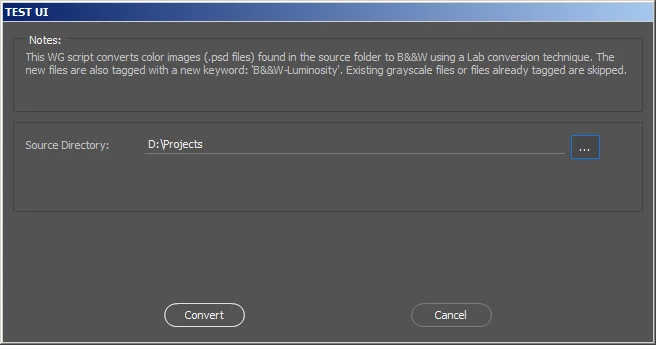
here is the stripped UI I get

before I used - works fine

new File(app.activeDocument.fullName.path)

now trying to catch 'source directory' value, but no success ((

it doesn't work, file cannot be saved

new File(pnl.source.text)

Thanks!

This topic has been closed for replies.
Correct answer Chuck Uebele

Here's a script that will save the current document as a jpg, with various ways to do so. the way it's set up now will take the text from the source folder from the UI and use that. Line 47 is using the variable of the actual folder path. Line 48 is using the file's full path. In all instances, you have to strip off the extension and put the jpg extension on the path name. This is done with the split('.').

#target photoshop

var doc = activeDocument

var filePath = new Folder(doc.path)

var fileFull = new File(doc.fullName)

var fileName = doc.name.split('.')[0]

var fullNameNoExt = fileFull.fsName.split('.')[0];

var srcFolder = new Folder('/c/');

var holdFolder = new Folder();//to check is the select a folder function is cancled

var dlg = new Window('dialog','Path test');

    dlg.sText = dlg.add('statictext',undefined,srcFolder.fsName);

    dlg.sText.size=[600,20]

    dlg.folderBtn = dlg.add('button',undefined,'Select Folder');


    dlg.saveBtn = dlg.add('button',undefined,'Save as jpg');

    dlg.saveBtn.onClick = function(){

        save ()

        dlg.close();

        }


    dlg.folderBtn.onClick = function(){                                                                                           

    holdFolder = new Folder(srcFolder);

    holdFolder = Folder.selectDialog('Select a folder to process', srcFolder);

    if(holdFolder){srcFolder = holdFolder};

    dlg.sText.text = srcFolder.fsName;

    };

dlg.show()


  function save(){

        var idsave = charIDToTypeID( "save" );

            var desc9 = new ActionDescriptor();

            var idAs = charIDToTypeID( "As  " );

                var desc10 = new ActionDescriptor();

                var idEQlt = charIDToTypeID( "EQlt" );

                desc10.putInteger( idEQlt, 8 );

                var idMttC = charIDToTypeID( "MttC" );

                var idMttC = charIDToTypeID( "MttC" );

                var idNone = charIDToTypeID( "None" );

                desc10.putEnumerated( idMttC, idMttC, idNone );

            var idJPEG = charIDToTypeID( "JPEG" );

            desc9.putObject( idAs, idJPEG, desc10 );

            var idIn = charIDToTypeID( "In  " );

            desc9.putPath( idIn, new File( dlg.sText.text +'/'+ fileName +'.jpg' ) );

            //desc9.putPath( idIn, new File( filePath +'/'+ fileName +'.jpg' ) );

            //desc9.putPath( idIn, new File( fullNameNoExt +'.jpg' ) );

            var idDocI = charIDToTypeID( "DocI" );

            desc9.putInteger( idDocI, 560 );

            var idCpy = charIDToTypeID( "Cpy " );

            desc9.putBoolean( idCpy, true );

            var idsaveStage = stringIDToTypeID( "saveStage" );

            var idsaveStageType = stringIDToTypeID( "saveStageType" );

            var idsaveSucceeded = stringIDToTypeID( "saveSucceeded" );

            desc9.putEnumerated( idsaveStage, idsaveStageType, idsaveSucceeded );

        executeAction( idsave, desc9, DialogModes.NO );

        }

9 replies

K24076904
K24076904Author
Known Participant
July 5, 2019

Chuck Uebele

Thx! I will try that on Monday

Will let you know the result

Chuck Uebele
Community Expert
Community Expert
July 5, 2019

I think you would only want to have the one line.

Var pnl;

You also want to remove the "var" next to the pnl, if it appears elsewhere in the code, as that will cancel out the declaration you made.

K24076904
K24076904Author
Known Participant
July 8, 2019

Hi Chuck Uebele

Thanks for help!

I put var pnl; at the beginning of the code
and replaced all other 'var pnl =' to just 'pnl ='

still this line gives error

alert(new Folder(pnl.source.text).fullName);

maybe this part makes sense

  // for our panel, we have a source directory input

  var xx = xOfs;

  pnl.add('statictext', [xx,yy,xx+120,yy+20], 'Source Directory:');

  xx += 120;

  pnl.source = pnl.add('edittext', [xx,yy,xx+420,yy+20], opts.source);

  xx += 425;

  pnl.sourceBrowse = pnl.add('button', [xx,yy,xx+30,yy+20], '...');

I think I would give up on this one ))
as script is already working the other more simple way


looks like that SampleUI.jsx by xtools is infinity hard to modify for your needs (as JJMack mentioned in some other thread)

it has 13k of code lines...

Chuck Uebele
Community Expert
Community Expert
July 8, 2019

Best to keep it simple.

Chuck Uebele
Community Expert
Community Expert
July 4, 2019

You mentioned a wall between parts of the code. If you declare a variable within a function, it can only be seen by that function. To get around that, just declare the variable at beginning of the script. It doesn't have to have a value, it just needs to be declared:

Var someVariable

K24076904
K24076904Author
Known Participant
July 5, 2019

Chuck Uebele

not sure how to make it
just trying for test... (as script is already finished the other way)

I tried to add at the very top of the script

var pnl;

var pnl.source;

var pnl.source.text;

only first line goes ok

the other two gives error

only first line doesn't help

variable is still unknown...

Chuck Uebele
Community Expert
Community Expert
July 4, 2019

Just to clarify, do you want to save each file one by one, or as a batch? Also your script has options for turning the dialog boxes on or off. Do you need the dialog boxes? Sounds like it should all be automated to save time. Are you doing further work on the files or closing them? Are all the files staring out as PSDs?

K24076904
K24076904Author
Known Participant
July 4, 2019

Hi Chuck Uebele
Thx

yes, all initial files are PSDs saved in different locations

all are open and should not be closed after saving (to continue work on)

yes, no dialog boxes for automated process - just save everything in 1 click

pixxxelschubser
Community Expert
Community Expert
July 4, 2019

No problem here:

example file was saved correctly

But too many parts of your "down-cutted" code are undefined or not exists. That may be the cause.

One question:

Does the code provided in my post #10 works for you (standalone without any other changes) ?

Chuck Uebele
Community Expert
Community Expert
July 4, 2019

If you want to save the original with the same name and in the same folder, then just use save rather than save as. For saving the jpgs, they don't need to be flattened. Just saving them as a jpg will result in a flattened image, so you can cut all that code out. Just create a for loop to cycle through the open documents, and use the code to save as a jpg and you can then save as psd before or after that, unless there is only a background layer, then you should save before the jpg save.

Chuck Uebele
Community Expert
Chuck UebeleCommunity ExpertCorrect answer
Community Expert
July 4, 2019

Here's a script that will save the current document as a jpg, with various ways to do so. the way it's set up now will take the text from the source folder from the UI and use that. Line 47 is using the variable of the actual folder path. Line 48 is using the file's full path. In all instances, you have to strip off the extension and put the jpg extension on the path name. This is done with the split('.').

#target photoshop

var doc = activeDocument

var filePath = new Folder(doc.path)

var fileFull = new File(doc.fullName)

var fileName = doc.name.split('.')[0]

var fullNameNoExt = fileFull.fsName.split('.')[0];

var srcFolder = new Folder('/c/');

var holdFolder = new Folder();//to check is the select a folder function is cancled

var dlg = new Window('dialog','Path test');

    dlg.sText = dlg.add('statictext',undefined,srcFolder.fsName);

    dlg.sText.size=[600,20]

    dlg.folderBtn = dlg.add('button',undefined,'Select Folder');


    dlg.saveBtn = dlg.add('button',undefined,'Save as jpg');

    dlg.saveBtn.onClick = function(){

        save ()

        dlg.close();

        }


    dlg.folderBtn.onClick = function(){                                                                                           

    holdFolder = new Folder(srcFolder);

    holdFolder = Folder.selectDialog('Select a folder to process', srcFolder);

    if(holdFolder){srcFolder = holdFolder};

    dlg.sText.text = srcFolder.fsName;

    };

dlg.show()


  function save(){

        var idsave = charIDToTypeID( "save" );

            var desc9 = new ActionDescriptor();

            var idAs = charIDToTypeID( "As  " );

                var desc10 = new ActionDescriptor();

                var idEQlt = charIDToTypeID( "EQlt" );

                desc10.putInteger( idEQlt, 8 );

                var idMttC = charIDToTypeID( "MttC" );

                var idMttC = charIDToTypeID( "MttC" );

                var idNone = charIDToTypeID( "None" );

                desc10.putEnumerated( idMttC, idMttC, idNone );

            var idJPEG = charIDToTypeID( "JPEG" );

            desc9.putObject( idAs, idJPEG, desc10 );

            var idIn = charIDToTypeID( "In  " );

            desc9.putPath( idIn, new File( dlg.sText.text +'/'+ fileName +'.jpg' ) );

            //desc9.putPath( idIn, new File( filePath +'/'+ fileName +'.jpg' ) );

            //desc9.putPath( idIn, new File( fullNameNoExt +'.jpg' ) );

            var idDocI = charIDToTypeID( "DocI" );

            desc9.putInteger( idDocI, 560 );

            var idCpy = charIDToTypeID( "Cpy " );

            desc9.putBoolean( idCpy, true );

            var idsaveStage = stringIDToTypeID( "saveStage" );

            var idsaveStageType = stringIDToTypeID( "saveStageType" );

            var idsaveSucceeded = stringIDToTypeID( "saveSucceeded" );

            desc9.putEnumerated( idsaveStage, idsaveStageType, idsaveSucceeded );

        executeAction( idsave, desc9, DialogModes.NO );

        }

K24076904
K24076904Author
Known Participant
July 4, 2019

Chuck Uebele

is it possible to save srcFolder value to some external .ini file?
and restore that value on the next script run

Thx!

K24076904
K24076904Author
Known Participant
July 4, 2019

pixxxel schubser

Chuck Uebele

everything works now

last thing to figure out - how to save/restore path values on script exit/run


Thanks a lot to everyone!!!

I found the solution with saving values from this thread Memorize panel position

Chuck Uebele
Community Expert
Community Expert
July 4, 2019

There are two ways of writing paths:

'/c/myPath/'

'C:\\mypath\\'

If you use the standard Windows form C:\, you need double back slashes.

To combine a path with a file:

var myPath = new Folder('/c/');

var myFile = new File(myPath +'/myFile.jpg'

You need to add a slash before the file name when combining the two.

Chuck Uebele
Community Expert
Community Expert
July 3, 2019

Not exactly sure what you're trying to do, but here's a little script that will get a folder and assign it to a variable.

var srcFolder = new Folder('/c/');

var holdFolder = new Folder();//to check is the select a folder function is cancled

var dlg = new Window('dialog','Path test');

    dlg.sText = dlg.add('statictext',undefined,srcFolder.fsName);

    dlg.sText.size=[600,20]

    dlg.folderBtn = dlg.add('button',undefined,'Select Folder');


    dlg.folderBtn.onClick = function(){                                                                                            //source folder button

    holdFolder = new Folder(srcFolder);//assign existing folder to hold folder

    holdFolder = Folder.selectDialog('Select a folder to process', srcFolder);//get user input to select folder

    if(holdFolder){srcFolder = holdFolder};//if the user cancels, the source folder remains the same, otherwise it is assigned the new holdFolder value.

    dlg.sText.text = srcFolder.fsName;

    };

dlg.show()

pixxxelschubser
Community Expert
Community Expert
July 3, 2019

?

D:\Projects is a folder – and not a file.

K24076904
K24076904Author
Known Participant
July 3, 2019

pixxxel schubser

it comes from recorded action and works as path fine

see the Line 12:

I'm trying to pass 'source folder' value to that place

maybe some error here

function asjpg1() {

  // Save

  function step1(enabled, withDialog) {

    if (enabled != undefined && !enabled)

      return;

    var dialogMode = (withDialog ? DialogModes.ALL : DialogModes.NO);

    var desc1 = new ActionDescriptor();

    var desc2 = new ActionDescriptor();

    desc2.putInteger(cTID('EQlt'), 12);

    desc2.putEnumerated(cTID('MttC'), cTID('MttC'), cTID('None'));

    desc1.putObject(cTID('As  '), sTID("JPEGFormat"), desc2);

    desc1.putPath(cTID('In  '), new File(app.activeDocument.fullName.path));

    desc1.putInteger(cTID('DocI'), 195);

    executeAction(cTID('save'), desc1, dialogMode);

  };

  step1();      // Save

};

K24076904
K24076904Author
Known Participant
July 3, 2019

I just tried

new Folder(pnl.source.text)

no luck (