


Participant
February 24, 2010
Beantwortet

Save as .hdr ? [2010 CS4]

  • February 24, 2010
  • 1 Antwort
  • 50922 Ansichten

I'm trying to learn about HDR.  When I create the file of three images in CS4 (64bit)...I've been told I should "Save As" a radiance format (.hdr) then open the file in Photomax to process into a HDR image.  However, when I go to "Save As" in CS4 there is no option available to save in the .hdr format. How do I get this option into CS4?


[year and version added to title by moderator, as the answer has changed in newer versions]
 

Beste Antwort von J453

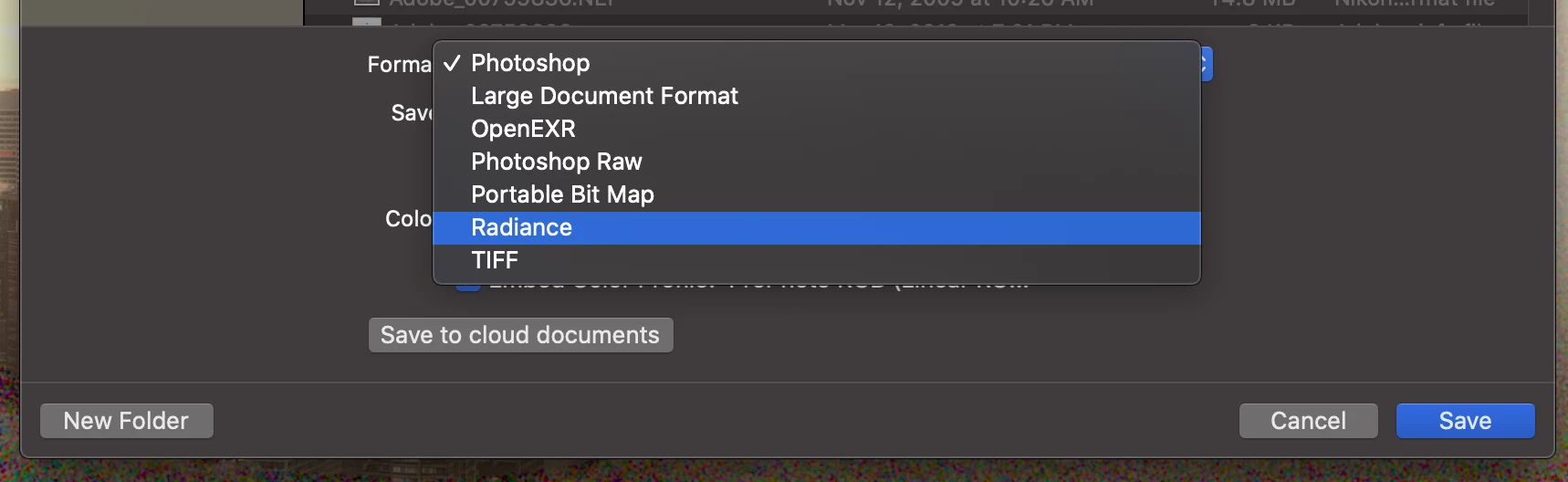
THe main problem was that i`m a bit frustrated but the way to get it to save is 2 merge all your layers and than in the normal save as menu you can choose radiance (HDRI ect.)


If you're using Photoshop 22.x or 23.x, make sure your document is a 32-bit document (Image > Mode > 32-bits/channel) then go to File > Save a Copy... and select "Radiance" from the Format pop-up.


1 Antwort

Chris Cox
Legend
February 25, 2010

The HDR (Radiance) file format will only be available in 32 bit/channel.

Converting an 8 or 16 bit image to 32 bit and saving is missing the point -- you've got a low dynamic range image to start with!

Participating Frequently
June 6, 2021

not realy since you photographed at multiuple exposures and should be able to automomatically make it form an hdri in this overpriced piece of software.

Also i simply dont even have the option to save as hdri/radiance

Ald al i did ws edit a file that ws already an HDRi so i`m stuck here anyone that can help ?


Participant
November 10, 2021

Same problem here, did you find a solution?