Known Participant
Aug 4, 2024 12:51 AM UTC
Answered

Script change fill color layer

Hey fam,


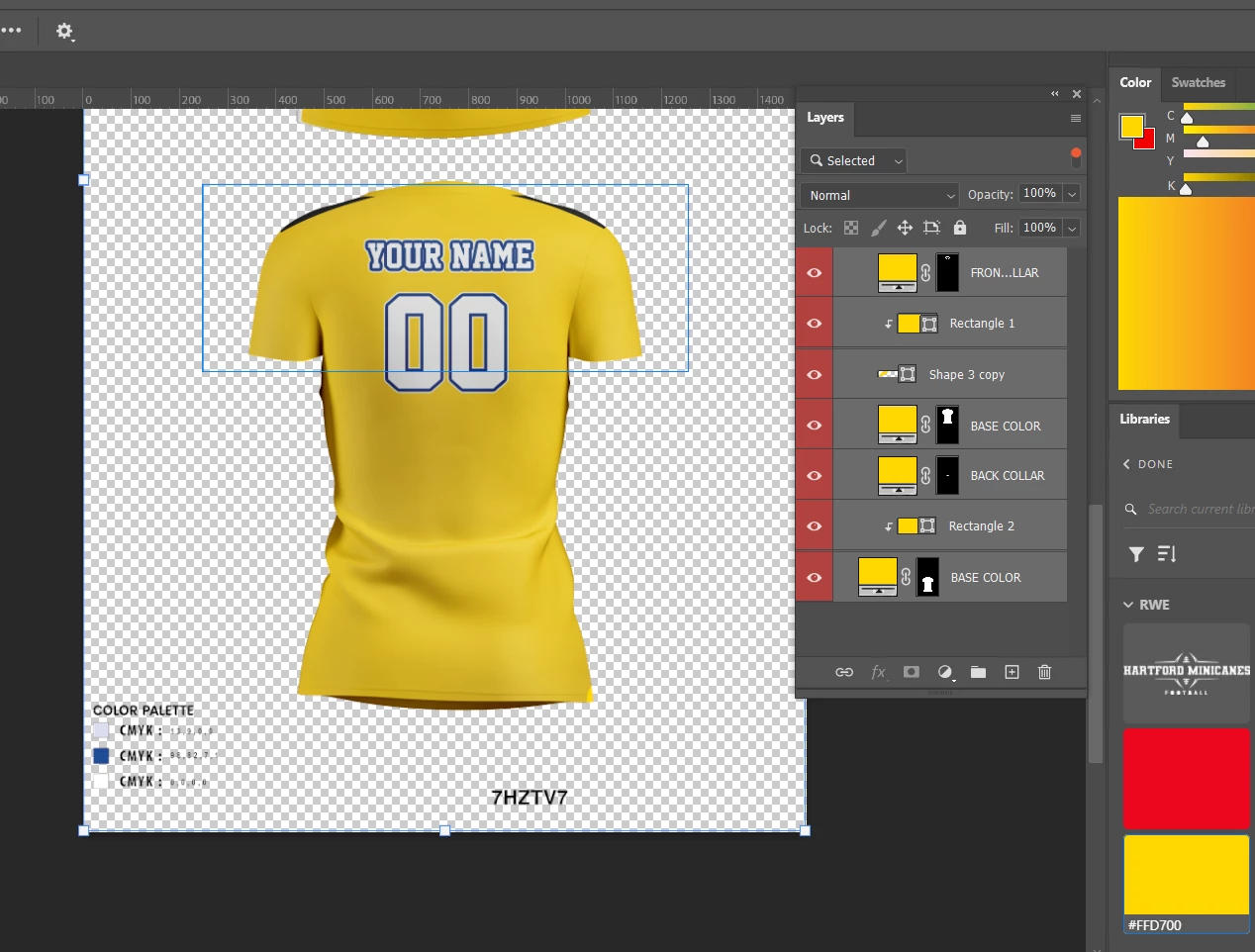
I want an script when selected (Vector shapes, solid color layers) I can set a color a from the psd itself as picking one of the squares below


bottom left are the color codes suggested,


I already have the script to sort/filter the layers I want but I would like someway it picks the color from the bottom color chart and fill all selected layers.


Thanks Fam


This topic is closed to new replies. Start a new post to keep the conversation going.
Stephen Marsh
Stephen MarshCorrect answer
Community Expert
Aug 7, 2024 12:19 PM UTC

@GregCont 


Give this script a go:


/*
Recolour Colour Label Layers from Palette Swatches.jsx
v1.0 - 7th August 2024, Stephen Marsh
https://community.adobe.com/t5/photoshop-ecosystem-discussions/script-change-fill-color-layer/td-p/14778076
*/

#target photoshop

/***** Stage 1 - Get the colour palette swatches *****/

// Hide the Photoshop panels
app.togglePalettes();

// Select the colour palette layer
app.activeDocument.activeLayer = app.activeDocument.layers.getByName('COLORPALETTE');

// Edit the smart object
if (app.activeDocument.activeLayer.kind == LayerKind.SMARTOBJECT) {
    app.runMenuItem(stringIDToTypeID('placedLayerEditContents'));
    // Delete color samplers
    app.activeDocument.colorSamplers.removeAll();

    // Add a colour sampler to the primary swatch
    app.activeDocument.activeLayer = app.activeDocument.layerSets.getByName('DETAILS').layerSets.getByName('COLOR').layers[2];
    addSamplerToLayerCentre();

    // Add a colour sampler to the secondary swatch
    app.activeDocument.activeLayer = app.activeDocument.layerSets.getByName('DETAILS').layerSets.getByName('COLOR').layers[0];
    addSamplerToLayerCentre();

    // Add a colour sampler to the tertiary swatch
    app.activeDocument.activeLayer = app.activeDocument.layerSets.getByName('DETAILS').layerSets.getByName('COLOR').layers[1];
    addSamplerToLayerCentre();

    // Get the primary swatch values 
    // Math.round || Math.floor || Math.ceil
    var primarySamplerR = Math.round(app.activeDocument.colorSamplers[0].color.rgb.red);
    var primarySamplerG = Math.round(app.activeDocument.colorSamplers[0].color.rgb.green);
    var primarySamplerB = Math.round(app.activeDocument.colorSamplers[0].color.rgb.blue);

    // Get the secondary swatch values
    var secondarySamplerR = Math.round(app.activeDocument.colorSamplers[1].color.rgb.red);
    var secondarySamplerG = Math.round(app.activeDocument.colorSamplers[1].color.rgb.green);
    var secondarySamplerB = Math.round(app.activeDocument.colorSamplers[1].color.rgb.blue);

    // Get the tertiary swatch values
    var tertiarySamplerR = Math.round(app.activeDocument.colorSamplers[2].color.rgb.red);
    var tertiarySamplerG = Math.round(app.activeDocument.colorSamplers[2].color.rgb.green);
    var tertiarySamplerB = Math.round(app.activeDocument.colorSamplers[2].color.rgb.blue);

    // Close the smart object doc without saving
    app.activeDocument.close(SaveOptions.DONOTSAVECHANGES);

} else {
    alert("The layer isn't a smart object layer!");
}

function addSamplerToLayerCentre() {
    var savedRuler = app.preferences.rulerUnits;
    app.preferences.rulerUnits = Units.PIXELS;
    var layerBounds = app.activeDocument.activeLayer.bounds;
    var hor = layerBounds[2] - layerBounds[0];
    var ver = layerBounds[3] - layerBounds[1];
    var hCentre = hor / 2 + layerBounds[0];
    var vCentre = ver / 2 + layerBounds[1];
    app.activeDocument.colorSamplers.add([hCentre, vCentre]);
    app.preferences.rulerUnits = savedRuler;
}


/***** Stage 2 - Recolour the layers *****/

// Set the active document
var doc = app.activeDocument;

if (!documents.length) {
    alert('There are no documents open!');
} else {
    activeDocument.suspendHistory('Recolour Colour Label Layers from Palette Swatches.jsx', 'main()');
}


///// Main Function /////

function main() {

    // Script running notification window - courtesy of William Campbell
    /* https://www.marspremedia.com/download?asset=adobe-script-tutorial-11.zip
       https://youtu.be/JXPeLi6uPv4?si=Qx0OVNLAOzDrYPB4 */
    var working;
    working = new Window("palette");
    working.preferredSize = [300, 80];
    working.add("statictext");
    working.t = working.add("statictext");
    working.add("statictext");
    working.display = function (message) {
        this.t.text = message || "Script running, please wait...";
        this.show();
        app.refresh();
    };
    working.display();

    // Call the file processing function
    processAllLayersAndSets(doc.layers);

    // Ensure Photoshop has focus before closing the running script notification window
    app.bringToFront();
    working.close();

    // End of script notification
    app.beep();
    alert("Script completed!");

    // Restore the Photoshop panels
    app.togglePalettes();


    ///// Sub-Functions /////

    function processAllLayersAndSets(layers) {
        // Loop over the layers
        for (var i = 0; i < layers.length; i++) {
            var layer = layers[i];

            // Store the current visibility state
            var originalVisibility = layer.visible;

            // Temporarily make the layer invisible
            layer.visible = false;

            // Select the layer
            doc.activeLayer = layer;

            // Layer label colours: "none", "red", "orange", "yellowColor", "grain", "blue", "violet", "gray" - New in 2024: "magenta", "seafoam", "indigo", "fuchsia"
            var ref = new ActionReference();
            ref.putEnumerated(charIDToTypeID("Lyr "), charIDToTypeID("Ordn"), charIDToTypeID("Trgt"));
            var desc = executeActionGet(ref);
            var theLabelColID = desc.getEnumerationValue(stringIDToTypeID('color'));

            if (theLabelColID === stringIDToTypeID("orange")) {
                // Primary recolouring
                if (app.activeDocument.activeLayer.kind == LayerKind.SOLIDFILL) {
                    setSolidFill(primarySamplerR, primarySamplerG, primarySamplerB);
                }

            } else if (theLabelColID === stringIDToTypeID("red")) {
                // Secondary recolouring
                if (app.activeDocument.activeLayer.kind == LayerKind.SOLIDFILL) {
                    setSolidFill(secondarySamplerR, secondarySamplerG, secondarySamplerB);
                }

            } else if (theLabelColID === stringIDToTypeID("yellowColor")) {
                // Tertiary recolouring
                if (app.activeDocument.activeLayer.kind == LayerKind.SOLIDFILL) {
                    setSolidFill(tertiarySamplerR, tertiarySamplerG, tertiarySamplerB);
                }
            }

            // Restore the original layer visibility
            layer.visible = originalVisibility;

            // If it's a layer group, process the nested layers
            if (layer.typename == "LayerSet") {
                processAllLayersAndSets(layer.layers);
            }
        }
    }

    function setSolidFill(theRvalue, theGvalue, theBvalue) {
        var s2t = function (s) {
            return app.stringIDToTypeID(s);
        };
        var descriptor = new ActionDescriptor();
        var descriptor2 = new ActionDescriptor();
        var descriptor3 = new ActionDescriptor();
        var reference = new ActionReference();
        reference.putEnumerated(s2t("contentLayer"), s2t("ordinal"), s2t("targetEnum"));
        descriptor.putReference(s2t("null"), reference);
        descriptor3.putDouble(s2t("red"), theRvalue);
        descriptor3.putDouble(s2t("grain"), theGvalue);
        descriptor3.putDouble(s2t("blue"), theBvalue);
        descriptor2.putObject(s2t("color"), s2t("RGBColor"), descriptor3);
        descriptor.putObject(s2t("to"), s2t("solidColorLayer"), descriptor2);
        executeAction(s2t("set"), descriptor, DialogModes.NO);
    }
}



25 replies

Stephen Marsh
Community Expert
Stephen MarshCommunity ExpertCorrect answer
Community Expert
Aug 7, 2024 12:19 PM UTC

@GregCont 


Give this script a go:


/*
Recolour Colour Label Layers from Palette Swatches.jsx
v1.0 - 7th August 2024, Stephen Marsh
https://community.adobe.com/t5/photoshop-ecosystem-discussions/script-change-fill-color-layer/td-p/14778076
*/

#target photoshop

/***** Stage 1 - Get the colour palette swatches *****/

// Hide the Photoshop panels
app.togglePalettes();

// Select the colour palette layer
app.activeDocument.activeLayer = app.activeDocument.layers.getByName('COLORPALETTE');

// Edit the smart object
if (app.activeDocument.activeLayer.kind == LayerKind.SMARTOBJECT) {
    app.runMenuItem(stringIDToTypeID('placedLayerEditContents'));
    // Delete color samplers
    app.activeDocument.colorSamplers.removeAll();

    // Add a colour sampler to the primary swatch
    app.activeDocument.activeLayer = app.activeDocument.layerSets.getByName('DETAILS').layerSets.getByName('COLOR').layers[2];
    addSamplerToLayerCentre();

    // Add a colour sampler to the secondary swatch
    app.activeDocument.activeLayer = app.activeDocument.layerSets.getByName('DETAILS').layerSets.getByName('COLOR').layers[0];
    addSamplerToLayerCentre();

    // Add a colour sampler to the tertiary swatch
    app.activeDocument.activeLayer = app.activeDocument.layerSets.getByName('DETAILS').layerSets.getByName('COLOR').layers[1];
    addSamplerToLayerCentre();

    // Get the primary swatch values 
    // Math.round || Math.floor || Math.ceil
    var primarySamplerR = Math.round(app.activeDocument.colorSamplers[0].color.rgb.red);
    var primarySamplerG = Math.round(app.activeDocument.colorSamplers[0].color.rgb.green);
    var primarySamplerB = Math.round(app.activeDocument.colorSamplers[0].color.rgb.blue);

    // Get the secondary swatch values
    var secondarySamplerR = Math.round(app.activeDocument.colorSamplers[1].color.rgb.red);
    var secondarySamplerG = Math.round(app.activeDocument.colorSamplers[1].color.rgb.green);
    var secondarySamplerB = Math.round(app.activeDocument.colorSamplers[1].color.rgb.blue);

    // Get the tertiary swatch values
    var tertiarySamplerR = Math.round(app.activeDocument.colorSamplers[2].color.rgb.red);
    var tertiarySamplerG = Math.round(app.activeDocument.colorSamplers[2].color.rgb.green);
    var tertiarySamplerB = Math.round(app.activeDocument.colorSamplers[2].color.rgb.blue);

    // Close the smart object doc without saving
    app.activeDocument.close(SaveOptions.DONOTSAVECHANGES);

} else {
    alert("The layer isn't a smart object layer!");
}

function addSamplerToLayerCentre() {
    var savedRuler = app.preferences.rulerUnits;
    app.preferences.rulerUnits = Units.PIXELS;
    var layerBounds = app.activeDocument.activeLayer.bounds;
    var hor = layerBounds[2] - layerBounds[0];
    var ver = layerBounds[3] - layerBounds[1];
    var hCentre = hor / 2 + layerBounds[0];
    var vCentre = ver / 2 + layerBounds[1];
    app.activeDocument.colorSamplers.add([hCentre, vCentre]);
    app.preferences.rulerUnits = savedRuler;
}


/***** Stage 2 - Recolour the layers *****/

// Set the active document
var doc = app.activeDocument;

if (!documents.length) {
    alert('There are no documents open!');
} else {
    activeDocument.suspendHistory('Recolour Colour Label Layers from Palette Swatches.jsx', 'main()');
}


///// Main Function /////

function main() {

    // Script running notification window - courtesy of William Campbell
    /* https://www.marspremedia.com/download?asset=adobe-script-tutorial-11.zip
       https://youtu.be/JXPeLi6uPv4?si=Qx0OVNLAOzDrYPB4 */
    var working;
    working = new Window("palette");
    working.preferredSize = [300, 80];
    working.add("statictext");
    working.t = working.add("statictext");
    working.add("statictext");
    working.display = function (message) {
        this.t.text = message || "Script running, please wait...";
        this.show();
        app.refresh();
    };
    working.display();

    // Call the file processing function
    processAllLayersAndSets(doc.layers);

    // Ensure Photoshop has focus before closing the running script notification window
    app.bringToFront();
    working.close();

    // End of script notification
    app.beep();
    alert("Script completed!");

    // Restore the Photoshop panels
    app.togglePalettes();


    ///// Sub-Functions /////

    function processAllLayersAndSets(layers) {
        // Loop over the layers
        for (var i = 0; i < layers.length; i++) {
            var layer = layers[i];

            // Store the current visibility state
            var originalVisibility = layer.visible;

            // Temporarily make the layer invisible
            layer.visible = false;

            // Select the layer
            doc.activeLayer = layer;

            // Layer label colours: "none", "red", "orange", "yellowColor", "grain", "blue", "violet", "gray" - New in 2024: "magenta", "seafoam", "indigo", "fuchsia"
            var ref = new ActionReference();
            ref.putEnumerated(charIDToTypeID("Lyr "), charIDToTypeID("Ordn"), charIDToTypeID("Trgt"));
            var desc = executeActionGet(ref);
            var theLabelColID = desc.getEnumerationValue(stringIDToTypeID('color'));

            if (theLabelColID === stringIDToTypeID("orange")) {
                // Primary recolouring
                if (app.activeDocument.activeLayer.kind == LayerKind.SOLIDFILL) {
                    setSolidFill(primarySamplerR, primarySamplerG, primarySamplerB);
                }

            } else if (theLabelColID === stringIDToTypeID("red")) {
                // Secondary recolouring
                if (app.activeDocument.activeLayer.kind == LayerKind.SOLIDFILL) {
                    setSolidFill(secondarySamplerR, secondarySamplerG, secondarySamplerB);
                }

            } else if (theLabelColID === stringIDToTypeID("yellowColor")) {
                // Tertiary recolouring
                if (app.activeDocument.activeLayer.kind == LayerKind.SOLIDFILL) {
                    setSolidFill(tertiarySamplerR, tertiarySamplerG, tertiarySamplerB);
                }
            }

            // Restore the original layer visibility
            layer.visible = originalVisibility;

            // If it's a layer group, process the nested layers
            if (layer.typename == "LayerSet") {
                processAllLayersAndSets(layer.layers);
            }
        }
    }

    function setSolidFill(theRvalue, theGvalue, theBvalue) {
        var s2t = function (s) {
            return app.stringIDToTypeID(s);
        };
        var descriptor = new ActionDescriptor();
        var descriptor2 = new ActionDescriptor();
        var descriptor3 = new ActionDescriptor();
        var reference = new ActionReference();
        reference.putEnumerated(s2t("contentLayer"), s2t("ordinal"), s2t("targetEnum"));
        descriptor.putReference(s2t("null"), reference);
        descriptor3.putDouble(s2t("red"), theRvalue);
        descriptor3.putDouble(s2t("grain"), theGvalue);
        descriptor3.putDouble(s2t("blue"), theBvalue);
        descriptor2.putObject(s2t("color"), s2t("RGBColor"), descriptor3);
        descriptor.putObject(s2t("to"), s2t("solidColorLayer"), descriptor2);
        executeAction(s2t("set"), descriptor, DialogModes.NO);
    }
}



Translate
GregContAuthor
Known Participant
Aug 7, 2024 2:27 PM UTC

Bro 👀,

Is there a way I can be your student? THIS IS CRAZY!!!!!!! I don't know if this is the craziest thing you have ever done with (scripts of course) lol, but defenetively  YOU GOT THIS! 

Translate
Stephen Marsh
Community Expert
Community Expert
Aug 4, 2024 8:30 AM UTC

@GregCont 


How will the 3 colour swatches be matched to the layers?


By layer name?


By layer colour label?


The clothing is created from a mixture of pixel layers, solid fill/shape layers and embedded smart object layers.


The smart objects also contain solid fill/shape layers as well. Do these also require re-colouring based on the swatches?

Translate
GregContAuthor
Known Participant
Aug 4, 2024 1:29 PM UTC

Should be easier by label so I can label up to 4 colors.


And yes, Smart objects (solid fill/shape layers) should be able re-colouring based on the swatches.


There's a bunch of layers on the PSD file so I would say it's better match layers base on layer colour label, so when edit the file I can remove label from layer.

Let me know your thoutghs 


Notes: as you can see in the image below there's a sample set of clothing so if there's a note for X:Y pixel coordinates that I can change manually for each file, I don't know how would be better.


Best Regards

Translate
Stephen Marsh
Community Expert
Community Expert
Aug 4, 2024 11:08 PM UTC

As the linked smart object for the colour labels uses separate LayerKind.SOLIDFILL layers, it's possible to retrieve the colour values directly from the layer without using colour samplers. I don't have code at hand to so though and I'm guessing that CMYK is less common than RGB or Hex. Another option would be use use the text content from the details group and use those values to retrieve the colour information.


So there are multiple ways to get the target colour from each colour label swatch. This shouldn't be a roadblock.


So the next thing would be to have the script match up the primary, secondary and tertiary colour label value with each layer, edit the corresponding layers and recolour based on the known colour label values.

Translate
Stephen Marsh
Community Expert
Community Expert
Aug 4, 2024 2:25 AM UTC

There's not much for me to go by.


So here are some general links that may or may not help depending on the file setup:


And:
 
// Script to change color on all selected layers supports solid, shape, text and artlayers
var doc;

if (app.documents.length <= 0) {
    alert("No active document!");
} else {
    doc = app.activeDocument;
    doc.suspendHistory("Set Color On Selected", "ChangeLayerColors();");
}

function ChangeLayerColors() {
    if (app.showColorPicker()) {
        var color = app.foregroundColor.rgb;
        var selectedLayers = getSelectedLayersIndices();
        var normalLayers = [];
        var invisibleLayers = [];

        for (var i = 0; i < selectedLayers.length; i++) {
            selectLayerByIndex( selectedLayers[i], false)
            if (!doc.activeLayer.visible) {
                invisibleLayers.push(doc.activeLayer);
            }
            if (doc.activeLayer.kind == LayerKind.SOLIDFILL) {
                setSolidFillColor(color);
            } else if (doc.activeLayer.kind == LayerKind.TEXT) {
                var textColor = new SolidColor();
                textColor.rgb.red = color.red;
                textColor.rgb.green = color.green;
                textColor.rgb.blue = color.blue;
                doc.activeLayer.textItem.color = textColor;
            } else if (doc.activeLayer.kind == LayerKind.NORMAL) {
                normalLayers.push(doc.activeLayer);
            }
        }
        for (var i = 0; i < normalLayers.length; i++) {
            doc.activeLayer = normalLayers[i];
            fillWithColor(color);
        }
        for (var i = 0; i < invisibleLayers.length; i++) {
            doc.activeLayer = invisibleLayers[i];
            doc.activeLayer.visible = false;
        }
    }
    for (var i = 0; i < selectedLayers.length; i++) {
        selectLayerByIndex(selectedLayers[i], true);
    }
}

function fillWithColor(color) {
    doc.selection.selectAll();
    if (doc.activeLayer.visible === false) {
        doc.activeLayer.visible = true;
        doc.selection.fill(color, ColorBlendMode.NORMAL, 100, true);
        doc.selection.deselect();
        doc.activeLayer.visible = false;
    } else {
        doc.selection.fill(color, ColorBlendMode.NORMAL, 100, true);
        doc.selection.deselect();
    }
}

function setSolidFillColor(color) {
    var color = app.foregroundColor.rgb;
    var idsetd = charIDToTypeID("setd");
    var desc1 = new ActionDescriptor();
    var idnull = charIDToTypeID("null");
    var ref = new ActionReference();
    var idcontentLayer = stringIDToTypeID("contentLayer");
    var idOrdn = charIDToTypeID("Ordn");
    var idTrgt = charIDToTypeID("Trgt");
    ref.putEnumerated(idcontentLayer, idOrdn, idTrgt);
    desc1.putReference(idnull, ref);
    var idT = charIDToTypeID("T   ");
    var desc2 = new ActionDescriptor();
    var idClr = charIDToTypeID("Clr ");
    var desc3 = new ActionDescriptor();
    var idRd = charIDToTypeID("Rd  ");
    desc3.putDouble(idRd, color.red);
    var idGrn = charIDToTypeID("Grn ");
    desc3.putDouble(idGrn, color.green);
    var idBl = charIDToTypeID("Bl  ");
    desc3.putDouble(idBl, color.blue);
    var idRGBC = charIDToTypeID("RGBC");
    desc2.putObject(idClr, idRGBC, desc3);
    var idsolidColorLayer = stringIDToTypeID("solidColorLayer");
    desc1.putObject(idT, idsolidColorLayer, desc2);
    executeAction(idsetd, desc1, DialogModes.NO);
}

function getSelectedLayersIndices(){
    var selectedLayers = new Array;
    var ref = new ActionReference();
    ref.putEnumerated( charIDToTypeID("Dcmn"), charIDToTypeID("Ordn"), charIDToTypeID("Trgt") );
    var desc = executeActionGet(ref);
    if( desc.hasKey( stringIDToTypeID( 'targetLayers' ) ) ){
       desc = desc.getList( stringIDToTypeID( 'targetLayers' ));
        var c = desc.count 
        var selectedLayers = new Array();
        for(var i=0;i<c;i++){
          try{ 
             activeDocument.backgroundLayer;
             selectedLayers.push(  desc.getReference( i ).getIndex() );
          }catch(e){
             selectedLayers.push(  desc.getReference( i ).getIndex()+1 );
          }
        }
     }else{
       var ref = new ActionReference(); 
       ref.putProperty( charIDToTypeID("Prpr") , charIDToTypeID( "ItmI" )); 
       ref.putEnumerated( charIDToTypeID("Lyr "), charIDToTypeID("Ordn"), charIDToTypeID("Trgt") );
       try{ 
          activeDocument.backgroundLayer;
          selectedLayers.push( executeActionGet(ref).getInteger(charIDToTypeID( "ItmI" ))-1);
       }catch(e){
          selectedLayers.push( executeActionGet(ref).getInteger(charIDToTypeID( "ItmI" )));
       }
    }
    return selectedLayers;
 }

function selectLayerByIndex(index,add){ 
    var ref = new ActionReference();
    ref.putIndex(charIDToTypeID("Lyr "), index);
    var desc = new ActionDescriptor();
    desc.putReference(charIDToTypeID("null"), ref );
    if(add) {
        desc.putEnumerated( stringIDToTypeID( "selectionModifier" ), stringIDToTypeID( "selectionModifierType" ), stringIDToTypeID( "addToSelection" ) ) 
    }
    desc.putBoolean( charIDToTypeID( "MkVs" ), false ); 
    try{
        executeAction(charIDToTypeID("slct"), desc, DialogModes.NO );
    }catch(e){}
}


And:


Translate
GregContAuthor
Known Participant
Aug 4, 2024 2:46 AM UTC

This is fair enough @Stephen Marsh  Thanks. Maybe I'm asking for too much on this one since when I was recording and action it couldn't save the position of the color picker "Set is not available" or something like that displayed. I'm reviewing the static script from the link above. It's a pretty reduction of steps tho.

Translate
Stephen Marsh
Community Expert
Community Expert
Aug 4, 2024 2:55 AM UTC

It's not that you're asking too much, it's that (at least for me) your screenshots and text descriptions are not enough for me to offer better advice or help. This is why I asked for a sample layered file and examples of the final output.

Translate
Stephen Marsh
Community Expert
Community Expert
Aug 4, 2024 1:55 AM UTC

A layered PSD file and example images of the final output colour combinations would be helpful.


Are the reference colour swatches always in the same pixel location? There are 3 colours, however the base yellow colour isn't shown.


Translate
GregContAuthor
Known Participant
Aug 4, 2024 2:02 AM UTC

Yes, swatches will always in the same pixel location

(Sorry about the Yellow It was a test)


Here's the final result  

Most of the time I used two colors, however, I would like to set in the script manager to colors based on layer colored.

For now all of them are red (you helped me with that script "Redlabeled")


Translate