
Participant
December 14, 2021
Answered

Script for Open as Layer Without File Extension

  • December 14, 2021
  • 1 reply
  • 972 views

I have been searching for a script to open an image and rename a background layer into the file name. I found the below script which works perfectly; however, I'd like to have the layer name without a file extension.

Can someone please help me with editing the script?

Your help will be much appreciated.


// (c) Copyright 2008. Adobe Systems, Incorporated. All rights reserved.

/*
@@@BUILDINFO@@@ OpenAsLayer.jsx 1.0.0.0
*/

var begDesc = "$$$/JavaScripts/OpenAsLayer/Description=Assign this to the open document event. This will promote a document with only a background layer to a layer with the document name." // endDesc


// on localized builds we pull the $$$/Strings from a .dat file, see documentation for more details
$.localize = true;

if ( app.documents.length > 0 ) {
var doc = activeDocument;
if ( doc.layers.length == 1 && doc.activeLayer.isBackgroundLayer ) {
doc.activeLayer.isBackgroundLayer = false;
var docNameNoExtension = doc.name;
if (stripExtension) {
var extensionIndex = docNameNoExtension.lastIndexOf (".");
if (extensionIndex != -1) {
docNameNoExtension = docNameNoExtension.substr(0, extensionIndex);
}
}
doc.activeLayer.name = docNameNoExtension;
}
}
This topic has been closed for replies.
Correct answer Stephen Marsh

Modified code (not exhaustively tested, use at your own risk):


// (c) Copyright 2008. Adobe Systems, Incorporated. All rights reserved.
/*
@@@BUILDINFO@@@ OpenAsLayer.jsx 1.0.0.0
*/
var begDesc = "$$$/JavaScripts/OpenAsLayer/Description=Assign this to the open document event. This will promote a document with only a background layer to a layer with the document name." // endDesc

// on localized builds we pull the $$$/Strings from a .dat file, see documentation for more details
$.localize = true;
if (app.documents.length > 0) {
    var doc = activeDocument;
    if (doc.layers.length == 1 && doc.activeLayer.isBackgroundLayer) {
        doc.activeLayer.isBackgroundLayer = false;
        var docNameNoExtension = doc.name.replace(/\.[^\.]+$/, '');
    }
}
doc.activeLayer.name = docNameNoExtension;


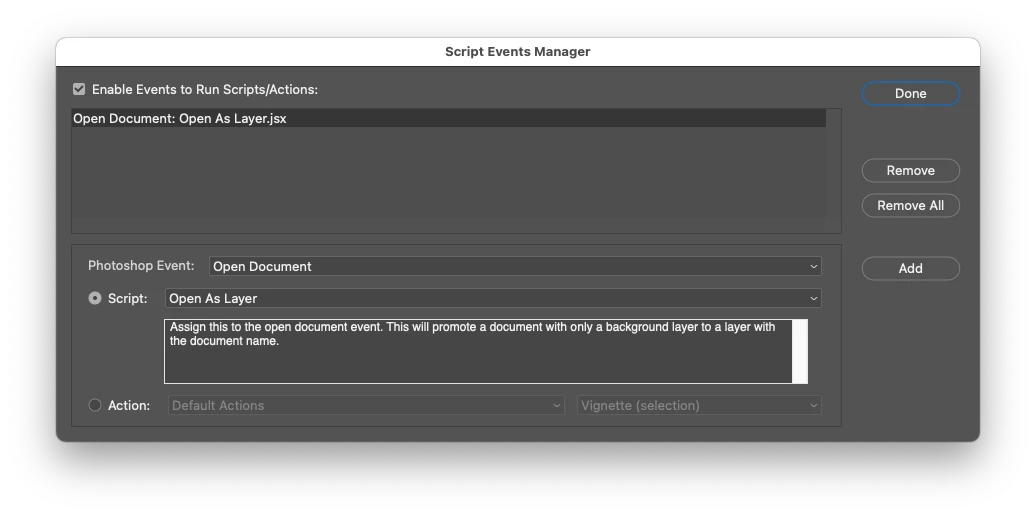
The script is intended to be driven via the File > Scripts > Scripts Events Manager:


https://prepression.blogspot.com/2021/10/photoshop-script-events-manager.html


It could be run manually though. Example location of the original script (backup before replacing):


Mac:

/Applications/Adobe Photoshop 2022/Presets/Scripts/Event Scripts Only/Open As Layer.jsx


Win:

C:\Program Files\Adobe\Adobe Photoshop 2022\Presets\Scripts\Event Scripts Only\Open As Layer.jsx


1 reply

Stephen Marsh
Community Expert
Stephen MarshCommunity ExpertCorrect answer
Community Expert
December 14, 2021

Modified code (not exhaustively tested, use at your own risk):


// (c) Copyright 2008. Adobe Systems, Incorporated. All rights reserved.
/*
@@@BUILDINFO@@@ OpenAsLayer.jsx 1.0.0.0
*/
var begDesc = "$$$/JavaScripts/OpenAsLayer/Description=Assign this to the open document event. This will promote a document with only a background layer to a layer with the document name." // endDesc

// on localized builds we pull the $$$/Strings from a .dat file, see documentation for more details
$.localize = true;
if (app.documents.length > 0) {
    var doc = activeDocument;
    if (doc.layers.length == 1 && doc.activeLayer.isBackgroundLayer) {
        doc.activeLayer.isBackgroundLayer = false;
        var docNameNoExtension = doc.name.replace(/\.[^\.]+$/, '');
    }
}
doc.activeLayer.name = docNameNoExtension;


The script is intended to be driven via the File > Scripts > Scripts Events Manager:


https://prepression.blogspot.com/2021/10/photoshop-script-events-manager.html


It could be run manually though. Example location of the original script (backup before replacing):


Mac:

/Applications/Adobe Photoshop 2022/Presets/Scripts/Event Scripts Only/Open As Layer.jsx


Win:

C:\Program Files\Adobe\Adobe Photoshop 2022\Presets\Scripts\Event Scripts Only\Open As Layer.jsx


michi5E16Author
Participant
December 14, 2021

Amazing!! It works perfectly!
Thank you so much for your time and great support. Truly appreciated!