TaraRebeka
Known Participant
May 3, 2024
Answered

Script to add Image Size to Description field to include in Printing Marks

  • May 3, 2024
  • 3 replies
  • 1012 views

Hi all,

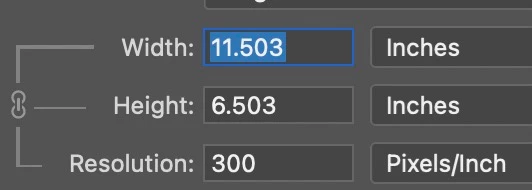
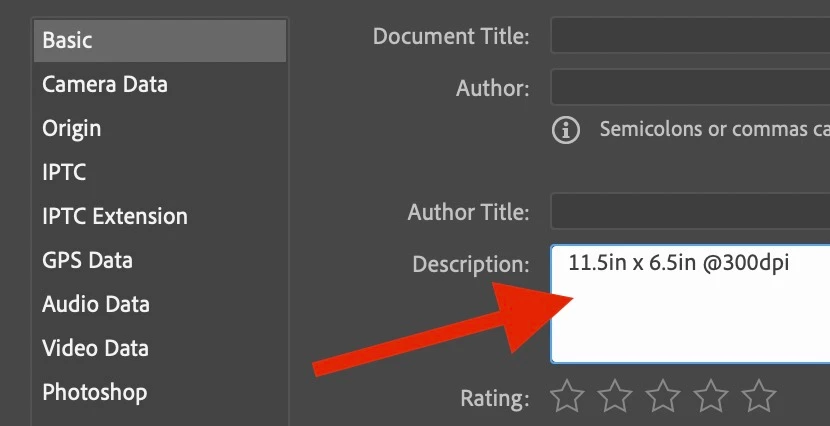
Any help appreciated on this. I'm looking for a script that will add this info:


Into the Description field:


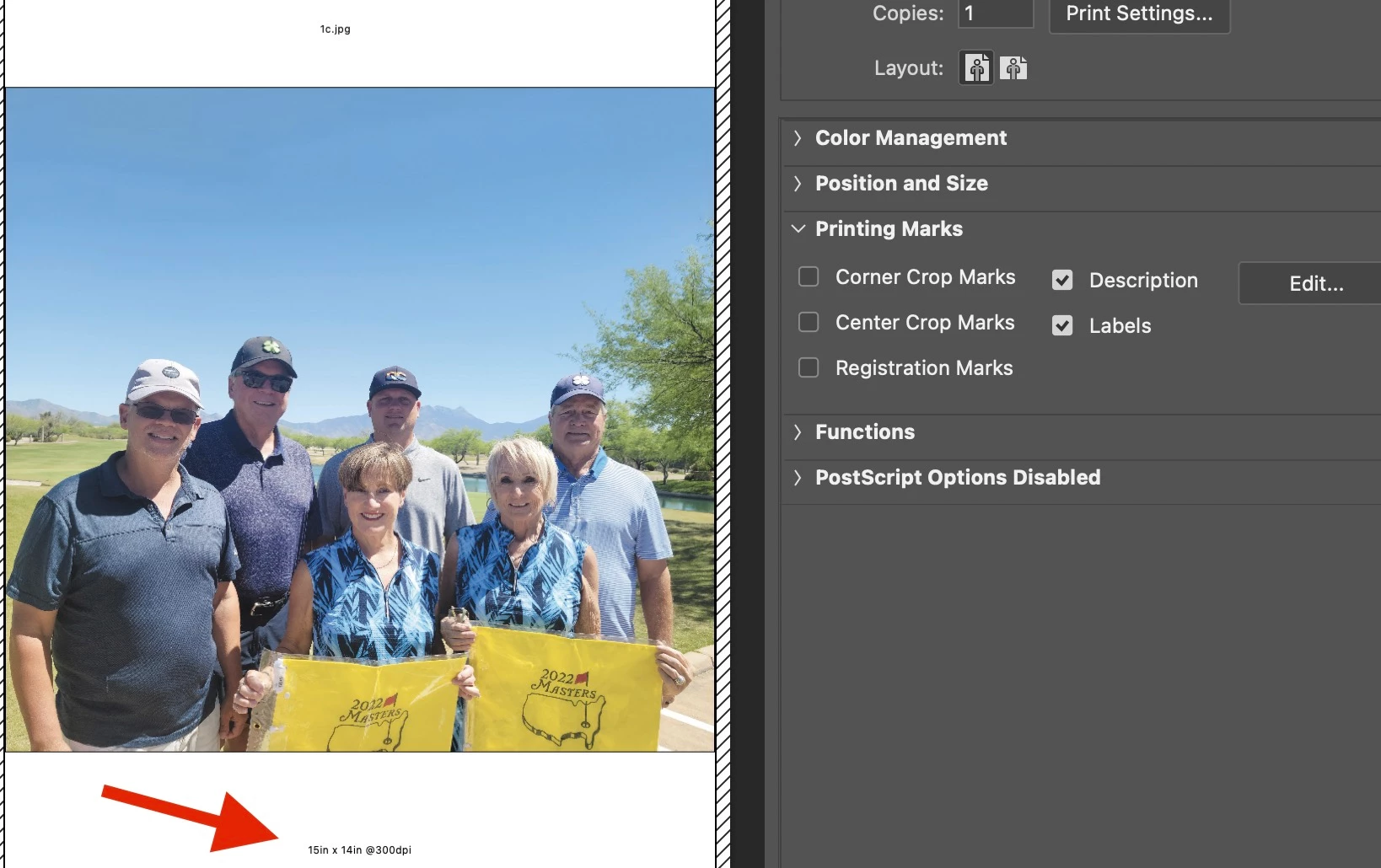
Allowing it to display in a printout when the Description field is checked in the Printing Marks window:


Thanks!

This topic has been closed for replies.
Correct answer Stephen Marsh

@TaraRebeka 


The following script will do this for a single open/active document.


P.S. It's ppi – not dpi, you can change that yourself if you disagree!  :]


Legacy:


/*
Add Document Dimensions & Resolution to Description Metadata of Open Document.jsx
4th May 2024, Stephen Marsh
https://community.adobe.com/t5/photoshop-ecosystem-discussions/script-to-add-image-size-to-description-field-to-include-in-printing-marks/td-p/14597499
*/

#target photoshop

// Rounded to 1 decimal place
var theDims = Math.round(activeDocument.width.as('in') * 10) / 10 + "in x " + activeDocument.height.as('in').toFixed(1) + "in @" + activeDocument.resolution + "ppi";

activeDocument.info.caption = theDims;


Or current:


/*
Add Document Dimensions & Resolution to Description Metadata of Open Document.jsx
4th May 2024, Stephen Marsh
https://community.adobe.com/t5/photoshop-ecosystem-discussions/script-to-add-image-size-to-description-field-to-include-in-printing-marks/td-p/14597499
*/

#target photoshop

// Rounded to 1 decimal place
var theDims = Math.round(activeDocument.width.as('in') * 10) / 10 + "in x " + activeDocument.height.as('in').toFixed(1) + "in @" + activeDocument.resolution + "ppi";

if (ExternalObject.AdobeXMPScript === undefined) ExternalObject.AdobeXMPScript = new ExternalObject("lib:AdobeXMPScript");
var xmp = new XMPMeta(activeDocument.xmpMetadata.rawData);
xmp.deleteProperty(XMPConst.NS_DC, 'description');
xmp.setProperty(XMPConst.NS_DC, 'description', theDims);
app.activeDocument.xmpMetadata.rawData = xmp.serialize();


You could automate this when opening a file using the Script Events Manager:


https://prepression.blogspot.com/2021/10/photoshop-script-events-manager.html


https://prepression.blogspot.com/2017/11/downloading-and-installing-adobe-scripts.html



3 replies

Legend
May 10, 2024

Be aware that Save for Web will strip this out unless you use the All Metadata option. I write product weight into this field using a script, but also write it into the Headline field of my master PSD files. I have a second script that pulls the Headline data and writes it back into Description. That way I don't have to manually reenter the weights on my finished JPEG files.

Stephen Marsh
Community Expert
Community Expert
May 3, 2024

Adobe Bridge is better suited to such things than Photoshop IMHO.


As I don't normally script Bridge, this hack is a little rougher than I would like (PNG files are not supported).


/*
https://community.adobe.com/t5/photoshop-ecosystem-discussions/script-to-add-image-size-to-description-field-to-include-in-printing-marks/td-p/14597499
*/

#target bridge

///// NOTE: PNG files will return the incorrect dimension and resolution values, ignore them!

if (BridgeTalk.appName == "bridge") {
   FT = MenuElement.create("command", "Add Dimensions & Resolution to Description", "at the end of Tools");
}

FT.onSelect = function () {
   //var thumbs = app.document.selections;
   var thumbs = app.document.getSelection('jpg, jpeg, tif, tiff, psd, psb, webp'); // Don't include PNG!
   if (!thumbs.length) return;
   if (ExternalObject.AdobeXMPScript == undefined) ExternalObject.AdobeXMPScript = new ExternalObject("lib:AdobeXMPScript");
   for (var a in thumbs) {
      var selectedFile = thumbs[a].spec;
      ///// Not for PNG
      var theRes = thumbs[a].core.quickMetadata.xResolution;
      ///// Rounded to 1 decimal place
      var theWidth = (thumbs[a].core.quickMetadata.width / thumbs[a].core.quickMetadata.xResolution).toFixed (1);
      var theHeight = (thumbs[a].core.quickMetadata.height / thumbs[a].core.quickMetadata.xResolution).toFixed (1);
      var theDims = theWidth + "in x " + theHeight + "in @" + theRes + "ppi";
      /////
      var myXmpFile = new XMPFile(selectedFile.fsName, XMPConst.UNKNOWN, XMPConst.OPEN_FOR_UPDATE);
      var myXmp = myXmpFile.getXMP();
      var Desc = [];
      var count = myXmp.countArrayItems(XMPConst.NS_DC, "description");
      for (var i = 1; i <= count; i++) {
         Desc.push(myXmp.getArrayItem(XMPConst.NS_DC, "description", i));
      }
      myXmp.deleteProperty(XMPConst.NS_DC, "description");
      myXmp.appendArrayItem(XMPConst.NS_DC, "description", theDims, 0, XMPConst.ALIAS_TO_ALT_TEXT);
      myXmp.setQualifier(XMPConst.NS_DC, "description[1]", "http://www.w3.org/XML/1998/namespace", "lang", "x-default");
      if (myXmpFile.canPutXMP(myXmp)) {
         myXmpFile.putXMP(myXmp);
         myXmpFile.closeFile(XMPConst.CLOSE_UPDATE_SAFELY);
      }
   }
}


https://prepression.blogspot.com/2017/11/downloading-and-installing-adobe-scripts.html

Stephen Marsh
Community Expert
Stephen MarshCommunity ExpertCorrect answer
Community Expert
May 3, 2024

@TaraRebeka 


The following script will do this for a single open/active document.


P.S. It's ppi – not dpi, you can change that yourself if you disagree!  :]


Legacy:


/*
Add Document Dimensions & Resolution to Description Metadata of Open Document.jsx
4th May 2024, Stephen Marsh
https://community.adobe.com/t5/photoshop-ecosystem-discussions/script-to-add-image-size-to-description-field-to-include-in-printing-marks/td-p/14597499
*/

#target photoshop

// Rounded to 1 decimal place
var theDims = Math.round(activeDocument.width.as('in') * 10) / 10 + "in x " + activeDocument.height.as('in').toFixed(1) + "in @" + activeDocument.resolution + "ppi";

activeDocument.info.caption = theDims;


Or current:


/*
Add Document Dimensions & Resolution to Description Metadata of Open Document.jsx
4th May 2024, Stephen Marsh
https://community.adobe.com/t5/photoshop-ecosystem-discussions/script-to-add-image-size-to-description-field-to-include-in-printing-marks/td-p/14597499
*/

#target photoshop

// Rounded to 1 decimal place
var theDims = Math.round(activeDocument.width.as('in') * 10) / 10 + "in x " + activeDocument.height.as('in').toFixed(1) + "in @" + activeDocument.resolution + "ppi";

if (ExternalObject.AdobeXMPScript === undefined) ExternalObject.AdobeXMPScript = new ExternalObject("lib:AdobeXMPScript");
var xmp = new XMPMeta(activeDocument.xmpMetadata.rawData);
xmp.deleteProperty(XMPConst.NS_DC, 'description');
xmp.setProperty(XMPConst.NS_DC, 'description', theDims);
app.activeDocument.xmpMetadata.rawData = xmp.serialize();


You could automate this when opening a file using the Script Events Manager:


https://prepression.blogspot.com/2021/10/photoshop-script-events-manager.html


https://prepression.blogspot.com/2017/11/downloading-and-installing-adobe-scripts.html



c.pfaffenbichler
Community Expert
Community Expert
May 4, 2024
quote

P.S. It's ppi – not dpi, you can change that yourself if you disagree!  :]

Alas, there seems to be no real room for disagreement here.