Known Participant
January 1, 2024
해결됨

Script to input and select and move layers based on the input

  • January 1, 2024
  • 8 답변들
  • 3566 조회

I'm not entirely sure of the scope of what's possible but I'm trying to do the following:

Pretext: I have 52 layers named a1 to z1 and also a2 to z2. Each layer has a letter corrseponding to its name. A2 is just a different letter A. The intention is to input a name and generate that name based on the text. I'm planning to print out peoples names that they input. But I don't want to manually sort out each name and each layer on every single order, and since print on demand sites wouldn't allow me to upload 52 pictures, sort and print based on someone's input I would have to at least somewhat do this normally. The name would display based one 1 then 2 then 1 then 2.

for example inputting ADAM, would select layer A1 then move, D2 then move, A2 then move, M1 then move. This is how I envision it, let me know if I'm on the right track please:

  1. Upon clicking action input a name.
  2. Append a 1 corresponding to the first letter of that input and select that layer,
  3. Move layer.
  4. Check for input length.
  5. if more than 1, select the next letter in the input and append a 2,
  6. Move layer,
  7. Continue to input length finishes.


to simplify id set up each position from one to ten and just select that as a position based on the input length in the sequencer.


Can this be done in photoshop?

이 주제는 답변이 닫혔습니다.
최고의 답변: c.pfaffenbichler

I have no access to the files on the onedrive server so I cannot test with them. 

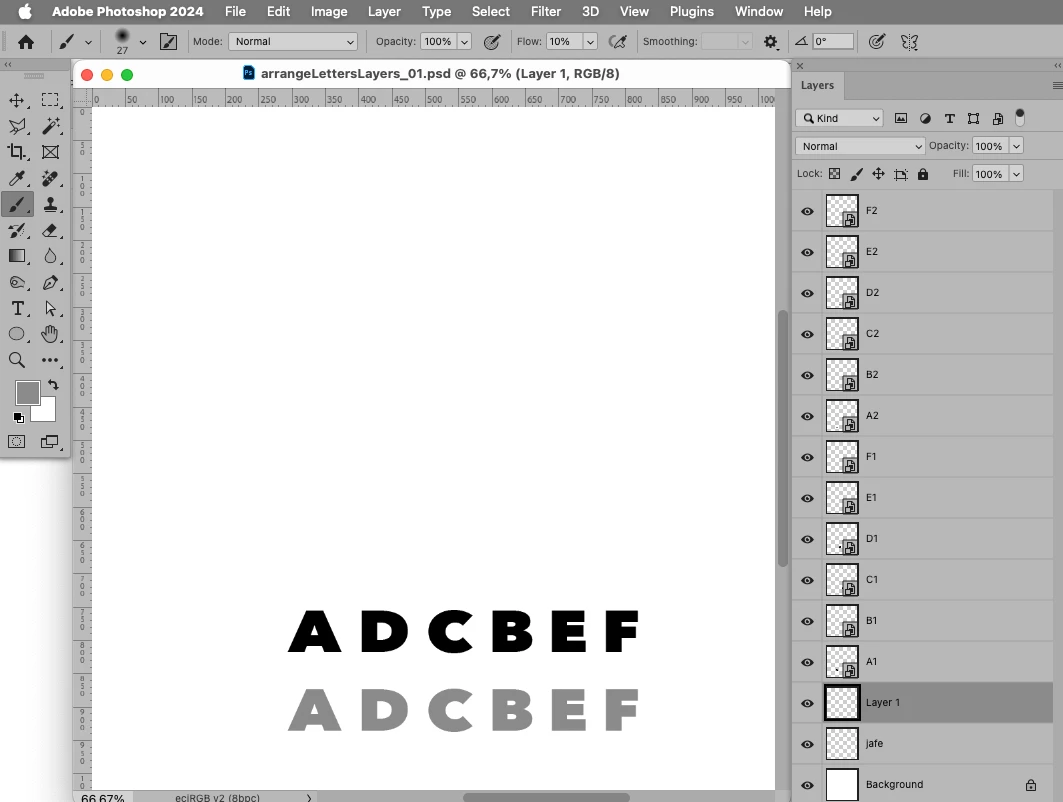
With a simple test file (with layers only for »a« through »f«) I was able to use the Script below to get an Array of Arrays (containing the Layer’s name, the index [which can be used to address/select the layer], the bounds [which can be used to calculate the necessary offsets]) in which the layers starting with the intended letter are being »rotated« (see the multiple »e«s for example). 
 

// 2023, use it at your own risk;
if (app.documents.length > 0) {
var myDocument = activeDocument;
var originalRulerUnits = app.preferences.rulerUnits;
app.preferences.rulerUnits = Units.PIXELS;
////////////////////////////////////
var theString = "badebefefe";
var theLayers = collectLayersBounds ();
theLayers.sort();
var theRegExp = /^\D\d$/i;
// create arrays sorted by initial letter;
var theArrays = new Array;
for (var m = 0; m < theLayers.length; m++) {
    var thisOne = theLayers[m];
    var theCheck = false;
    if (thisOne[0].match(theRegExp) != null) {
        var theLetter = String(thisOne[0].match(/^\D/i));
        for (var n = 0; n < theArrays.length; n++) {
            if (theArrays[n][0][0][0] == theLetter) {
                theArrays[n].push(thisOne);
                var theCheck = true
            }
        };
        if (theCheck != true) {theArrays.push([thisOne])};
    }
};
// check string against array;
var theResult = new Array;
for (var o = 0; o < theString.length; o++) {
    var thisOne = theString[o];
    for (var p = 0; p < theArrays.length; p++) {
        if (theArrays[p][0][0][0].match(new RegExp (thisOne, "i")) != null) {
            theResult.push (theArrays[p][0])
            theArrays[p].push(theArrays[p].splice(0,1));
        }
    };
};
alert (theResult.join("\n"));
////////////////////////////////////
app.preferences.rulerUnits = originalRulerUnits;
};
////// collect layers //////
function collectLayersBounds () {
// get number of layers;
var ref = new ActionReference();
ref.putEnumerated( charIDToTypeID("Dcmn"), charIDToTypeID("Ordn"), charIDToTypeID("Trgt") ); 
var applicationDesc = executeActionGet(ref);
var theNumber = applicationDesc.getInteger(stringIDToTypeID("numberOfLayers"));
// process the layers;
var theLayers = new Array;
for (var m = 0; m <= theNumber; m++) {
try {
var ref = new ActionReference();
ref.putIndex( charIDToTypeID( "Lyr " ), m);
var layerDesc = executeActionGet(ref);
var layerSet = typeIDToStringID(layerDesc.getEnumerationValue(stringIDToTypeID("layerSection")));
var isBackground = layerDesc.getBoolean(stringIDToTypeID("background"));
// if group collect values;
if (layerSet != "layerSectionEnd" && layerSet != "layerSectionStart" && isBackground != true) {
var theName = layerDesc.getString(stringIDToTypeID('name'));
var theID = layerDesc.getInteger(stringIDToTypeID('layerID'));
var theBounds = layerDesc.getObjectValue(stringIDToTypeID("bounds"));
var theseBounds = [theBounds.getUnitDoubleValue(stringIDToTypeID("left")), theBounds.getUnitDoubleValue(stringIDToTypeID("top")), theBounds.getUnitDoubleValue(stringIDToTypeID("right")), theBounds.getUnitDoubleValue(stringIDToTypeID("bottom"))];
theLayers.push([theName, theID, theseBounds])
};
}
catch (e) {};
};
return theLayers
};


8 답변

c.pfaffenbichler
Community Expert
Community Expert
January 5, 2024

If you want to invest more time please try the following code. 

With a simple test-file it seems to perform fairly speedy. 

edit: I had forgotten to remove the revert I used while testing and I updated the code accordingly. 


// collect layers named »letterNumber« and get an array according to a string, then duplicate and move the layers accordingly;
// 2024, use it at your own risk;
if (app.documents.length > 0) {
// revert;
//executeAction( stringIDToTypeID( "revert" ), undefined, DialogModes.NO );
var myDocument = activeDocument;
var originalRulerUnits = app.preferences.rulerUnits;
app.preferences.rulerUnits = Units.PIXELS;
////////////////////////////////////
var theString = prompt("Enter a name:", "badebefefefe");
if (theString) {
var theLayers = collectLayersBounds ();
theLayers.sort();
var theRegExp = /^\D\d$/i;
// create arrays sorted by initial letter;
var theArrays = new Array;
for (var m = 0; m < theLayers.length; m++) {
    var thisOne = theLayers[m];
    var theCheck = false;
    if (thisOne[0].match(theRegExp) != null) {
        var theLetter = String(thisOne[0].match(/^\D/i));
        for (var n = 0; n < theArrays.length; n++) {
            if (theArrays[n][0][0][0] == theLetter) {
                theArrays[n].push(thisOne);
                var theCheck = true
            }
        };
        if (theCheck != true) {theArrays.push([thisOne])};
    }
};
// check string against array;
var theResult = new Array;
for (var o = 0; o < theString.length; o++) {
    var thisOne = theString[o];
    for (var p = 0; p < theArrays.length; p++) {
        if (theArrays[p][0][0][0].match(new RegExp (thisOne, "i")) != null) {
            theResult.push (theArrays[p][0])
            var theStuff = theArrays[p].splice(0,1);
            theArrays[p].push(theStuff[0]);
        }
    };
};
if (theResult.length > 0) {
app.togglePalettes;
////////////////////////////////////
var theX = 0;
var theY = 0;
for (var q = 0; q < theResult.length; q++) {
    var thisOne = theResult[q];
    duplicateMoveRotateScale(true, thisOne[1], theX-thisOne[2][0], thisOne[2][1]*(-1), 100, 100, 0);
    theX = theX+(thisOne[2][2]-thisOne[2][0]);
    theY = Math.max(theY, thisOne[2][3]-thisOne[2][1]);
    var thisLayerId = getLayerId();
    moveLayerTo (thisLayerId, getTopLayerIndex ()+1);
};
if (theX != 0 && theY != 0) {myDocument.crop([0,0,theX,theY])};
};
app.togglePalettes;
};
////////////////////////////////////
app.preferences.rulerUnits = originalRulerUnits;
};
////// collect layers //////
function collectLayersBounds () {
// get number of layers;
var ref = new ActionReference();
ref.putEnumerated( charIDToTypeID("Dcmn"), charIDToTypeID("Ordn"), charIDToTypeID("Trgt") ); 
var applicationDesc = executeActionGet(ref);
var theNumber = applicationDesc.getInteger(stringIDToTypeID("numberOfLayers"));
// process the layers;
var theLayers = new Array;
for (var m = 0; m <= theNumber; m++) {
try {
var ref = new ActionReference();
ref.putIndex( charIDToTypeID( "Lyr " ), m);
var layerDesc = executeActionGet(ref);
var layerSet = typeIDToStringID(layerDesc.getEnumerationValue(stringIDToTypeID("layerSection")));
var isBackground = layerDesc.getBoolean(stringIDToTypeID("background"));
// if group collect values;
if (layerSet != "layerSectionEnd" && layerSet != "layerSectionStart" && isBackground != true) {
var theName = layerDesc.getString(stringIDToTypeID('name'));
var theID = layerDesc.getInteger(stringIDToTypeID('layerID'));
var theBounds = layerDesc.getObjectValue(stringIDToTypeID("bounds"));
var theseBounds = [theBounds.getUnitDoubleValue(stringIDToTypeID("left")), theBounds.getUnitDoubleValue(stringIDToTypeID("top")), theBounds.getUnitDoubleValue(stringIDToTypeID("right")), theBounds.getUnitDoubleValue(stringIDToTypeID("bottom"))];
theLayers.push([theName, theID, theseBounds])
};
}
catch (e) {};
};
return theLayers
};
////// based on code by mike hale, via paul riggott //////
function selectLayerByID(id,add){
try {
add = undefined ? add = false:add 
var ref = new ActionReference();
ref.putIdentifier(charIDToTypeID("Lyr "), id);
var desc = new ActionDescriptor();
desc.putReference(charIDToTypeID("null"), ref );
if(add) desc.putEnumerated( stringIDToTypeID( "selectionModifier" ), stringIDToTypeID( "selectionModifierType" ), stringIDToTypeID( "addToSelection" ) ); 
desc.putBoolean( charIDToTypeID( "MkVs" ), false ); 
try{
executeAction(charIDToTypeID("slct"), desc, DialogModes.NO );
}catch(e){
alert(e.message); 
}
} catch (e) {}
};
////// duplicate layer and move, rotate and scale it //////
function duplicateMoveRotateScale (copyOrNot, theID, theX, theY, theScaleX, theScaleY, theRotation) {
selectLayerByID(theID,false);
/*smartify (activeDocument.activeLayer);
var ref = new ActionReference();
ref.putProperty (stringIDToTypeID ("property"), charIDToTypeID ("LyrI"));
ref.putEnumerated(charIDToTypeID("Lyr "), charIDToTypeID("Ordn"), charIDToTypeID("Trgt")); 
d = executeActionGet(ref); 
var theID = d.getInteger(charIDToTypeID('LyrI'));*/
try{
var idTrnf = charIDToTypeID( "Trnf" );
    var desc10 = new ActionDescriptor();
    var idnull = charIDToTypeID( "null" );
        var ref6 = new ActionReference();
        //ref6.putIdentifier( charIDToTypeID( "Lyr " ), theID );
        ref6.putEnumerated( charIDToTypeID( "Lyr " ), charIDToTypeID( "Ordn" ), charIDToTypeID( "Trgt" ) );
    desc10.putReference( idnull, ref6 );
    var idFTcs = charIDToTypeID( "FTcs" );
    var idQCSt = charIDToTypeID( "QCSt" );
    var idQcsa = charIDToTypeID( "Qcsa" );
    desc10.putEnumerated( idFTcs, idQCSt, idQcsa );
    var idOfst = charIDToTypeID( "Ofst" );
        var desc11 = new ActionDescriptor();
        var idHrzn = charIDToTypeID( "Hrzn" );
        var idPxl = charIDToTypeID( "#Pxl" );
        desc11.putUnitDouble( idHrzn, idPxl, theX );
        var idVrtc = charIDToTypeID( "Vrtc" );
        var idPxl = charIDToTypeID( "#Pxl" );
        desc11.putUnitDouble( idVrtc, idPxl, theY );
    var idOfst = charIDToTypeID( "Ofst" );
    desc10.putObject( idOfst, idOfst, desc11 );
    var idWdth = charIDToTypeID( "Wdth" );
    var idPrc = charIDToTypeID( "#Prc" );
    desc10.putUnitDouble( idWdth, idPrc, theScaleX );
    var idHght = charIDToTypeID( "Hght" );
    var idPrc = charIDToTypeID( "#Prc" );
    desc10.putUnitDouble( idHght, idPrc, theScaleY );
    var idAngl = charIDToTypeID( "Angl" );
    var idAng = charIDToTypeID( "#Ang" );
    desc10.putUnitDouble( idAngl, idAng, theRotation );
    var idIntr = charIDToTypeID( "Intr" );
    var idIntp = charIDToTypeID( "Intp" );
    var idbicubicAutomatic = stringIDToTypeID( "bicubicAutomatic" );
    desc10.putEnumerated( idIntr, idIntp, idbicubicAutomatic );
    var idCpy = charIDToTypeID( "Cpy " );
    desc10.putBoolean( idCpy, copyOrNot );
executeAction( idTrnf, desc10, DialogModes.NO );
return theID
} catch (e) {}
};
////// by mike hale, via paul riggott //////
function getLayerIndex(theId){
var ref = new ActionReference(); 
ref.putProperty(stringIDToTypeID('property'), stringIDToTypeID('itemIndex'));
//  ref.putEnumerated(charIDToTypeID("Lyr "), charIDToTypeID("Ordn"), charIDToTypeID("Trgt")); 
ref.putIdentifier(charIDToTypeID("Lyr "), theId); 
d = executeActionGet(ref);
return (d.getInteger(stringIDToTypeID('itemIndex'))-1); 
};
////// move active layer in front of other layer in layer stack //////
function moveLayerTo (thisLayerId, theIndex) {
selectLayerByID(thisLayerId, false);
var idlayer = stringIDToTypeID( "layer" );
    var desc58 = new ActionDescriptor();
        var ref19 = new ActionReference();
        ref19.putEnumerated( idlayer, stringIDToTypeID( "ordinal" ), stringIDToTypeID( "targetEnum" ) );
    desc58.putReference( stringIDToTypeID( "null" ), ref19 );
        var ref20 = new ActionReference();
        ref20.putIndex( idlayer, theIndex );
    desc58.putReference( stringIDToTypeID( "to" ), ref20 );
    desc58.putBoolean( stringIDToTypeID( "adjustment" ), false );
    desc58.putInteger( stringIDToTypeID( "version" ), 5 );
        var list11 = new ActionList();
        list11.putInteger(thisLayerId);
    desc58.putList( stringIDToTypeID( "layerID" ), list11 );
executeAction( stringIDToTypeID( "move" ), desc58, DialogModes.NO );
};
////// get active layer’s id //////
function getLayerId () {
var ref = new ActionReference();
ref.putEnumerated( charIDToTypeID("Lyr "), charIDToTypeID("Ordn"), charIDToTypeID("Trgt") ); 
var layerDesc = executeActionGet(ref);
//var theName = layerDesc.getString(stringIDToTypeID('name'));
var theID = layerDesc.getInteger(stringIDToTypeID('layerID'));
/*var theBounds = layerDesc.getObjectValue(stringIDToTypeID("bounds"));
var theseBounds = [theBounds.getUnitDoubleValue(stringIDToTypeID("left")), theBounds.getUnitDoubleValue(stringIDToTypeID("top")), theBounds.getUnitDoubleValue(stringIDToTypeID("right")), theBounds.getUnitDoubleValue(stringIDToTypeID("bottom"))];
var theWidth = theseBounds[2]-theseBounds[0];
var theHeight = theseBounds[3]-theseBounds[1];*/
//return [theName, theID, theseBounds, theWidth, theHeight]
return theID
};
////// number of layers //////
function getTopLayerIndex () {
var ref = new ActionReference();
ref.putEnumerated( charIDToTypeID("Dcmn"), charIDToTypeID("Ordn"), charIDToTypeID("Trgt") ); 
var docDesc = executeActionGet(ref);
var numberOfLayers = docDesc.getInteger(stringIDToTypeID("numberOfLayers"));
var background = docDesc.getBoolean(stringIDToTypeID("hasBackgroundLayer"));
if (background == false) {numberOfLayers--};
return numberOfLayers
};


updated 2024-01-07


c.pfaffenbichler
Community Expert
Community Expert
January 3, 2024

I have no access to the files on the onedrive server so I cannot test with them. 

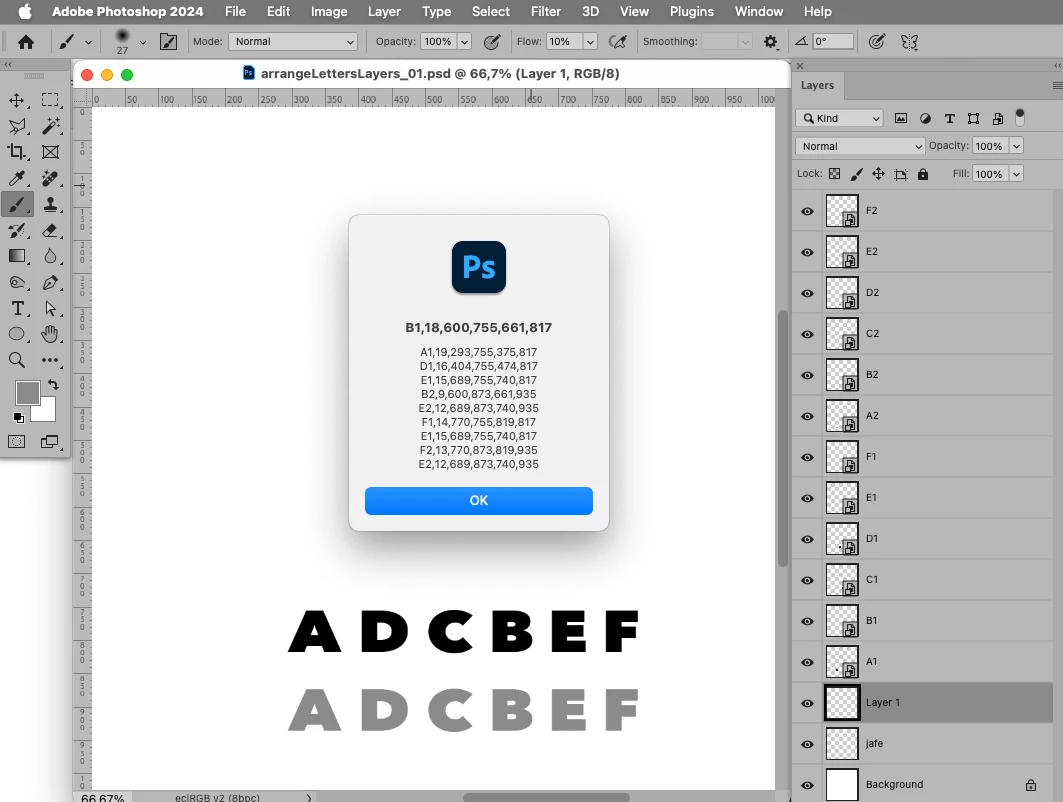
With a simple test file (with layers only for »a« through »f«) I was able to use the Script below to get an Array of Arrays (containing the Layer’s name, the index [which can be used to address/select the layer], the bounds [which can be used to calculate the necessary offsets]) in which the layers starting with the intended letter are being »rotated« (see the multiple »e«s for example). 
 

// 2023, use it at your own risk;
if (app.documents.length > 0) {
var myDocument = activeDocument;
var originalRulerUnits = app.preferences.rulerUnits;
app.preferences.rulerUnits = Units.PIXELS;
////////////////////////////////////
var theString = "badebefefe";
var theLayers = collectLayersBounds ();
theLayers.sort();
var theRegExp = /^\D\d$/i;
// create arrays sorted by initial letter;
var theArrays = new Array;
for (var m = 0; m < theLayers.length; m++) {
    var thisOne = theLayers[m];
    var theCheck = false;
    if (thisOne[0].match(theRegExp) != null) {
        var theLetter = String(thisOne[0].match(/^\D/i));
        for (var n = 0; n < theArrays.length; n++) {
            if (theArrays[n][0][0][0] == theLetter) {
                theArrays[n].push(thisOne);
                var theCheck = true
            }
        };
        if (theCheck != true) {theArrays.push([thisOne])};
    }
};
// check string against array;
var theResult = new Array;
for (var o = 0; o < theString.length; o++) {
    var thisOne = theString[o];
    for (var p = 0; p < theArrays.length; p++) {
        if (theArrays[p][0][0][0].match(new RegExp (thisOne, "i")) != null) {
            theResult.push (theArrays[p][0])
            theArrays[p].push(theArrays[p].splice(0,1));
        }
    };
};
alert (theResult.join("\n"));
////////////////////////////////////
app.preferences.rulerUnits = originalRulerUnits;
};
////// collect layers //////
function collectLayersBounds () {
// get number of layers;
var ref = new ActionReference();
ref.putEnumerated( charIDToTypeID("Dcmn"), charIDToTypeID("Ordn"), charIDToTypeID("Trgt") ); 
var applicationDesc = executeActionGet(ref);
var theNumber = applicationDesc.getInteger(stringIDToTypeID("numberOfLayers"));
// process the layers;
var theLayers = new Array;
for (var m = 0; m <= theNumber; m++) {
try {
var ref = new ActionReference();
ref.putIndex( charIDToTypeID( "Lyr " ), m);
var layerDesc = executeActionGet(ref);
var layerSet = typeIDToStringID(layerDesc.getEnumerationValue(stringIDToTypeID("layerSection")));
var isBackground = layerDesc.getBoolean(stringIDToTypeID("background"));
// if group collect values;
if (layerSet != "layerSectionEnd" && layerSet != "layerSectionStart" && isBackground != true) {
var theName = layerDesc.getString(stringIDToTypeID('name'));
var theID = layerDesc.getInteger(stringIDToTypeID('layerID'));
var theBounds = layerDesc.getObjectValue(stringIDToTypeID("bounds"));
var theseBounds = [theBounds.getUnitDoubleValue(stringIDToTypeID("left")), theBounds.getUnitDoubleValue(stringIDToTypeID("top")), theBounds.getUnitDoubleValue(stringIDToTypeID("right")), theBounds.getUnitDoubleValue(stringIDToTypeID("bottom"))];
theLayers.push([theName, theID, theseBounds])
};
}
catch (e) {};
};
return theLayers
};




Known Participant
January 4, 2024

I ended up creating the script myself but this is the closest to the answer required and helped me further optimise the script I was using. Thanks alot.

Just for info, mine asks for input, finds the first letter, shifts the next letters to the right of the first letter to create the name.

It has a counter for how many of the same letters have appeared to change to another letter, and if more than 2 duplicate letters have apppeared move onto the 3rd and 4th letter in that sequence.

Outside of that script it checks to if the last letter was not a duplicate and move to the second variation, or first, so that each letter uses a different variation and is likely not to have the same variation next to each other in the name outside of a duplicated letter repeat.

the script then crops the canvas to fit the letters perfectly.

The only issue i'm having is that when trying to align all letters after canvas cropping photoshop hangs or crashes but i'm sure I'll solve that with more testing.


Thanks alot for yours and everyone elses help.

c.pfaffenbichler
Community Expert
Community Expert
January 4, 2024

How do you align the Layers in the code? 

Move the Layers based on their bounds or select them all and use the AM-code for actual Align-commands or …? 

Do you remove the superfluous letter-layers at some point? 


Could you please post screenshots with the pertinent Panels (Toolbar, Layers, Options Bar, …) visible? 

Stephen Marsh
Community Expert
Community Expert
January 2, 2024

It will take time and effort to create automation for such a task. The investment in time and effort has to be balanced against the time and effort of doing this manually for the volume of orders received.


A different approach would be to create a separate square canvas file for each letter in the alphabet (all using the same canvas size and common baseline, same pixel size and resolution etc). 


A script could open each required letter and stack the files horizontally to create a word.


This could be very basic, as in you manually select the required letters and the script would just make the word. You would have to manually account for cases where there was more than one of the same letter, either by manually fixing the stacked layered file or having multiple copies of the same letter file where you could then select them multiple times as needed.


Another approach could be a script using a text file as a list of input files, placing each image as required to the right of the previous file (this would be more automated than the previous example).


A script could read a text file where the name was "bob", it could then split each letter to a new separate line, including adding text to create a fixed image source path, i.e.:


"~/Desktop/Illuminated Letters/b.psd"

"~/Desktop/Illuminated Letters/o.psd"

"~/Desktop/Illuminated Letters/b.psd"


The script would then open and horizontally stack each file to create the word.


Known Participant
January 4, 2024

That last bit was the closest to my solution, so I've marked you also as correct answer. Thank you.


Now i've got to figure out how to automate the ordering after its created without having to manually place an order each time if the worst (and I guess best) happens and I get a bunch of orders at once. It's a shame order and print services don't offer this already.

c.pfaffenbichler
Community Expert
Community Expert
January 4, 2024

If I remember correctly a Script can evaluate the text in the clipboard, so you could create a version that offers no dialog but simply uses that. 

Or do you need to add more functionality like selecting from several different letter-options? 

How do the orders arrive – text in a mail? 

Stephen Marsh
Community Expert
Community Expert
January 2, 2024

OK, so you wish to create file with a customer's first and last name, using a custom letter for each letter in their name. This has to be at a high resolution for print output, so the following suggestion may have limitations...


One can create custom colour raster fonts with each letter being an image.


The following is commercial software, it mentions supporting bitmap fonts:


https://www.fontself.com/features


There are other alternatives if you search the web.

c.pfaffenbichler
Community Expert
Community Expert
January 1, 2024

And as with type in general some combinations of letters (like »VA« for example) can result in an uneven appearance if they are not properly spaced/kerned. 

Do you intend to give the results a »go-over« anyway or do you expect full automatization? 

Known Participant
January 1, 2024

Since each letter is within a square 1:1 profile I think it's not a problem in this case but I fully expect to at least quality check each one. The idea is to reduce the amount of work but I'm not opposed to little touch ups if required, especially as doing the whole thing by hand from scratch would be a pain.

Stephen Marsh
Community Expert
Community Expert
January 1, 2024

Perhaps you could post before/after screenshots or provide sample PSD and input files.


There may be a different or better way to do things.


Have you looked into Photoshop Variables (aka: data driven graphics):


https://helpx.adobe.com/au/photoshop/using/creating-data-driven-graphics.html

Known Participant
January 1, 2024

I have not yet but please see the following download links for the short (5 characters and below, and long 5-12).

 SHort:

https://1drv.ms/u/s!Aoh-V2KmRnV1gZgf5oTEH6bxy4o7XA?e=jvMgHg

Long:

https://1drv.ms/u/s!Aoh-V2KmRnV1gZgeK5HwQfleix3X3Q?e=rTIG8H


I've managed to find a print provider that can print long and thin but at the moment my images are 20cm x 60cm for short and 30cm x 90cm that most providers can provide.

I did think there might be a different and better way to do things.

 The example ChatGPT gave me was like:


// Sample Photoshop Script for Layer Selection

// Function to select a layer by name
function selectLayer(layerName) {
    var layer = app.activeDocument.layers.getByName(layerName);
    layer.visible = true;
    app.activeDocument.activeLayer = layer;
}

// Function to move the selected layer
function moveLayer(position) {
    app.activeDocument.activeLayer.translate(position[0], position[1]);
}

// Function to process input name
function processName(inputName) {
    for (var i = 0; i < inputName.length; i++) {
        var currentLetter = inputName[i].toLowerCase();
        var layerName = currentLetter + (i % 2 + 1); // Alternating between 1 and 2
        selectLayer(layerName);

        // Adjust these values based on your layout
        var positionX = i * 50; // Adjust as needed
        var positionY = 0; // Adjust as needed
        moveLayer([positionX, positionY]);
    }
}

// Example usage
var userInput = prompt("Enter a name:", "");
if (userInput) {
    app.activeDocument.suspendHistory("Process Name", "processName('" + userInput + "');");
}


c.pfaffenbichler
Community Expert
Community Expert
January 1, 2024

A Photoshop Action cannot do that by itself but a Script could automate such an operation. 

But have you thought the issue through? Will the target positions vary depending on the width of the Layers/Letters (essentially: Is a »W« exactly as wide as an »I«?)? Are the Layers sharp-edges or do they have soft edges or »sprinkles«? 


Could you please post screenshots with the pertinent Panels (Toolbar, Layers, Options Bar, …) visible? 

Known Participant
January 1, 2024

Thanks for the reply! Evert letter is massive but in the same 1:1 aspect ratio.

It is a problem I have thought about by just offering a larger canvas if the letter count is past 5.

Attached is how it looks.

c.pfaffenbichler
Community Expert
Community Expert
January 2, 2024

Could you please post screenshots with the pertinent Panels (Toolbar, Layers, Options Bar, …) visible?

Known Participant
January 1, 2024

I'd also need a check to see if an A (or other letter has been selected before) and if so select the next A, which would be A2 instead of A1
