Exit
  • Global community
    • Language:
      • Deutsch
      • English
      • Español
      • Français
      • Português
  • 日本語コミュニティ
  • 한국 커뮤니티
3

Se cambiaron los íconos de capa por un pincel y de máscara, se ve un cuadrado con un redondel

New Here ,
Jan 23, 2019 Jan 23, 2019

necesito ayuda! Mi hija tocó mi Mac con toda la mano y cambió en photoshop los íconos de Capas y máscaras.

No se como volver a ver las miniaturas como antes.Captura de pantalla 2019-01-23 a la(s) 17.13.52.png

5.9K
Translate
Report
Community guidelines
Be kind and respectful, give credit to the original source of content, and search for duplicates before posting. Learn more
community guidelines
Adobe
Advocate ,
Jan 23, 2019 Jan 23, 2019

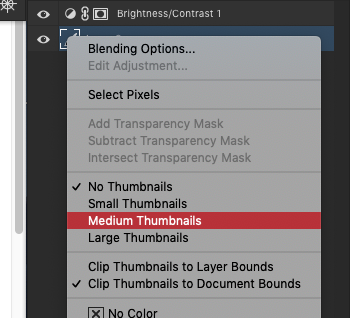
1.     Right click on one of those new icons.

2.     Change it from "No Thumbnails" to whatever size you might like.

Thats it. Your normal icons should return.

Screen Shot 2019-01-23 at 2.43.03 PM.png

Translate
Report
Community guidelines
Be kind and respectful, give credit to the original source of content, and search for duplicates before posting. Learn more
community guidelines
New Here ,
Dec 02, 2024 Dec 02, 2024

thnk u

Translate
Report
Community guidelines
Be kind and respectful, give credit to the original source of content, and search for duplicates before posting. Learn more
community guidelines
New Here ,
Oct 31, 2025 Oct 31, 2025
LATEST

1. Haz clic derecho en uno de esos iconos nuevos.

2. Cambia la opción de "Sin miniaturas" al tamaño que prefieras.

¡Listo! Tus iconos normales volverán a aparecer

(La anterior es la traducción al español)

Logrado.

Muchas gracias

Translate
Report
Community guidelines
Be kind and respectful, give credit to the original source of content, and search for duplicates before posting. Learn more
community guidelines