
I Am Eddie
Known Participant
April 24, 2024

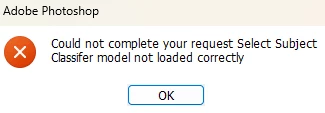
P: PS Error: Could not complete your request Select Subject Classifier model not loaded correctly
  • April 24, 2024
  • 84 replies
  • 48350 views

Hi,Is this a BUG?It happens after a new update. (2.57)

This topic has been closed for replies.

84 replies

Participating Frequently
April 30, 2024

A mi me pasa lo mismo,es la versión 25.7,  la versión beta 25.9 me anda bien


I Am Eddie
Known Participant
April 30, 2024

Thanks oscar,Will try the BETA later 😀

Community Expert
April 26, 2024

I can't reproduce this issue on my system. So I don't think it's a generally bug in the recent version.


Please try to reset the preferences of Photoshop first. Using the steps described here:

https://helpx.adobe.com/photoshop/using/preferences.html#reset-preferences

Please backup your settings before resetting the preferences. You can check:

https://helpx.adobe.com/photoshop/using/preferences.html#backup-photoshop-preferences


Is your system up-to-date? Do you have installed all recent updates and patches for the operating system and the device drivers, especially the graphic driver. If you have a NVidia graphic card installed, make sure that you are using the recent Studio version of the driver, not the Game Ready version.

Please also provide a copy of your 'System Info'. This can be get from the Photoshop menu item Help > System Info. There's a copy button in the System Info dialog. Press this button and paste the info into your next forum post.


My System: Intel i7-8700K - 64GB RAM - NVidia Geforce RTX 3060 - Windows 11 Pro 25H2 -- LR-Classic 15 - Photoshop 27 - Nik Collection 9 - PureRAW 6 - Topaz Photo AI
I Am Eddie
Known Participant
April 26, 2024

Does anyone encounter the same issue like i did?Updated version seems ruined my work now. (25.7)

I can't select any object with object selection tool.Help or advice needed.


Sameer K
Community Manager
Community Manager
April 26, 2024

Hey, @I Am Eddie. Welcome to the Photoshop Community. I'll need more info to help you figure this out. Please share the system info from Photoshop Help > System info > Copy & paste into a text document > upload & attach here. 


In this conversation, another user reported that updating to Photoshop 25.7 has helped. Please uninstall & re-install Photoshop 25.7 and check if that helps. 


The team is aware of this & working on it. As another workaround, you can use the menu item at the top to use Select Subject instead of clicking on the canvas.


Let me know how it goes. Thanks!

Sameer K

I Am Eddie
Known Participant
April 26, 2024

Hi,Tried the uninstall & reinstall method the error was still there.

Here are my PS Sys Info Attached.


Thank You.

Participant
April 24, 2024

Hi,

Photoshop keeps giving me this prompt when I use the select subject 

"Could not complete the Subject command Select Subject Classifier model not loaded correctly"

How do I fix this? It was working fine a few days ago.

Trevor.Dennis
Community Expert
Community Expert
April 24, 2024

Hi Mary Ann.  When I searched old threads, and Google generally, I found several posts with the same error, but none with a fix unfortunately.  There is not even information on if restarting Photoshop helped, but that would be my first step.  Try the Beta version.  If that works then it's not going to be an OS related item like a library or API or whatever.  If it persists, then I can only think of a Preferences reset, or reinstalling Photoshop.  My gut tells me that restarting has a decent chance of fixing it though.


If you are still stuck, then before you reinstall, can you tell us your OS version, and is this the most recent verion of Photoshop?

Stephen Marsh
Community Expert
Community Expert
April 30, 2024

I had the same problem, changing these preferences worked for me!  Thank you


@Amber28094357uihl 


So it now works on local processing, but not cloud?


Can I presume that you do have an active internet connection when using the cloud option?