Participant
February 9, 2016
해결됨

selection.fill bug in photoshop CC 2015 version 16.1.2 (2015.1.2)?

  • February 9, 2016
  • 3 답변들
  • 1583 조회

First off, boy do I miss ps-scripts.com

Trying to verify that there is in fact a bug in the most recent release of Photoshop (version 16.1.2). Not exhibiting this behavior in 16.0.1 or 15.2.2 on a mac.

This is the version from system info that is exhibiting the bug.

Adobe Photoshop Version: 2015.1.2 20160113.r.355 2016/01/13:23:59:59 CL 1059143  x64

Most of our scripts do not behave properly in version 16.1.2. I believe that this is limited to a bug using the fill method. Seems intermittent (sometimes it will fill with the proper color sometimes not). I tried to strip some script logic down to the bare minimum for what would exhibit the buggy behavior.  This is script that builds a multichannel document with 2 new spot channels (one with a square in the upper left ("Box1"), one with a square in the lower right ("Box2") overlapping the other). The result of the script should finally create an alpha channel that represents the region where the "Box1" & "Box2" channels intersect, resulting in a 500 pixel centered square.

var newImage = app.documents.add(1000, 1000, 72, "bug.tif", NewDocumentMode.GRAYSCALE, DocumentFill.WHITE);

var docRef = app.activeDocument;

docRef.changeMode(ChangeMode.MULTICHANNEL);

var rgbWhite = new SolidColor ();

rgbWhite.rgb.red = 255;

rgbWhite.rgb.green = 255;

rgbWhite.rgb.blue = 255;

var rgbBlack = new SolidColor ();

rgbBlack.rgb.red = 0;

rgbBlack.rgb.green = 0;

rgbBlack.rgb.blue = 0;

var box1Channel = docRef.channels.add();

box1Channel.kind = ChannelType.SPOTCOLOR;

box1Channel.name = "Box1";

docRef.activeLayer.invert(); 

var box1Region = Array(Array(0,0), Array(0, 750), Array(750, 750), Array(750, 0));

docRef.selection.select(box1Region);

docRef.selection.fill(rgbBlack);

docRef.selection.deselect();

var box2Channel = docRef.channels.add();

box2Channel.kind = ChannelType.SPOTCOLOR;

box2Channel.name = "Box2";

docRef.activeLayer.invert(); 

var box2Region = Array(Array(250,250), Array(250, 1000), Array(1000, 1000), Array(1000, 250));

docRef.selection.select(box2Region);

docRef.selection.fill(rgbBlack);

docRef.selection.deselect();

var alphaChannel = docRef.channels.add();

alphaChannel.name = "WhereBoxesIntersect";

var box1Selection = docRef.channels.getByName("Box1");

docRef.selection.load(box1Selection);

docRef.selection.fill(rgbWhite);

var box2Selection = docRef.channels.getByName("Box2");

docRef.selection.load(box2Selection);

docRef.selection.invert();

docRef.selection.fill(rgbBlack);

docRef.selection.deselect();

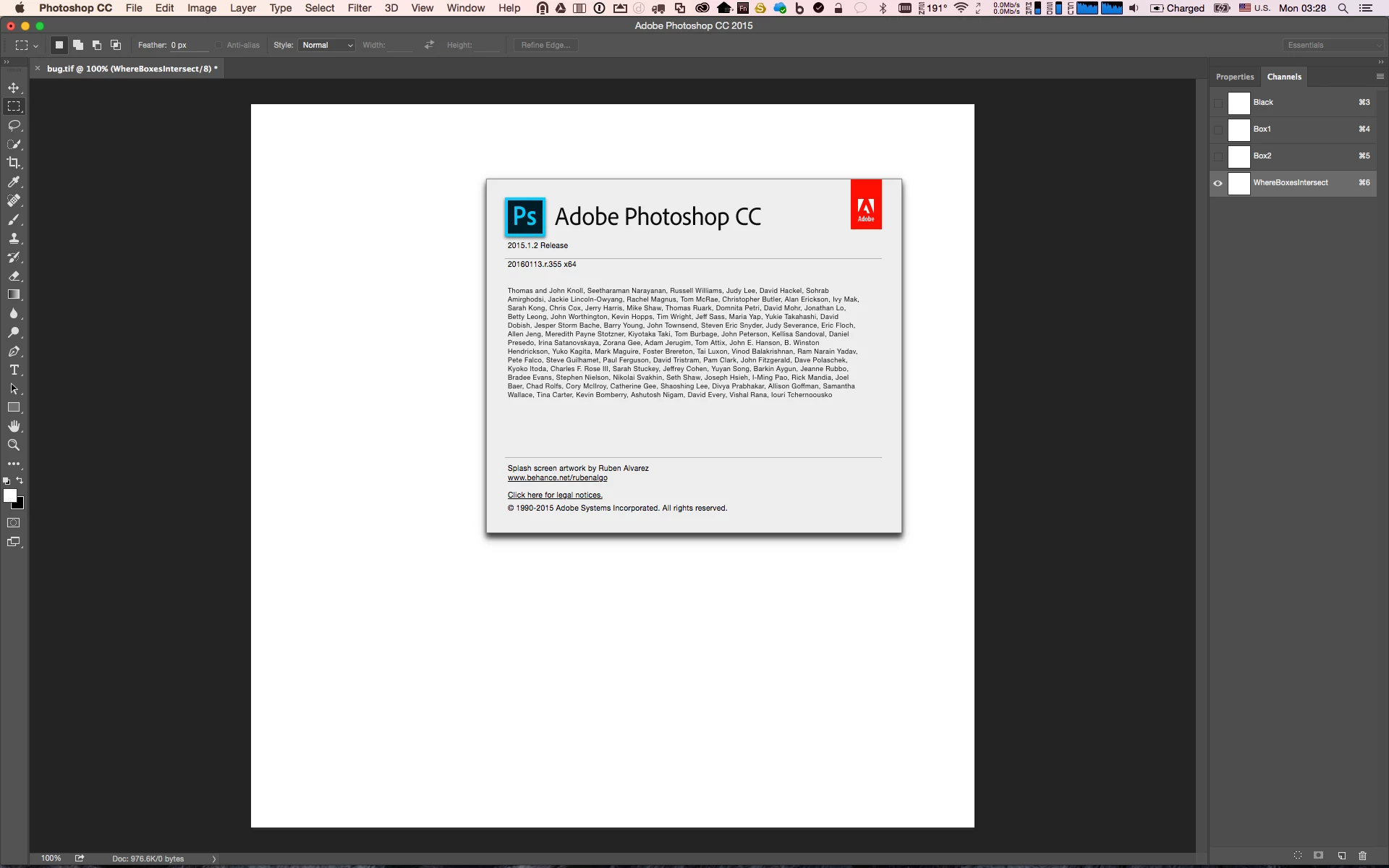
I've noticed that when using this script upon first launch of this version of photoshop (16.1.2) the script doesn't fill any of the channels with black.  See image below. Note the lack of black region fills in the spot and alpha channels.

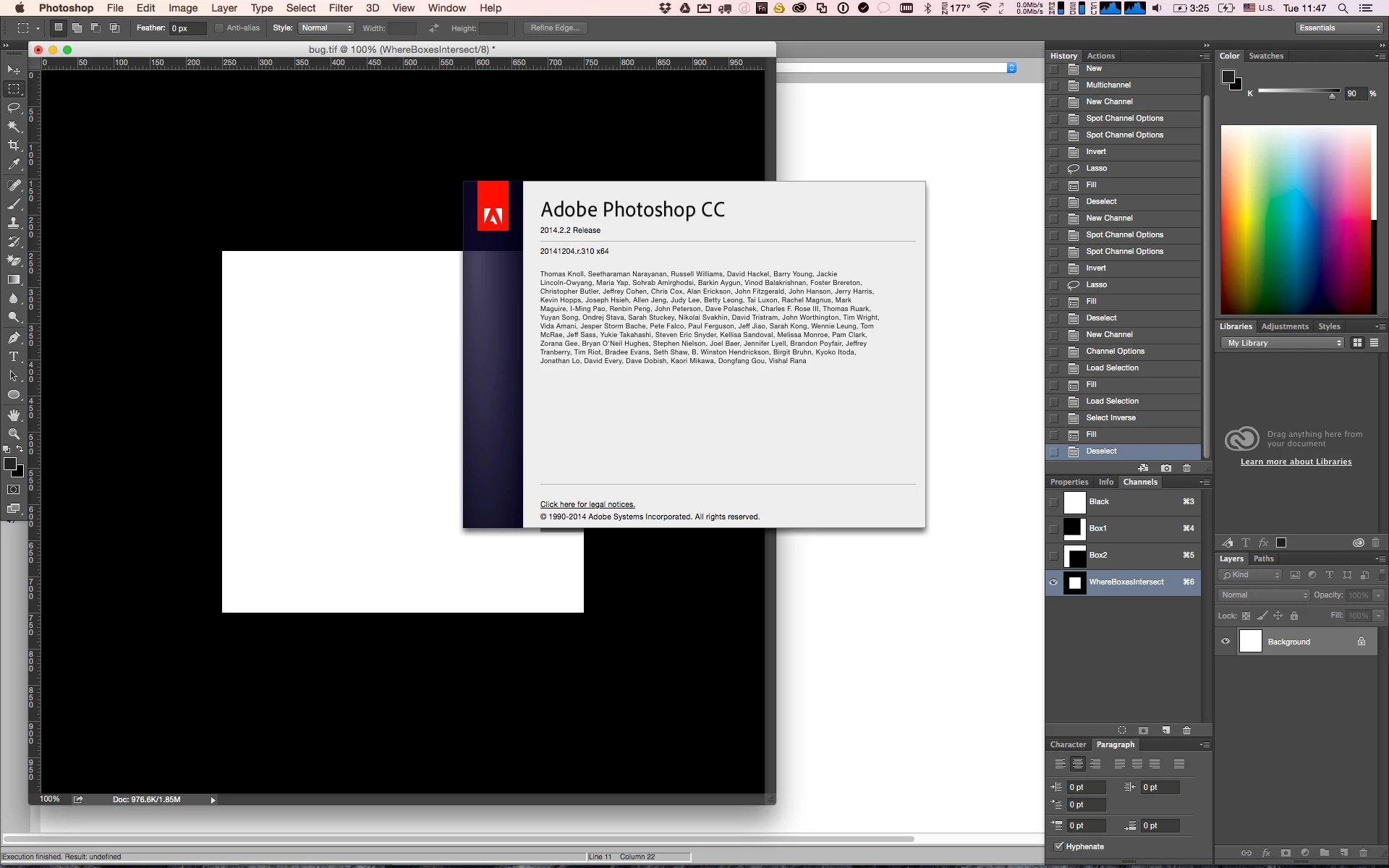
Any subsequent launches of the script on the other hand do seem to behave properly in version 16.1.2. Strange. In the context of most of our scripts though I can only say that the selection.fill method behavior is intermittent and inconsistent at best. Below is the expected behavior in version 15.2.2 and subsequent launches in 16.1.2. Note the black region fills in the spot and alpha channels.
Hopefully this can be confirmed and remedied with a patch going forward as it impacts our workflows. Thanks in advance for your time. Let me know how I can better elaborate.
이 주제는 답변이 닫혔습니다.
최고의 답변: JaysonDMG

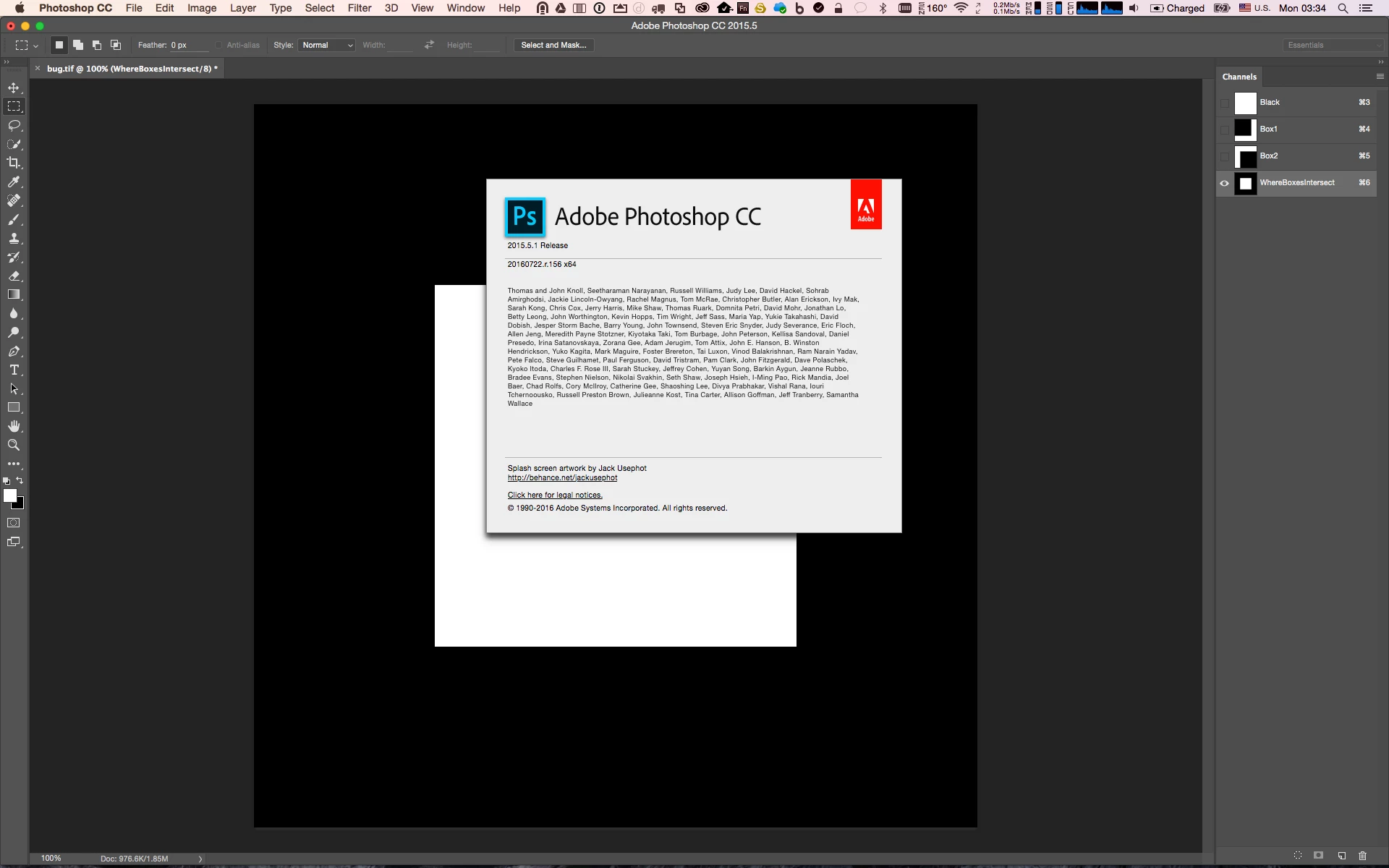
Hi Tom. Just wanted to revisit this for completeness as the bug appears to have been resolved in the most recent version of Photoshop-Adobe Photoshop CC (2015.5.1 Release | 20160722.r.156 x 64). Again the bug only appears in Adobe Photoshop CC (2015.1.2 Release | 20160113.r.355 x64).

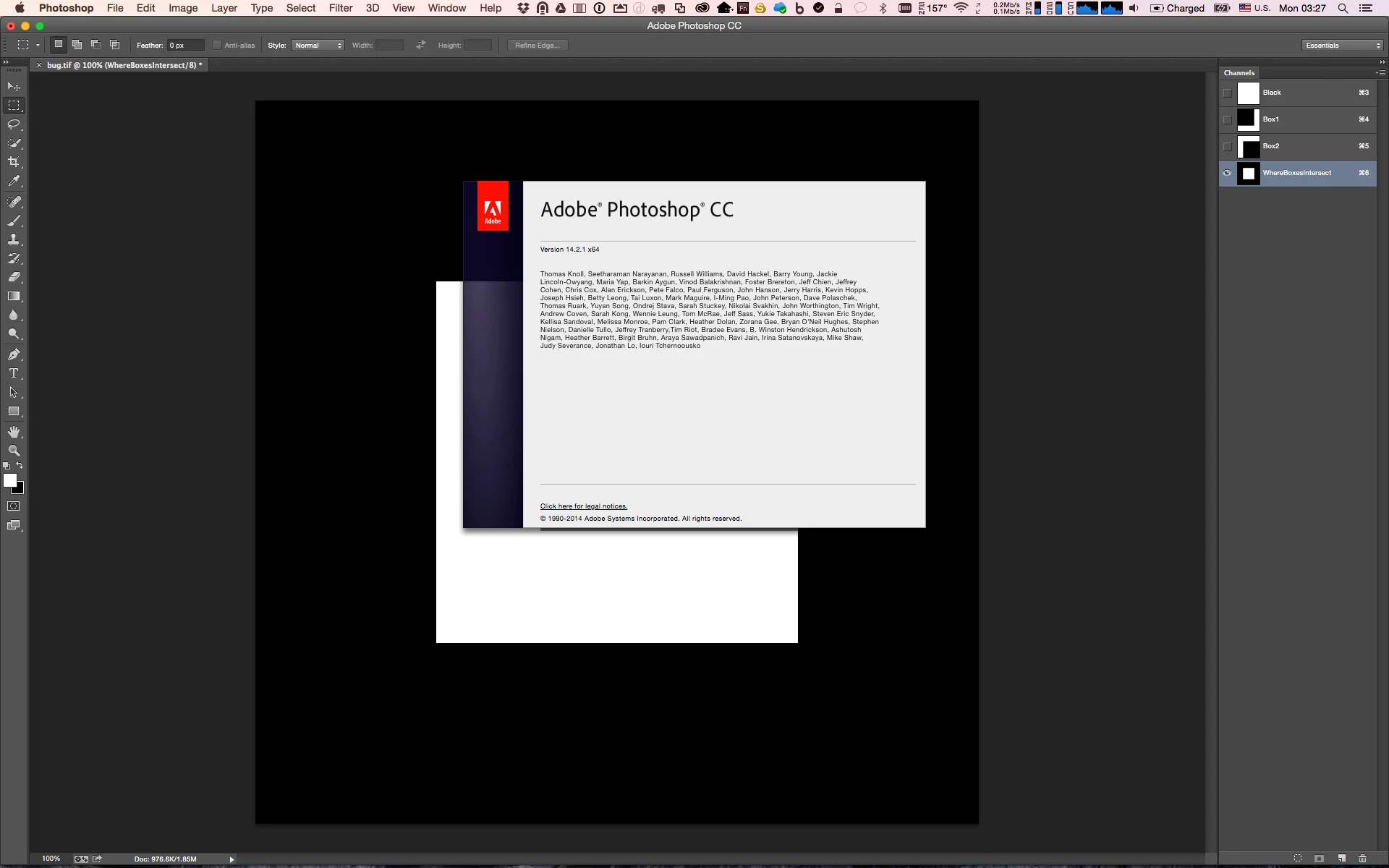
Below are screenshots of the behavior in the last 3 versions of Photoshop when launching the script from ESTK with preferences reset. I added ruler preference code to accommodate the preference reset.

// Set the ruler units to pixels

var originalRulerUnits = app.preferences.rulerUnits

app.preferences.rulerUnits = Units.PIXELS

var newImage = app.documents.add(1000, 1000, 72, "bug.tif", NewDocumentMode.GRAYSCALE, DocumentFill.WHITE);

var docRef = app.activeDocument;

docRef.changeMode(ChangeMode.MULTICHANNEL);

var rgbWhite = new SolidColor ();

rgbWhite.rgb.red = 255;

rgbWhite.rgb.green = 255;

rgbWhite.rgb.blue = 255;

var rgbBlack = new SolidColor ();

rgbBlack.rgb.red = 0;

rgbBlack.rgb.green = 0;

rgbBlack.rgb.blue = 0;

var box1Channel = docRef.channels.add();

box1Channel.kind = ChannelType.SPOTCOLOR;

box1Channel.name = "Box1";

docRef.activeLayer.invert(); 

var box1Region = Array(Array(0,0), Array(0, 750), Array(750, 750), Array(750, 0));

docRef.selection.select(box1Region);

docRef.selection.fill(rgbBlack);

docRef.selection.deselect();

var box2Channel = docRef.channels.add();

box2Channel.kind = ChannelType.SPOTCOLOR;

box2Channel.name = "Box2";

docRef.activeLayer.invert(); 

var box2Region = Array(Array(250,250), Array(250, 1000), Array(1000, 1000), Array(1000, 250));

docRef.selection.select(box2Region);

docRef.selection.fill(rgbBlack);

docRef.selection.deselect();

var alphaChannel = docRef.channels.add();

alphaChannel.name = "WhereBoxesIntersect";

var box1Selection = docRef.channels.getByName("Box1");

docRef.selection.load(box1Selection);

docRef.selection.fill(rgbWhite);

var box2Selection = docRef.channels.getByName("Box2");

docRef.selection.load(box2Selection);

docRef.selection.invert();

docRef.selection.fill(rgbBlack);

docRef.selection.deselect();

// restore unit settings

app.preferences.rulerUnits = originalRulerUnits

Adobe Photoshop CC (Version 14.2.1 x64)

Adobe Photoshop CC (2015.1.2 Release | 20160113.r.355 x64)

Adobe Photoshop CC (2015.5.1 Release | 20160722.r.156 x 64)

3 답변

Tom Ruark
Inspiring
February 25, 2016

Does this fail when running from the ESTK and not when dropping the script on Photoshop or using File -> Scripts?

The problem is the default colors for the alpha channel. If you have changed those and are running from the ESTK then the fill is picking up the tool bar colors and not the colors from your script. And this is the alpha color swatches and not the RGB color swatches.

To state it again:

Reset preferences.

ESTK and File -> Scripts should be fine now.

If you change the alpha channel default swatches from white/black to something else then you will get those colors when running via the ESTK and not the black/white from your script.

Let me know if you are seeing something different and the details.

JaysonDMG작성자답변
Participant
October 31, 2016

Hi Tom. Just wanted to revisit this for completeness as the bug appears to have been resolved in the most recent version of Photoshop-Adobe Photoshop CC (2015.5.1 Release | 20160722.r.156 x 64). Again the bug only appears in Adobe Photoshop CC (2015.1.2 Release | 20160113.r.355 x64).

Below are screenshots of the behavior in the last 3 versions of Photoshop when launching the script from ESTK with preferences reset. I added ruler preference code to accommodate the preference reset.

// Set the ruler units to pixels

var originalRulerUnits = app.preferences.rulerUnits

app.preferences.rulerUnits = Units.PIXELS

var newImage = app.documents.add(1000, 1000, 72, "bug.tif", NewDocumentMode.GRAYSCALE, DocumentFill.WHITE);

var docRef = app.activeDocument;

docRef.changeMode(ChangeMode.MULTICHANNEL);

var rgbWhite = new SolidColor ();

rgbWhite.rgb.red = 255;

rgbWhite.rgb.green = 255;

rgbWhite.rgb.blue = 255;

var rgbBlack = new SolidColor ();

rgbBlack.rgb.red = 0;

rgbBlack.rgb.green = 0;

rgbBlack.rgb.blue = 0;

var box1Channel = docRef.channels.add();

box1Channel.kind = ChannelType.SPOTCOLOR;

box1Channel.name = "Box1";

docRef.activeLayer.invert(); 

var box1Region = Array(Array(0,0), Array(0, 750), Array(750, 750), Array(750, 0));

docRef.selection.select(box1Region);

docRef.selection.fill(rgbBlack);

docRef.selection.deselect();

var box2Channel = docRef.channels.add();

box2Channel.kind = ChannelType.SPOTCOLOR;

box2Channel.name = "Box2";

docRef.activeLayer.invert(); 

var box2Region = Array(Array(250,250), Array(250, 1000), Array(1000, 1000), Array(1000, 250));

docRef.selection.select(box2Region);

docRef.selection.fill(rgbBlack);

docRef.selection.deselect();

var alphaChannel = docRef.channels.add();

alphaChannel.name = "WhereBoxesIntersect";

var box1Selection = docRef.channels.getByName("Box1");

docRef.selection.load(box1Selection);

docRef.selection.fill(rgbWhite);

var box2Selection = docRef.channels.getByName("Box2");

docRef.selection.load(box2Selection);

docRef.selection.invert();

docRef.selection.fill(rgbBlack);

docRef.selection.deselect();

// restore unit settings

app.preferences.rulerUnits = originalRulerUnits

Adobe Photoshop CC (Version 14.2.1 x64)

Adobe Photoshop CC (2015.1.2 Release | 20160113.r.355 x64)

Adobe Photoshop CC (2015.5.1 Release | 20160722.r.156 x 64)

JaysonDMG작성자
Participant
October 31, 2016

Adobe does not fix old version of their Applications. Photoshop  CC 2015  is no longer the current version of Photoshop  Photoshop CC 2015.5 is current and Adobe is working on some of the reported issues in CC 2015.5.


Sure. I was just showing for completeness and anyone who stumbles upon this thread in that they should most definitely update to CC 2015.5.

Participant
February 24, 2016

Glad to see I'm not the only one running into this bug! CC 2015 is surprisingly buggy so far, and not ready for production use, in my opinion.

JJMack
Community Expert
Community Expert
February 9, 2016

All I can say is its good to keep a working copy of Photoshop in reserve.  CC 2015 has been a rocky road only after its fourth update,  have I started using it.

JJMack