

Mike Witherell
Community Expert
Community Expert
April 12, 2017
Answered

Shortcut to flip a layer horizontal/vertical

  • April 12, 2017
  • 6 replies
  • 74078 views

In Photoshop. What is the shortcut for this? And especially if I have triggered a CMD+T free transform bounding box. Is there a way to flip horizontal where the image snaps to the correct width while dragging a bounding box handle in some way?

Mike Witherell in Washington DC
    This topic has been closed for replies.
    Correct answer c.pfaffenbichler
    Is there a way to flip horizontal where the image snaps to the correct width while dragging a bounding box handle in some way?

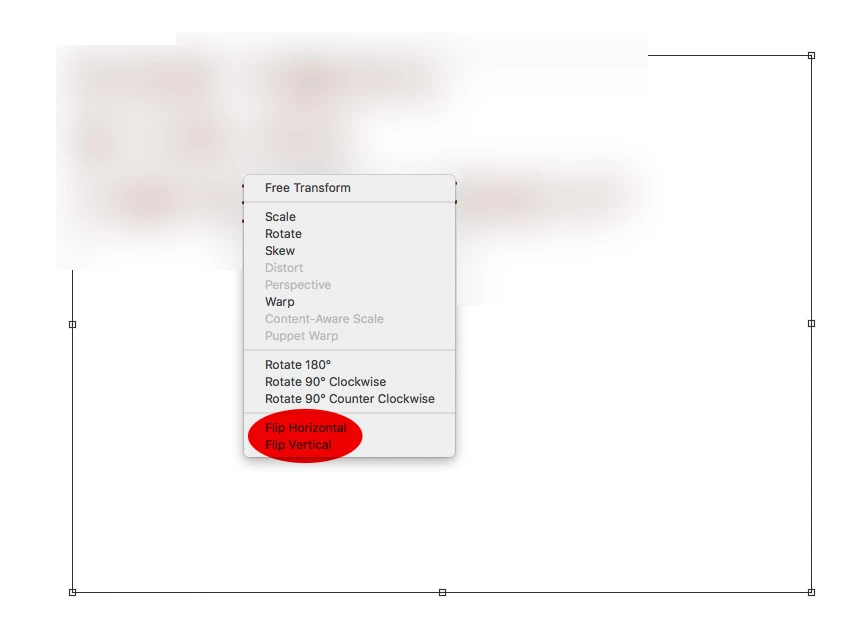
    When Transform has been invoked ctrl-clicking raises a contextual menu.

    In Photoshop. What is the shortcut for this?

    I think there is no default shortcut but you could assign one.

    6 replies

    Semaphoric
    Community Expert
    Community Expert
    December 14, 2017

    Although it's an extra step, you could drag in a guide and snap it to one edge of the layer. Then, Alt+Drag the opposite edge all the way over, until it snaps to the guide. You could probably make a script that would place the guide automatically (and possibly clear it when done).

    Mike Witherell
    Community Expert
    Community Expert
    December 14, 2017

    Thanks tons!

    Mike Witherell
    Participant
    December 9, 2017

    How to make a flip canvas button in photoshop hotkey How To Draw Tutorial - YouTube  this show you how to do it with the push of one button

    Mike Witherell
    Community Expert
    Community Expert
    April 12, 2017

    Thanks Dave, and Randy, and C. Pfaffenbichler, for your replies. I always assumed that I didn't know that obscure "secret" way, but evidently there isn't a secret way. Having considered the matter, the assigning of a custom shortcut is probably simplest way to go forward. Many thanks to you!

    Mike Witherell
    c.pfaffenbichler
    Community Expert
    Community Expert
    April 13, 2017

    If it is just about flipping the custom Shortcut seems to be the best way indeed, if you want to combine with other transformations Actions can be assigned F-keys.

    Randy Hufford
    Community Expert
    Community Expert
    April 12, 2017

    I do not know of a keyboard shortcut but you can add a negative sign in the tool bar option window. It will than flip transformed selection to exact size.

    c.pfaffenbichler
    Community Expert
    c.pfaffenbichlerCommunity ExpertCorrect answer
    Community Expert
    April 12, 2017
    Is there a way to flip horizontal where the image snaps to the correct width while dragging a bounding box handle in some way?

    When Transform has been invoked ctrl-clicking raises a contextual menu.

    In Photoshop. What is the shortcut for this?

    I think there is no default shortcut but you could assign one.

    Mike Witherell
    Community Expert
    Community Expert
    April 12, 2017

    Thanks, but...

    Come on, folks, read the question carefully!

    Mike Witherell
    c.pfaffenbichler
    Community Expert
    Community Expert
    April 12, 2017

    As I mentioned there is no default shortcut to »flip« – feel free to define one under Edit > Keyboard Shortcuts.

    Come on, folks, read the question carefully!

    Please elaborate.