Participant
Apr 30, 2024 7:55 PM UTC
Answered

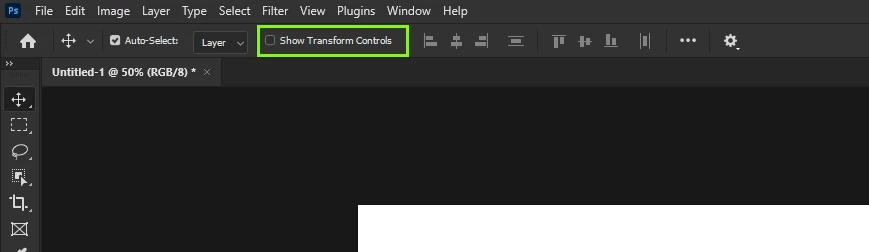
SHOW TRANSFORM CONTROL missing at the top

It used to display here. Now i have to click the gear in order to access it. Can somebody help?

Ged_Traynor
Ged_TraynorCorrect answer
Community Expert
Sep 11, 2024 7:54 AM UTC

With Photoshop version 25.12 update, the "Show Transform Controls" is back to the original location

6 replies

Participant
Aug 21, 2025 2:07 PM UTC

Photoshop 26.9 appears to have done away with the Show Transform Contrls option again 😞

The Move Tool automatically triggers the Free Transform option from the Edit Menu and there's no way of deactivating it while the Move Tool is selected.

Anyone find a fix for this on PS 26.9?

Translate
Ged_Traynor
Community Expert
Community Expert
Aug 21, 2025 2:21 PM UTC

@Paulo-SPIRIT disable this option in the preferences and restart Photoshop

Translate
Participant
Aug 25, 2025 5:51 PM UTC

@Ged_Traynor That worked! Thanks a lot 🙂

Translate
Ged_Traynor
Community Expert
Ged_TraynorCommunity ExpertCorrect answer
Community Expert
Sep 11, 2024 7:54 AM UTC

With Photoshop version 25.12 update, the "Show Transform Controls" is back to the original location

Translate
gener7
Community Expert
Community Expert
Apr 30, 2024 8:57 PM UTC

Since this is a change at the program level, I don't know of a way to bring it back other than to downgrade to an earlier version that has it. I think you could get used to the extra step of clicking on the gear and checking the box there when you need it. Some Tools have a "Legacy (old way) Mode", but I don't see it here.


You could place a feature request here:

https://community.adobe.com/t5/photoshop-ecosystem/ct-p/ct-photoshop?page=1&sort=latest_replies&filter=all&lang=all&tabid=ideas&topics=label-macos

Translate
saml25Author
Participant
May 1, 2024 12:47 PM UTC

Thank you! I was not aware that was part of a program update. I thought I clicked something.

Translate