nikunj.m
Legend
October 14, 2024
Question

Show us your skills with Photoshop's new Distraction Removal tool!

  • October 14, 2024
  • 54 replies
  • 11508 views


Hello Everyone,


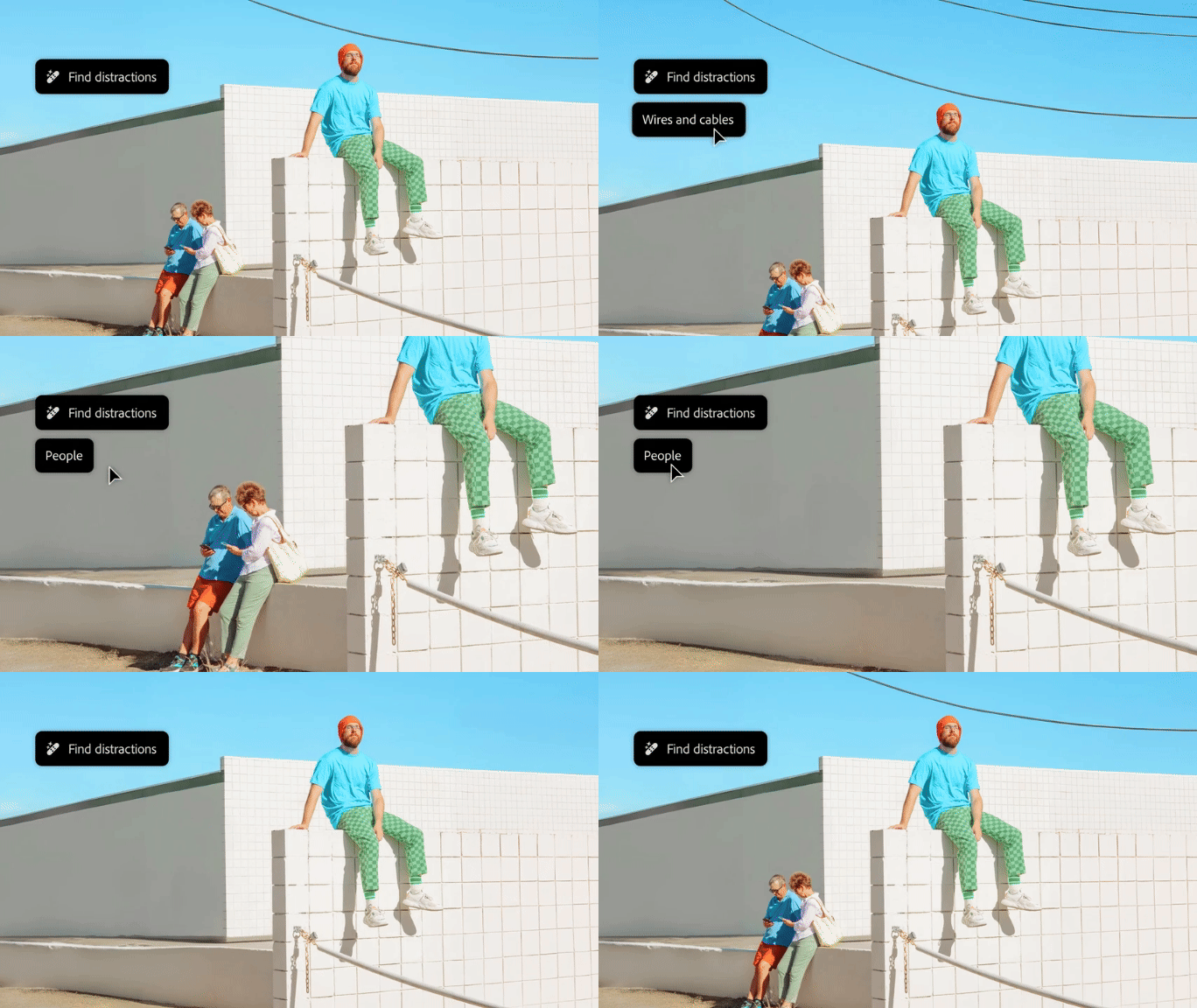
We’re thrilled to introduce the new Distraction Removal feature in Photoshop 26.0! With just a few clicks, you can effortlessly enhance your images by automatically removing unwanted elements like people, wires, cables, and imperfections. Let the Remove tool take care of the details so your subjects can truly shine.


Try it in the App

Distraction Removal with Remove Tool

To learn how to use the Remove tool and the new Remove Distractions, click here.


Simply select the Remove tool (nested with the Spot Healing tool), then choose Find Distractions from the Options menu. Pick either Wires and Cables or People based on your image.


Photoshop will automatically remove wires or let you edit people as needed.


You can select the Mode for how you want Photoshop to process the image: with Generative AI, Without AI, or leave it on Auto.


Give it a go and show us your Before & After magic! We can’t wait to see the incredible transformations you achieve with the Distraction Removal Tool!



If this was helpful, please click the  Upvote icon in the top left corner of this post. Your feedback helps us improve the experience. Thank you!

Submit your creation? Click 'Reply' below to post.

Click 'Follow' below to bookmark this post for easy reference.


54 replies

JR Boulay
Community Expert
Community Expert
November 5, 2024

Les templiers


Acrobate du PDF, InDesigner et Photoshopographe
Community Expert
November 4, 2024


Cleaning up the mall...

JR Boulay
Community Expert
Community Expert
November 4, 2024


Acrobate du PDF, InDesigner et Photoshopographe
fbeaume
Community Expert
Community Expert
November 4, 2024

Now you're the only one finisher!

JR Boulay
Community Expert
Community Expert
November 5, 2024

The others don't deserve to be here, they're lazy bums who just want to roll around on the floor.

😉

Acrobate du PDF, InDesigner et Photoshopographe
pixellingo
Community Expert
Community Expert
November 4, 2024

Wires? We don't need no stinkin' wires!

John W. | pixellingo
fbeaume
Community Expert
Community Expert
November 4, 2024

This feature is really powerfull!
Nicely done!

pixellingo
Community Expert
Community Expert
November 5, 2024

It is! And thank you!

John W. | pixellingo
Community Expert
November 2, 2024

Here's a expressway that has been a distraction for some time.

Peru Bob
Community Expert
Community Expert
November 2, 2024

Participating Frequently
October 31, 2024

This is a pair of black bellied whistling ducks- the first image you can see the broken 4"x 4" standing in front. It removed easily with the new feature. The image was scaled afterward to bring the pair a little closer the the viewer.  I could probably still remove one more distraction but it's fine like it is..


@mj
Community Expert
Community Expert
November 1, 2024

Nice one!

Participating Frequently
November 1, 2024

ty


EuanWilliamson
Community Expert
Community Expert
October 31, 2024

Best regards, Euan.
EuanWilliamson
Community Expert
Community Expert
October 31, 2024

Best regards, Euan.
Participating Frequently
October 31, 2024

Nice, work fast and get a great photo!

Participating Frequently
November 9, 2024