nikunj.m
Legend
Oct 14, 2024 1:25 PM UTC
Question

Show us your skills with Photoshop's new Distraction Removal tool!

 

Hello Everyone,
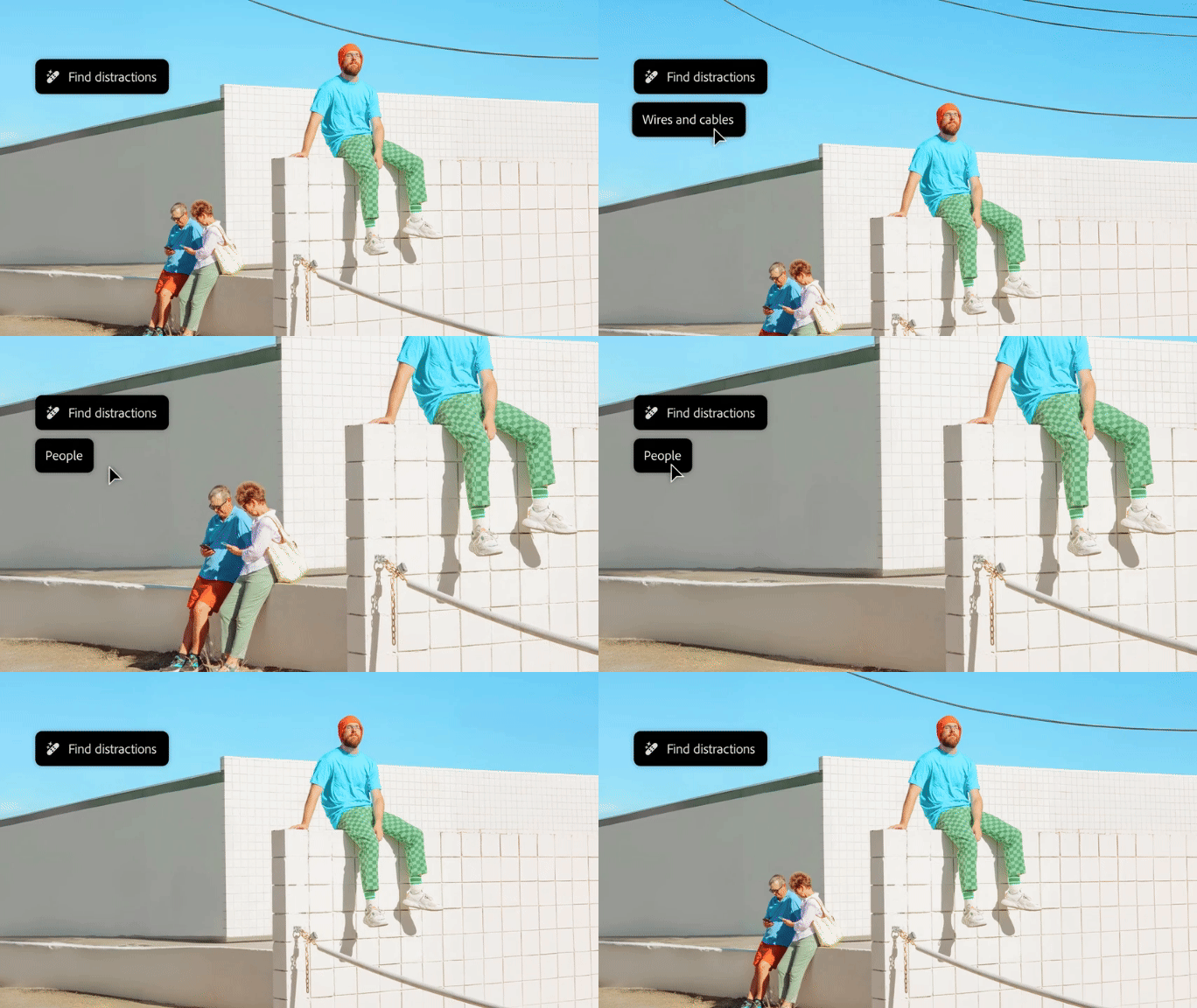
 

We’re thrilled to introduce the new Distraction Removal feature in Photoshop 26.0! With just a few clicks, you can effortlessly enhance your images by automatically removing unwanted elements like people, wires, cables, and imperfections. Let the Remove tool take care of the details so your subjects can truly shine.


Try it in the App

Distraction Removal with Remove Tool

To learn how to use the Remove tool and the new Remove Distractions, click here.


Simply select the Remove tool (nested with the Spot Healing tool), then choose Find Distractions from the Options menu. Pick either Wires and Cables or People based on your image.


Photoshop will automatically remove wires or let you edit people as needed.


You can select the Mode for how you want Photoshop to process the image: with Generative AI, Without AI, or leave it on Auto.


Give it a go and show us your Before & After magic! We can’t wait to see the incredible transformations you achieve with the Distraction Removal Tool!


If this was helpful, please click the  Upvote icon in the top left corner of this post. Your feedback helps us improve the experience. Thank you!

Submit your creation? Click 'Reply' below to post.

Click 'Follow' below to bookmark this post for easy reference.


119 replies

Cheizer
Participating Frequently
Oct 31, 2024 4:09 AM UTC

Translate
@mj
Community Expert
Community Expert
Oct 31, 2024 8:20 AM UTC

Impressive!

Translate
lambiloon
Community Expert
Community Expert
Oct 31, 2024 3:27 AM UTC

Translate
Ali Sajjad / Graphic Design Trainer / Freelancer / Adobe Certified Professional
didiermazier
Community Expert
Community Expert
Oct 30, 2024 8:15 PM UTC

Works fine. Look how the chairs were placed in the background


Translate
fbeaume
Community Expert
Community Expert
Nov 4, 2024 6:47 PM UTC

Impressionant!

Translate
Jeff Arola
Community Expert
Community Expert
Oct 30, 2024 5:33 PM UTC


Translate
fbeaume
Community Expert
Community Expert
Nov 4, 2024 6:48 PM UTC

well done!

Translate
TEXTUALOBJECTS
Participant
Oct 30, 2024 3:32 PM UTC

Request for this feature to be more developed on the web application. I only have the option to remove people, not wires - thanks!

Translate
GeekyGirlRex7295714
Community Expert
Community Expert
Oct 29, 2024 9:11 PM UTC


Translate
Writer | Developer | Facilitator | Geek!
@mj
Community Expert
Community Expert
Oct 30, 2024 8:10 AM UTC

It's got a photobomb removal button? Cool 🤣

Translate
Greg_S.
Community Expert
Community Expert
Oct 28, 2024 7:56 AM UTC

It has saved me from rising at 5 a.m. to get this view of the Spanish Steps:


Translate
@mj
Community Expert
Community Expert
Oct 28, 2024 10:17 AM UTC

Pesky tourists!

Translate
JR Boulay
Community Expert
Community Expert
Oct 27, 2024 11:31 AM UTC

Ljubljana


Translate
Acrobate du PDF, InDesigner et Photoshopographe
fbeaume
Community Expert
Community Expert
Oct 28, 2024 11:54 AM UTC

Remove distraction is on the point here! Great job!

Translate
@mj
Community Expert
Community Expert
Oct 30, 2024 4:53 PM UTC

Agreed!

Translate
Christelle RD
Community Expert
Community Expert
Oct 24, 2024 7:35 PM UTC


Translate
Sk. Arif Hossain
Participating Frequently
Oct 24, 2024 7:55 PM UTC

Nicely done 🙂

Translate
Sk. Arif Hossain
Christelle RD
Community Expert
Community Expert
Oct 24, 2024 8:30 PM UTC

Thank you Sk. Arif Hossain!
Glad you like 🙂

Translate
Amybeth M. ACI G7
Community Expert
Community Expert
Oct 24, 2024 12:36 PM UTC

Translate
Amybeth M G7 Certified Expert -End to End Workflow
fbeaume
Community Expert
Community Expert
Oct 28, 2024 11:52 AM UTC

generative added a selfie arm on the left background... Still a bit distractive but how to don't focus on Master Draplin's Face 😉
Well done!

Translate