nikunj.m
Legend
October 14, 2024
Question

Show us your skills with Photoshop's new Distraction Removal tool!

  • October 14, 2024
  • 54 replies
  • 11510 views


Hello Everyone,


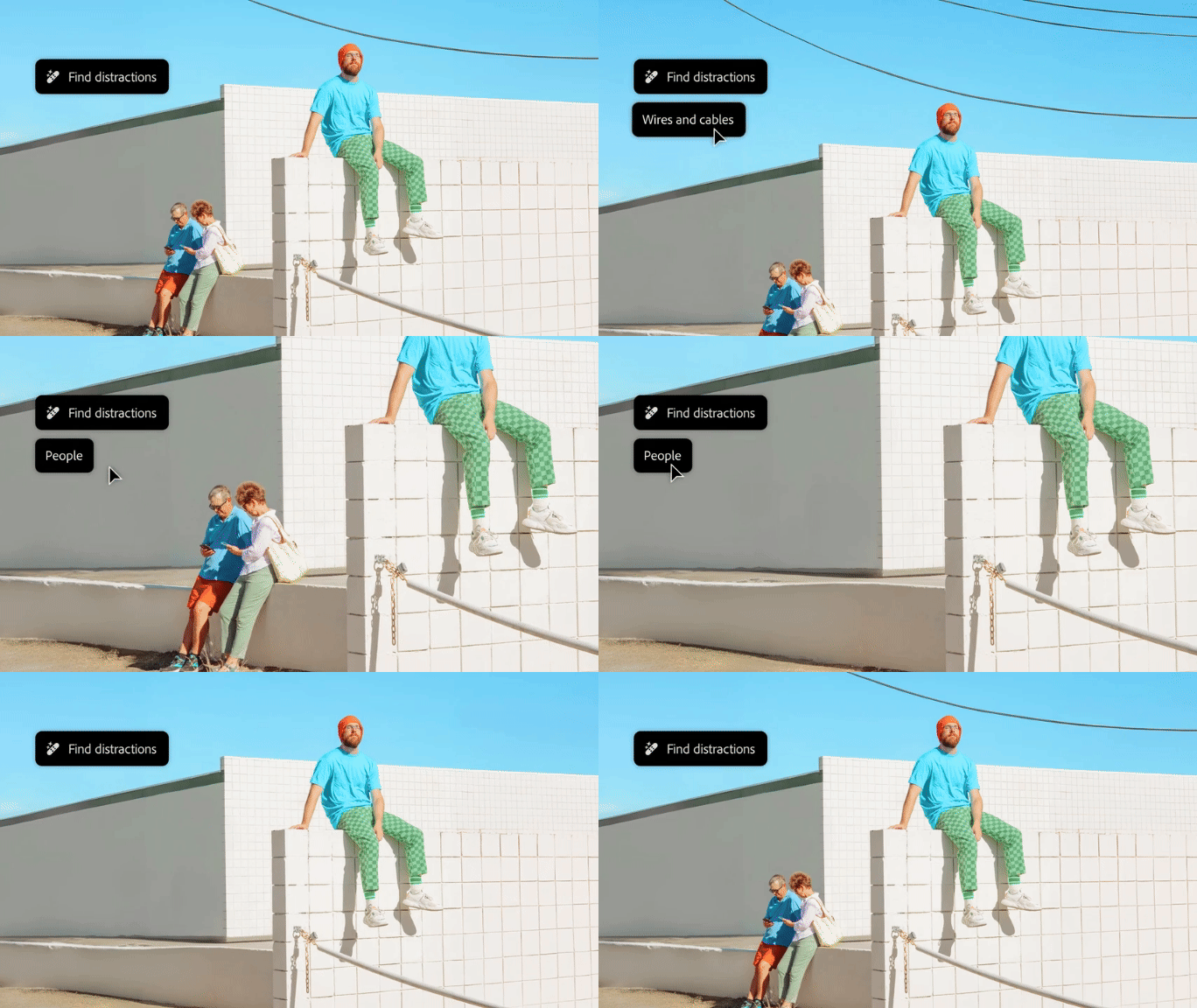
We’re thrilled to introduce the new Distraction Removal feature in Photoshop 26.0! With just a few clicks, you can effortlessly enhance your images by automatically removing unwanted elements like people, wires, cables, and imperfections. Let the Remove tool take care of the details so your subjects can truly shine.


Try it in the App

Distraction Removal with Remove Tool

To learn how to use the Remove tool and the new Remove Distractions, click here.


Simply select the Remove tool (nested with the Spot Healing tool), then choose Find Distractions from the Options menu. Pick either Wires and Cables or People based on your image.


Photoshop will automatically remove wires or let you edit people as needed.


You can select the Mode for how you want Photoshop to process the image: with Generative AI, Without AI, or leave it on Auto.


Give it a go and show us your Before & After magic! We can’t wait to see the incredible transformations you achieve with the Distraction Removal Tool!



If this was helpful, please click the  Upvote icon in the top left corner of this post. Your feedback helps us improve the experience. Thank you!

Submit your creation? Click 'Reply' below to post.

Click 'Follow' below to bookmark this post for easy reference.


54 replies

Henrik Heigl
Community Expert
Community Expert
October 24, 2024

before:


after:


I very much like how it works with the light.

regards,Henrik
Participant
October 23, 2024

Can't show anything as it locks/crashes when I use it

Participating Frequently
October 22, 2024

Before 


After

@mj
Community Expert
Community Expert
October 22, 2024

Did it remove the rose garden?

christianot40873293
Community Expert
Community Expert
October 21, 2024

christianot40873293
Community Expert
Community Expert
October 21, 2024
distracoes.png
AlanGilbertson
Community Expert
Community Expert
October 21, 2024

fbeaume
Community Expert
Community Expert
October 28, 2024

One click wireless!
Well done!

AlanGilbertson
Community Expert
Community Expert
November 3, 2024

It's actually better than that:

Known Participant
October 21, 2024

Unfortunatelly there is a bug that the application encountered error when applying Remove Tool/Find Disctation/People, as I haved reported to Adobe, I hope can receive the update for solve this issue. 

Awaiting the updater soon.

Thank you

October 19, 2024

 Not exactly cables and wires. However, PS came through and removed unnecessary distractions. Just having fun at a local market.

Myra Ferguson
Community Expert
Community Expert
October 19, 2024

October 19, 2024

peace and quiet.

@mj
Community Expert
Community Expert
October 19, 2024

Partial success

fbeaume
Community Expert
Community Expert
October 21, 2024

Yep... It might needs 2 or 3 more steps to be the King...;)