nikunj.m
Legend
Oct 14, 2024 1:25 PM UTC
Question

Show us your skills with Photoshop's new Distraction Removal tool!

 

Hello Everyone,
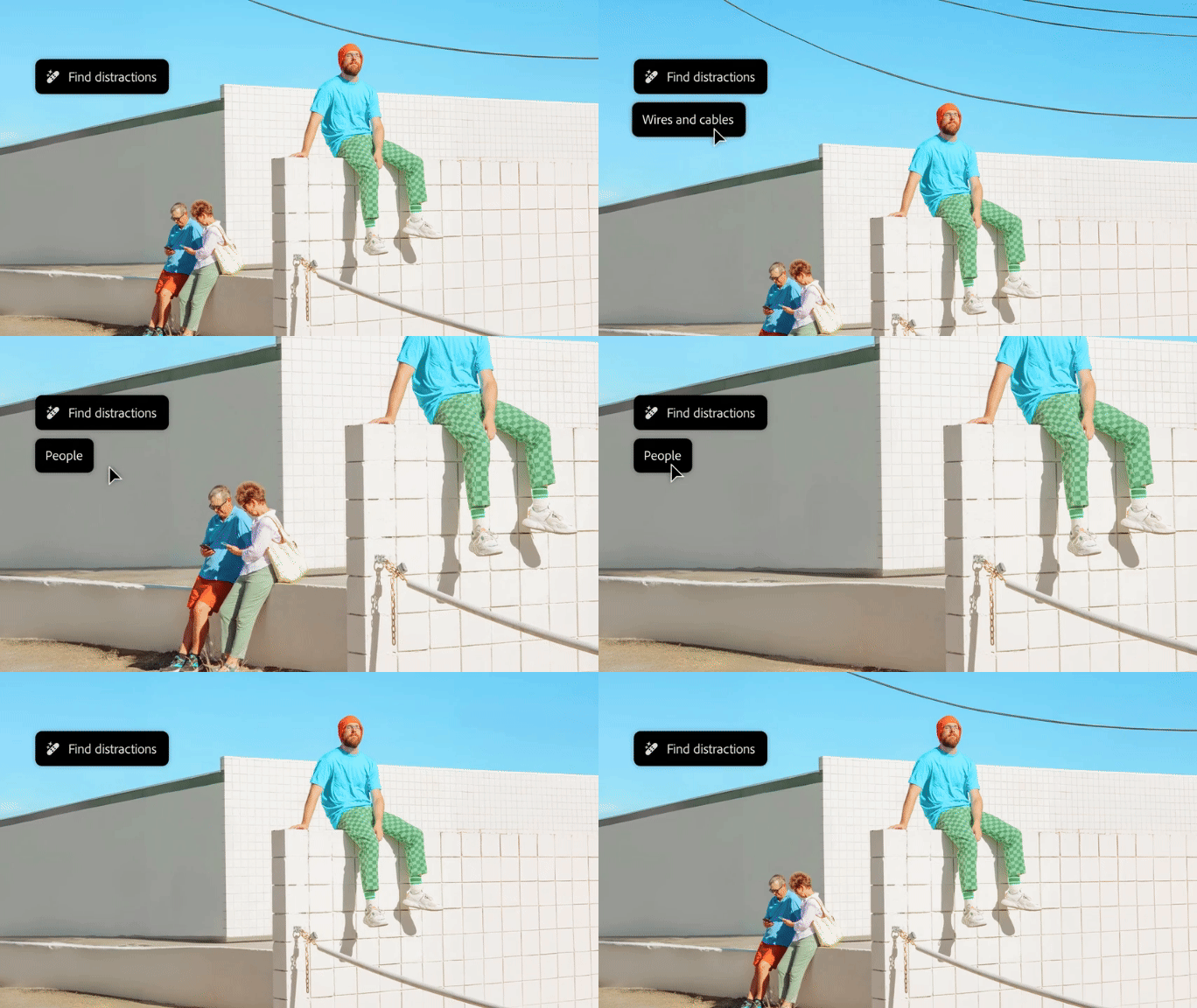
 

We’re thrilled to introduce the new Distraction Removal feature in Photoshop 26.0! With just a few clicks, you can effortlessly enhance your images by automatically removing unwanted elements like people, wires, cables, and imperfections. Let the Remove tool take care of the details so your subjects can truly shine.


Try it in the App

Distraction Removal with Remove Tool

To learn how to use the Remove tool and the new Remove Distractions, click here.


Simply select the Remove tool (nested with the Spot Healing tool), then choose Find Distractions from the Options menu. Pick either Wires and Cables or People based on your image.


Photoshop will automatically remove wires or let you edit people as needed.


You can select the Mode for how you want Photoshop to process the image: with Generative AI, Without AI, or leave it on Auto.


Give it a go and show us your Before & After magic! We can’t wait to see the incredible transformations you achieve with the Distraction Removal Tool!


If this was helpful, please click the  Upvote icon in the top left corner of this post. Your feedback helps us improve the experience. Thank you!

Submit your creation? Click 'Reply' below to post.

Click 'Follow' below to bookmark this post for easy reference.


119 replies

JR Boulay
Community Expert
Community Expert
Nov 5, 2024 2:45 PM UTC

Les templiers


Translate
Acrobate du PDF, InDesigner et Photoshopographe
Community Expert
Nov 4, 2024 7:41 PM UTC


Cleaning up the mall...

Translate
JR Boulay
Community Expert
Community Expert
Nov 4, 2024 6:24 PM UTC


Translate
Acrobate du PDF, InDesigner et Photoshopographe
fbeaume
Community Expert
Community Expert
Nov 4, 2024 6:51 PM UTC

Now you're the only one finisher!

Translate
JR Boulay
Community Expert
Community Expert
Nov 5, 2024 2:08 PM UTC

The others don't deserve to be here, they're lazy bums who just want to roll around on the floor.

😉

Translate
Acrobate du PDF, InDesigner et Photoshopographe
pixellingo
Community Expert
Community Expert
Nov 4, 2024 3:47 PM UTC

Wires? We don't need no stinkin' wires!

Translate
John W. | pixellingo
fbeaume
Community Expert
Community Expert
Nov 4, 2024 6:52 PM UTC

This feature is really powerfull!
Nicely done!

Translate
pixellingo
Community Expert
Community Expert
Nov 5, 2024 2:51 PM UTC

It is! And thank you!

Translate
John W. | pixellingo
Community Expert
Nov 2, 2024 4:13 AM UTC

Here's a expressway that has been a distraction for some time.

Translate
Peru Bob
Community Expert
Community Expert
Nov 2, 2024 1:00 AM UTC

Translate
Participating Frequently
Oct 31, 2024 9:45 PM UTC

This is a pair of black bellied whistling ducks- the first image you can see the broken 4"x 4" standing in front. It removed easily with the new feature. The image was scaled afterward to bring the pair a little closer the the viewer.  I could probably still remove one more distraction but it's fine like it is..


Translate
@mj
Community Expert
Community Expert
Nov 1, 2024 7:17 AM UTC

Nice one!

Translate
Participating Frequently
Nov 1, 2024 12:51 PM UTC

ty


Translate
EuanWilliamson
Community Expert
Community Expert
Oct 31, 2024 3:58 PM UTC


Translate
Best regards, Euan.
EuanWilliamson
Community Expert
Community Expert
Oct 31, 2024 3:57 PM UTC


Translate
Best regards, Euan.
Participating Frequently
Oct 31, 2024 10:23 AM UTC

Nice, work fast and get a great photo!

Translate
Participating Frequently
Nov 9, 2024 10:21 AM UTC