nikunj.m
Legend
October 14, 2024
Question

Show us your skills with Photoshop's new Distraction Removal tool!

  • October 14, 2024
  • 54 replies
  • 11510 views


Hello Everyone,


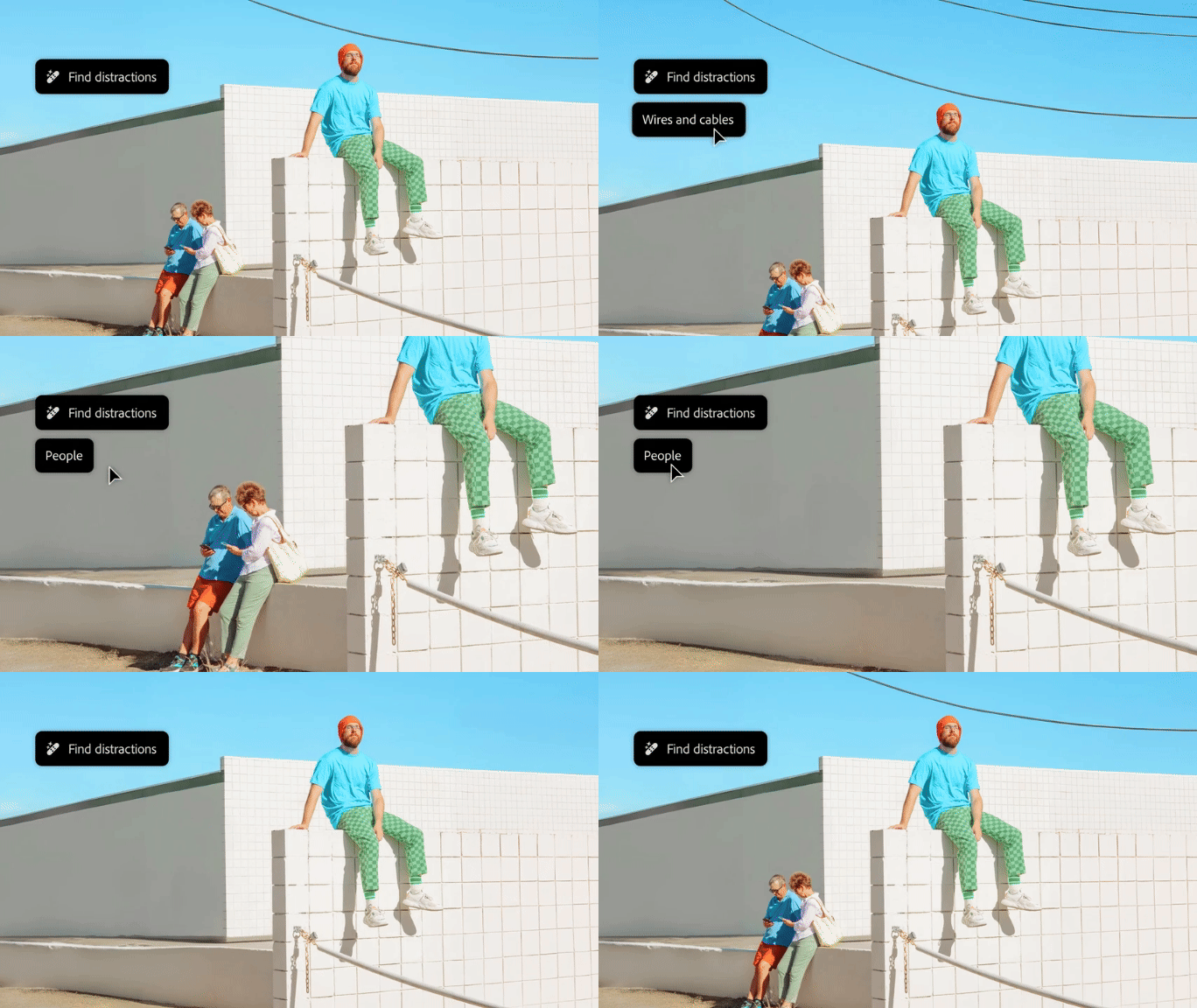
We’re thrilled to introduce the new Distraction Removal feature in Photoshop 26.0! With just a few clicks, you can effortlessly enhance your images by automatically removing unwanted elements like people, wires, cables, and imperfections. Let the Remove tool take care of the details so your subjects can truly shine.


Try it in the App

Distraction Removal with Remove Tool

To learn how to use the Remove tool and the new Remove Distractions, click here.


Simply select the Remove tool (nested with the Spot Healing tool), then choose Find Distractions from the Options menu. Pick either Wires and Cables or People based on your image.


Photoshop will automatically remove wires or let you edit people as needed.


You can select the Mode for how you want Photoshop to process the image: with Generative AI, Without AI, or leave it on Auto.


Give it a go and show us your Before & After magic! We can’t wait to see the incredible transformations you achieve with the Distraction Removal Tool!



If this was helpful, please click the  Upvote icon in the top left corner of this post. Your feedback helps us improve the experience. Thank you!

Submit your creation? Click 'Reply' below to post.

Click 'Follow' below to bookmark this post for easy reference.


54 replies

Community Expert
October 19, 2024

Anyone dislike bananas with their waffle?

Monika Gause
Community Expert
Community Expert
October 19, 2024

Great! I need that in real life: a banana removal tool. I need them removed from other peoples' hands.

derekwatson
Community Expert
Community Expert
October 18, 2024

This was so fast, a simple bit of retouching but used the wire detection and it worked first time...

Derek Watson
October 19, 2024

Bird on the wire. Nope bird on a pole

fbeaume
Community Expert
Community Expert
October 21, 2024

XD

derekwatson
Community Expert
Community Expert
October 17, 2024

Evening shot, so lighting fixed then bits of people etc removed... Some traces of them do remain so I think I would do a bit more manual work, this is using gen tools only

Derek Watson
m_ruppenthal
Participant
October 17, 2024

Mine simply doesn't work. I click on the 'Find Distractions' button, and no options appear. It's like the button is disabled.

Participant
October 18, 2024

I can't find the Find Distractions from option bar

Valdair Leonardo
Community Expert
Community Expert
October 18, 2024

Are you using the Photoshop Beta version and also do you the remove tool selected? 

didiermazier
Community Expert
Community Expert
October 17, 2024

It works

October 19, 2024

it works down to the wire.

Valdair Leonardo
Community Expert
Community Expert
October 16, 2024

Interesting that the remove tool "added" the stairs

Trevor.Dennis
Community Expert
Community Expert
October 17, 2024

Steps?  I thought it was a fallen over retaining wall that someone had taken a chainsaw to. Has anyone seen CG DreamColin Smith did a (sponsored) video on it a few days ago, and it is pretty impressive.  If you've seen this years's Sneaks, as well as checked out the new features in the major Photoshop update, you'll know they still pushing Firefly related features for all they are worth, but I can't help but think they are falling behind the competition.   Perfect Blend looked interesting though, so PLEASE Adobe, make that one happen.


Trevor.Dennis
Community Expert
Community Expert
October 16, 2024

Yikes!

fbeaume
Community Expert
Community Expert
October 18, 2024

LOL...
This wire wasn't so distractive!

Junior Rocha
Community Expert
Community Expert
October 16, 2024


October 19, 2024

new government initiative to clean up our neighborhood

Monika Gause
Community Expert
Community Expert
October 15, 2024

This was about eliminating the distractions, right?


October 19, 2024

Park or not to park

EuanWilliamson
Community Expert
Community Expert
October 15, 2024

Best regards, Euan.
Mohit Goyal
Community Manager
Community Manager
October 15, 2024

Love that. Thank you for sharing that @EuanWilliamson