
Inspiring
April 23, 2018
Answered

Simple dashed line - simply [2018]

  • April 23, 2018
  • 6 replies
  • 64896 views

Hello there!

How to draw a dashed line in PS?? I tried it intuitive way. I read that simple dashed line I don't get. To draw a line I'm, supposed not to use "line", but "pen". But there is no "shape" option form me. Only brushes. Can I simply draw a dashed line?? (of 4 px thick with 24 px, 4 px break, 6 px, 4 px break, 6 px, 4 px break --- then repeat)
Correct answer Barb Binder

Hello hello-there:

In your first screen shot you have the Pencil tool selected and not the Pen tool. The Shape option won't be visible until you choose the Pen.

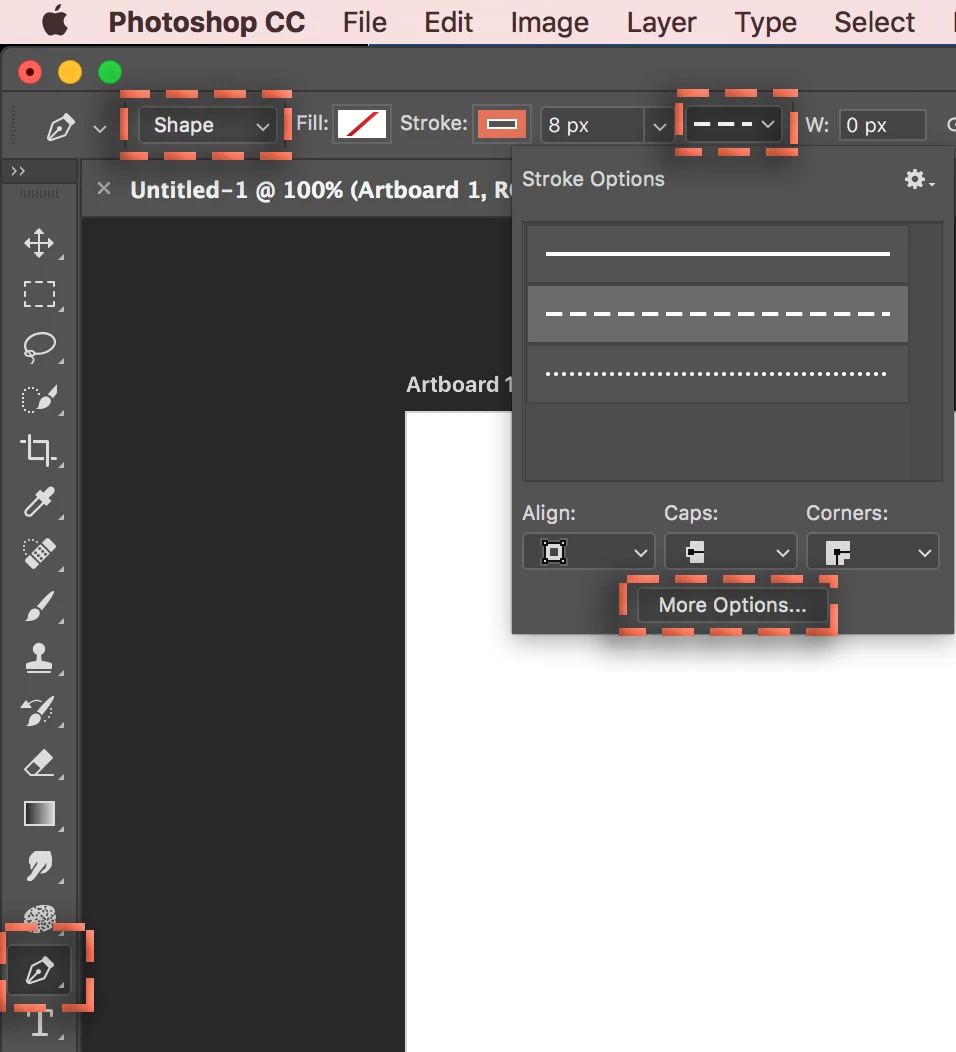
Select the Pen, choose Shape from the mode menu, choose dashed from the Shape Stroke Type menu, and click on More Options to set up your custom dash/gap pattern, then add the shapes to the page.

The Pen tool itself is confusing to those unfamiliar with bezier drawing tools—expect a learning curve, but if all you need are straight line segments, just click at each corner point.

~Barb

6 replies

Participant
August 2, 2024

I have the same question. I am also using Photoshop CS5 on a PC. My screen options look nothing like the screen shots in the answers below.  I used the pen tool. I drew a line. I clicked on every tab of every toolbox and expanded every menu. Look at my screen shot and see there is no Shape pull-down, there is no Stroke pull-down. I'm utterly baffled.


jane-e
Community Expert
Community Expert
August 2, 2024
quote

I have the same question.


I am also using Photoshop CS5 on a PC. My screen options look nothing like the screen shots in the answers below.  I used the pen tool. I drew a line. I clicked on every tab of every toolbox and expanded every menu. Look at my screen shot and see there is no Shape pull-down, there is no Stroke pull-down. I'm utterly baffled.


By @Kathleen389602409hnc


This is not the same question. CS5 was released 14 years ago in 2010. Things have changed. You don't have a Shape or Stroke dropdown in CS5. They were introduced in later versions.


In addition, what you show is not a line. It is one anchor point with two direction handles. To draw a "line" (actually a path) with the Pen tool, click once then move your mouse and click a second time. Don't drag the mouse. 


Jane


Participating Frequently
March 26, 2023

could not get to work. Easy on Microsoft

Participating Frequently
March 26, 2023

I think the design of what you descibed is awful for simple use. I find it over elaborate and due to this defective in application

Inspiring
April 23, 2018

Thank you both c.pfaffenbichler​ and BarbBinder

With the Pen Tool I can even change the "Line"-lines to dashed lines. Still a mess with too many option at unexpected positions to simply draw a line, but with your help it's easier.

c.pfaffenbichler
Community Expert
Community Expert
April 23, 2018

Set the line to the middle, if it’s set to outside or inside it may be inconvenient to place.

Barb Binder
Community Expert
Barb BinderCommunity ExpertCorrect answer
Community Expert
April 23, 2018

Hello hello-there:

In your first screen shot you have the Pencil tool selected and not the Pen tool. The Shape option won't be visible until you choose the Pen.

Select the Pen, choose Shape from the mode menu, choose dashed from the Shape Stroke Type menu, and click on More Options to set up your custom dash/gap pattern, then add the shapes to the page.

The Pen tool itself is confusing to those unfamiliar with bezier drawing tools—expect a learning curve, but if all you need are straight line segments, just click at each corner point.

~Barb

~Barb at Rocky Mountain Training
c.pfaffenbichler
Community Expert
Community Expert
April 23, 2018

Nice touch, using dashed lines for the markings.

Barb Binder
Community Expert
Community Expert
April 23, 2018

LOL! And sorry to repeat exactly what you said—I'm moving slowly this morning.

~Barb

~Barb at Rocky Mountain Training
c.pfaffenbichler
Community Expert
Community Expert
April 23, 2018
But there is no "shape" option form me.

What is the Pen Tool set to in the Options Bar?

And please don’t even try to write it up but post a meaningful screenshot.

To draw a line I'm, supposed not to use "line", but "pen".

Please read up on what the Line Tool actually does.

And to make sure: Which Photoshop version are you using?

Inspiring
April 23, 2018