
Inspiring
January 7, 2020
Answered

Smart objects updating twice

  • January 7, 2020
  • 1 reply
  • 1324 views

I am sorry if this question has been asked, I've tried searching everywhere for it and haven't found an answer.


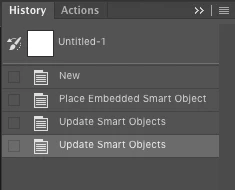
I have files that contain bitmap smart objects and when I open them, make changes to them and then save them, I have to wait through the "Updating Smart Object" progress bar. Then when it's complete, I close the smart object window and go back into the file that contains the smart object, and I have to sit through the "Updating Smart Object" progress bar again. In the history for the file that contains the smart object, I can see that there are two steps listed as "Update Smart Object". I wouldn't care, but the files I'm dealing with are 10-20gb, so they take a VERY long time to update, so it's killing my productivity to have to wait for it to do the same exact function twice, if that's what is actually happening.


Does anyone else have this issue? I'm wondering if it's related to my configuration. I have an older computer that doesn't have the same problem. I am running Photoshop 20.0.4 on an iMac Pro running High Sierra (10.13.6).


Any suggestions would be greatly appreciated.
This topic has been closed for replies.
Correct answer bcmann1817249421

In CC2019 it does update the file twice in the history panel.

Not sure why it would take longer on a machine with more RAM.

Perhaps check your performance preferences and change your Cache levels and tile size to acommodate for the larger size file.


I double checked the older iMac and it was actually running a newer version of Photoshop (21.0.2). So I ran the update on the iMac Pro and that seems to fix the problem. Now I only get "Update Smart Object" once in the history pallet.


Thank you for the responses to my question. It made me double check all my details!

1 reply

Kevin Stohlmeyer
Community Expert
Community Expert
January 7, 2020

That is a HUGE file size for a smart object in Photoshop so I would expect it to take some time to update.

What kind of RAM do you have available on both old and current machines?

Inspiring
January 7, 2020

I know the files are huge. We are dealing with billboards that can be up to 200 feet by 25 feet. So the file sizes get ridiculous! I'm working with 128gb of RAM in the iMac Pro and 64gb in the iMac. 


It can take 5-10 minutes to save the smart object, then when I close the smart object, I have to wait another 5-10 minutes for it to update for a second time. It's painful to watch it do it twice! None of the other computers we have do that, I'm not sure what's causing it. I've deleted my preferences, uninstalled and re-installed Photoshop. I can't figure it out.

Kevin Stohlmeyer
Community Expert
Community Expert
January 7, 2020

Yes and it's running High Sierra too.


In CC2019 it does update the file twice in the history panel.

Not sure why it would take longer on a machine with more RAM.

Perhaps check your performance preferences and change your Cache levels and tile size to acommodate for the larger size file.