

Geppetto Luis
Legend
Sep 26, 2019 8:42 AM UTC
Answered

Split image based on the number entered

I would like this possibility possible
be able to divide the image based on the number entered
guy
original image and wide 4500 px I insert divided 3 total 1500px
so also for the height
if I have 3250px I insert divided 2 total 1625px


// ======
var dialog = new Window("dialog"); 
    dialog.text = "TEST"; 
    dialog.orientation = "column"; 
    dialog.alignChildren = ["center","top"]; 
    dialog.spacing = 10; 
    dialog.margins = 16; 

var statictext1 = dialog.add("statictext", undefined, undefined, {name: "statictext1"}); 
    statictext1.text = "DIVIDE IMAGE  "; 

// PANEL1
// ======
var panel1 = dialog.add("panel", undefined, undefined, {name: "panel1"}); 
    panel1.text = "OPTION"; 
    panel1.orientation = "column"; 
    panel1.alignChildren = ["left","top"]; 
    panel1.spacing = 10; 
    panel1.margins = 10; 

// POT
// ===
var POT = panel1.add("group", undefined, {name: "POT"}); 
    POT.orientation = "row"; 
    POT.alignChildren = ["left","center"]; 
    POT.spacing = 10; 
    POT.margins = 0; 

var statictext2 = POT.add("statictext", undefined, undefined, {name: "statictext2"}); 
    statictext2.text = "HORIZONTAL PX"; 

var edittext1 = POT.add('edittext {properties: {name: "edittext1"}}'); 
    edittext1.text = "4500"; 

var statictext3 = POT.add("statictext", undefined, undefined, {name: "statictext3"}); 
    statictext3.text = ":"; 

var edittext2 = POT.add('edittext {properties: {name: "edittext2"}}'); 
    edittext2.text = "3"; 

var statictext4 = POT.add("statictext", undefined, undefined, {name: "statictext4"}); 
    statictext4.text = "= PX"; 

var edittext3 = POT.add('edittext {properties: {name: "edittext3"}}'); 
    edittext3.text = "1500"; 

// GROUP1
// ======
var group1 = panel1.add("group", undefined, {name: "group1"}); 
    group1.orientation = "row"; 
    group1.alignChildren = ["left","center"]; 
    group1.spacing = 10; 
    group1.margins = 0; 

var statictext5 = group1.add("statictext", undefined, undefined, {name: "statictext5"}); 
    statictext5.text = "VERICAL PX"; 
    statictext5.preferredSize.width = 107; 

var edittext4 = group1.add('edittext {properties: {name: "edittext4"}}'); 
    edittext4.text = "3250"; 

var statictext6 = group1.add("statictext", undefined, undefined, {name: "statictext6"}); 
    statictext6.text = ":"; 

var edittext5 = group1.add('edittext {properties: {name: "edittext5"}}'); 
    edittext5.text = "2"; 

var statictext7 = group1.add("statictext", undefined, undefined, {name: "statictext7"}); 
    statictext7.text = "= PX"; 

var edittext6 = group1.add('edittext {properties: {name: "edittext6"}}'); 
    edittext6.text = "1625"; 

// DIALOG
// ======
var button1 = dialog.add("button", undefined, undefined, {name: "button1"}); 
    button1.text = "CLOSE"; 

dialog.show();

This topic is closed to new replies. Start a new post to keep the conversation going.
Stephen Marsh
Stephen MarshCorrect answer
Community Expert
Sep 26, 2019 1:14 PM UTC


It is too late for me to try to figure out the scriptUI, so this uses two prompts:


EDIT: changed the basic " / " characters into proper math " \xF7 " ÷ division symbols. 


#target photoshop
    (function() {
        var startRulerUnits = app.preferences.rulerUnits;
        app.preferences.rulerUnits = Units.PIXELS;
        var doc = app.activeDocument;
        var w = doc.width;
        var h = doc.height;

        // var x = 3;
        // var y = 2;

        var x = prompt("Divide the document pixel width by:", 3);
        if (x == null) {
            return
        }; // Test if CANCEL returns null, then do nothing.  
        if (x == "") {
            return
        }; // Test if an empty string is returned, then do nothing.  
        // Adding a regex to remove anything that is not an integer digit would be nice...

        var y = prompt("Divide the document pixel height by:", 2);
        if (y == null) {
            return
        }; // Test if CANCEL returns null, then do nothing.  
        if (y == "") {
            return
        }; // Test if an empty string is returned, then do nothing.  
        // Adding a regex to remove anything that is not an integer digit would be nice...

        var wx = w / x;
        var hy = h / y;
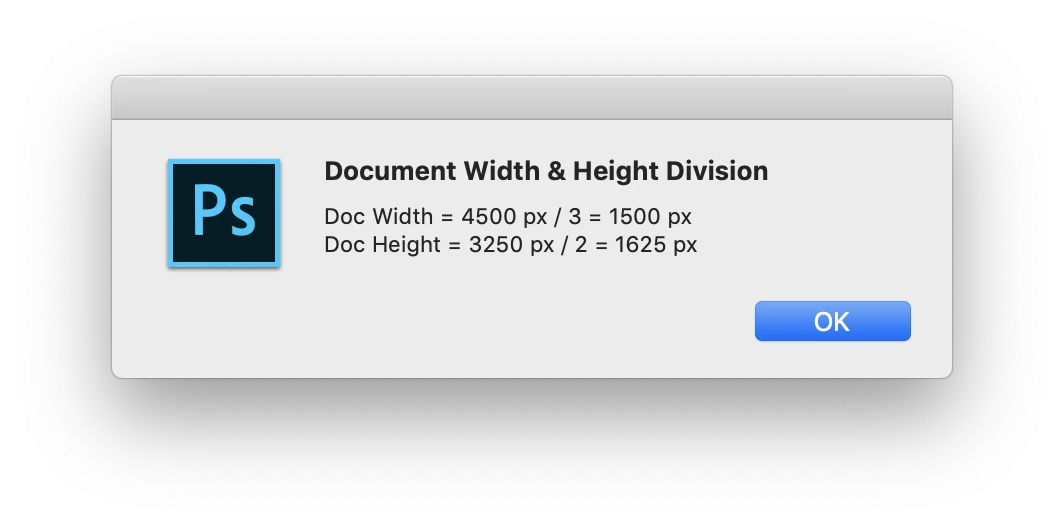
        alert("Document Width & Height Division" + "\n" + "Doc Width = " + w + " \xF7 " + x + " = " + wx + "\n" + "Doc Height = " + h + " \xF7 " + y + " = " + hy);
        app.preferences.rulerUnits = startRulerUnits;
    })();


8 replies

Stephen Marsh
Community Expert
Community Expert
Sep 28, 2019 9:23 AM UTC

I have now had some time to play with a scriptUI version:


// community.adobe.com/t5/Photoshop/Split-image-based-on-the-number-entered/td-p/10633054

#target photoshop

// scriptUI builder - scriptui.joonas.me 

// START scriptUI

// DIALOG Window
var win1 = new Window("dialog");
win1.text = "Document Width & Height Division - Input";
win1.preferredSize.width = 350;
win1.orientation = "column";
win1.alignChildren = ["left", "top"];
win1.spacing = 10;
win1.margins = 15;

// Entry Field Label 1
var label1 = win1.add("statictext", undefined, undefined, {
    name: "label1"
});
label1.text = "Divide the image width by:"; // The visible text in the GUI

// Entry Field 1
var entryField1 = win1.add('edittext {properties: {name: "entryField1"}}');
entryField1.helpTip = "Enter an integer value"; // GUI Tooltip
entryField1.text = "2"; // Predefined user entry text 1
entryField1.alignment = ["fill", "top"];

// Entry Field Label 2
var label2 = win1.add("statictext", undefined, undefined, {
    name: "label2"
});
label2.text = "Divide the image height by:"; // The visible text in the GUI

// Entry Field 2
var entryField2 = win1.add('edittext {properties: {name: "entryField2"}}');
entryField2.helpTip = "Enter an integer value"; // GUI Tooltip
entryField2.text = "2"; // Predefined user entry text 2
entryField2.alignment = ["fill", "top"];

// GROUP1 - OK Button
var group1 = win1.add("group", undefined, {
    name: "group1"
});
group1.orientation = "row";
group1.alignChildren = ["left", "top"];
group1.spacing = 3;
group1.margins = 0;
group1.alignment = ["center", "top"];

var okButton = group1.add("button", undefined, undefined, {
    name: "okButton"
});
okButton.text = "OK";

// GROUP2 - Cancel Button
var group2 = group1.add("group", undefined, {
    name: "group2"
});
group2.orientation = "row";
group2.alignChildren = ["left", "top"];
group2.spacing = 3;
group2.margins = 0;
group2.alignment = ["center", "top"];

var cancelButton = group2.add("button", undefined, undefined, {
    name: "cancelButton"
});
cancelButton.text = "Cancel";
cancelButton.alignment = ["left", "top"];

// Close the Window based on buttonTEST function results
okButton.onClick = function() {
    buttonTEST()
    close = true;
    win1.close();
};

win1.show();

// END scriptUI

// Start Button Error Checking

function buttonTEST() {

    // Add scriptUI input for the userEntry1 variable
    // Test if CANCEL returns null, then do nothing
    var userEntry1 = entryField1.text
    if (userEntry1 == null) {
        return
    };
    // Test if an empty string is returned, then do nothing
    if (userEntry1 == "") {
        return
    };
    // Remove anything that is not a digit or decimal point  
    var userEntry1B = userEntry1.replace(/[^\d.]+/g, "");
    // Assuming that parseInt is more appropriate than parseFloat
    // var userEntry1C = parseInt(userEntry1B, 10); 

    // Add scriptUI input for the userEntry2 variable
    // Test if CANCEL returns null, then do nothing
    var userEntry2 = entryField2.text
    if (userEntry2 == null) {
        return
    };
    // Test if an empty string is returned, then do nothing
    if (userEntry2 == "") {
        return
    };
    // Remove anything that is not a digit or decimal point
    var userEntry2B = userEntry2.replace(/[^\d.]+/g, "");
    // Assuming that parseInt is more appropriate than parseFloat    
    // var userEntry2C = parseInt(userEntry2B, 10);

    // End Button Error Checking


    ////////////////////////////////////////////////////////////////////////////////
    // The code to run the input from the scriptUI entries goes here
    var originalRulerUnits = app.preferences.rulerUnits;
    app.preferences.rulerUnits = Units.PIXELS;
    var doc = app.activeDocument;
    var w = doc.width;
    var h = doc.height;
    var dividedWidth = w / userEntry1B; // scriptUI input #1
    var dividedHeight = h / userEntry2B; // scriptUI input #2
    app.preferences.rulerUnits = originalRulerUnits;
    ////////////////////////////////////////////////////////////////////////////////   

    // Start scriptUI Alert Replacement for standard system alert
    var win2 = new Window("dialog");
    win2.text = "Document Width & Height Division - Result";
    win2.preferredSize.width = 350;
    win2.orientation = "column";
    win2.alignChildren = ["center", "top"];
    win2.spacing = 10;
    win2.margins = 15;

    var uiAlert = win2.add("group");
    uiAlert.orientation = "column";
    uiAlert.alignChildren = ["left", "center"];
    uiAlert.spacing = 0;

    uiAlert.add("statictext", undefined, ("Doc Width = " + w + " \xF7 " + userEntry1B + " = " + dividedWidth), {
        name: "uiAlert",
        multiline: true
    });
    uiAlert.add("statictext", undefined, ("Doc Height = " + h + " \xF7 " + userEntry2B + " = " + dividedHeight), {
        name: "uiAlert",
        multiline: true
    });

    var okButton = win2.add("button", undefined, undefined, {
        name: "okButton"
    });
    okButton.text = "OK";

    win2.show();
    // End scriptUI Alert    

}


NOTE: Code edited, the version originally emailed by the forum software when I posted is now outdated and not correct.


Translate
Stephen Marsh
Community Expert
Stephen MarshCommunity ExpertCorrect answer
Community Expert
Sep 26, 2019 1:14 PM UTC


It is too late for me to try to figure out the scriptUI, so this uses two prompts:


EDIT: changed the basic " / " characters into proper math " \xF7 " ÷ division symbols. 


#target photoshop
    (function() {
        var startRulerUnits = app.preferences.rulerUnits;
        app.preferences.rulerUnits = Units.PIXELS;
        var doc = app.activeDocument;
        var w = doc.width;
        var h = doc.height;

        // var x = 3;
        // var y = 2;

        var x = prompt("Divide the document pixel width by:", 3);
        if (x == null) {
            return
        }; // Test if CANCEL returns null, then do nothing.  
        if (x == "") {
            return
        }; // Test if an empty string is returned, then do nothing.  
        // Adding a regex to remove anything that is not an integer digit would be nice...

        var y = prompt("Divide the document pixel height by:", 2);
        if (y == null) {
            return
        }; // Test if CANCEL returns null, then do nothing.  
        if (y == "") {
            return
        }; // Test if an empty string is returned, then do nothing.  
        // Adding a regex to remove anything that is not an integer digit would be nice...

        var wx = w / x;
        var hy = h / y;
        alert("Document Width & Height Division" + "\n" + "Doc Width = " + w + " \xF7 " + x + " = " + wx + "\n" + "Doc Height = " + h + " \xF7 " + y + " = " + hy);
        app.preferences.rulerUnits = startRulerUnits;
    })();


Translate
Geppetto Luis
Legend
Sep 26, 2019 6:08 PM UTC
Perfect
Translate
c.pfaffenbichler
Community Expert
Community Expert
Sep 26, 2019 9:34 AM UTC

You might be able to use code from this thread to handle the results of your dialog window. 

https://community.adobe.com/t5/Photoshop/Dividing-big-document-to-smaller-ones/td-p/9311087

Translate
Geppetto Luis
Legend
Sep 26, 2019 9:48 AM UTC
yes I could but I'm not interested in cutting the image I am interested in knowing only the size that the rectangles will have based on the number I insert
Translate
c.pfaffenbichler
Community Expert
Community Expert
Sep 26, 2019 10:14 AM UTC
Yiz can set the ruler units to pixels, get the document’s width and height and divide them.
Translate
c.pfaffenbichler
Community Expert
Community Expert
Sep 26, 2019 9:30 AM UTC

Please explain what you mean by »divide the image« exactly – do you mean the file, a Layer, do you want to get X x Y separete resulting files or Layers, …? 

Translate
Geppetto Luis
Legend
Sep 26, 2019 9:36 AM UTC
I mean a document I would like to make a simple division as if it were a calculator guy the document is 4500px wide I insert in edittext 3 result 1500px if I insert in editttext 5 result = 900px
Translate