
Ronaldheichou3
Participant
December 11, 2018
Answered

Stroke option is grayed out

  • December 11, 2018
  • 1 reply
  • 25811 views

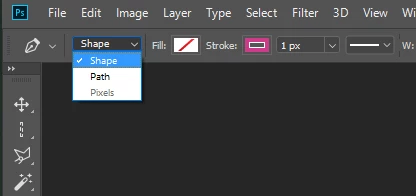
I can't access the stroke options dropdown or any other dropdowns when I select the path selection tool. It's mostly grayed out for reasons I don't know. I have path selected while using pen tool and in the path is selected in the path window. What am I doing wrong?

Message was edited by: Ronald Chamberlain Format changes
This topic has been closed for replies.
Correct answer Semaphoric

Those options are only available if you have selected "Shape":


A plain Path can be stroked or filled via the Paths panel, but these are not "Live" as with Shape layers. However, they can be stroke with any painting tool — Brush, Sponge, Clone Stamp, Eraser, etc.

1 reply

Trevor.Dennis
Community Expert
Community Expert
December 11, 2018

Right click the path in the paths panel, and choose Stroke path.  Use the drop down to select the tool you wish to stroke with.

Note, you need to set the brush size and properties before doing this

Ronaldheichou3
Participant
December 11, 2018

Nothing changed I'm afraid. They are still grayed out. I didn't change anything in photoshop settings, so I really am confused why it's not working. I'm new to Photoshop btw. Here is the area circled that I was talking about. 

Participant
May 14, 2024

I only have "layer" and "group" as on option. There is no "shape" option. I just want to add a stroke to a circle.


You need to have the pen tool active to have the options for path or shape.