
Inspiring
April 12, 2017
Answered

Substitue fonts with my selection

  • April 12, 2017
  • 1 reply
  • 893 views

Hi there,

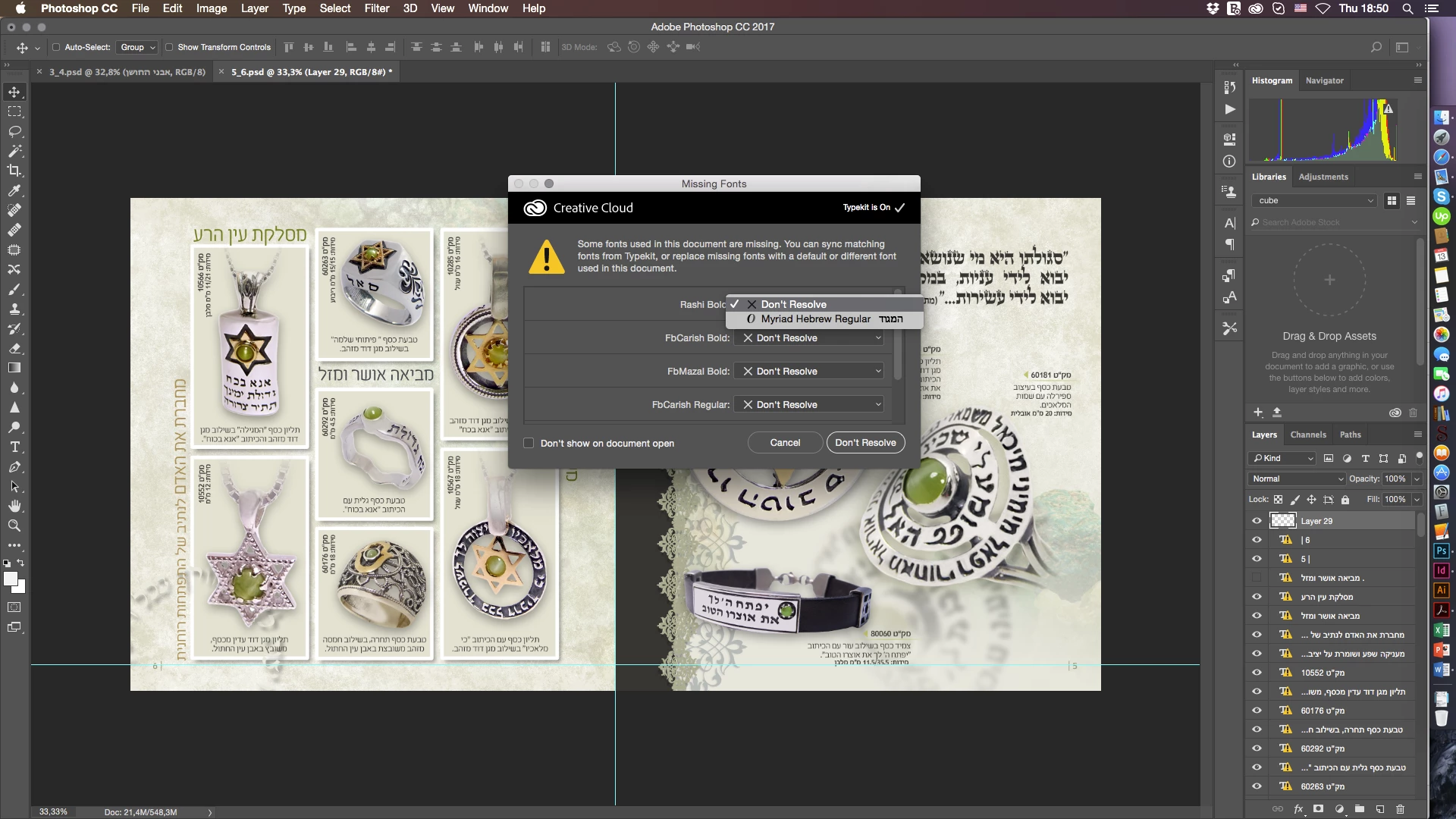
I have a catalogue in Hebrew. I do not have the original fonts. However, I do not use them since the document was translated into a different language. Now, I have to add back translation into Photoshop file. I need to use Myriad Pro. The fonts would have Regular, Bold, Black and Italic. I noticed that I cannot substitute original fonts with a selection of my own. Instead, PS is making a substitution based on a font selection I do not need. Not to mention that PS does not even substitute them properly: Regular with Regular, Bold with Bold etc.

As I searched Google and Adobe Help I noticed that the only way I can do that is absolutely unproductive to say the least. Especially because I have text frames that contains Regular and Bold and Black styles of same font. Once I clicked on any of those text frames PS will make a substitution using regular all over.

Is there any other option to do it more efficient and more accurate? Once I can make substation with my font I will create Paragraph styles and everything will be just fine. I hope.

Thank you.

Sebastian
This topic has been closed for replies.
Correct answer War Unicorn

No. Exactly this is the issue with Adobe PS. After all complaints they received from previous versions, they still didn't fix the issue.

See attached.


Interesting; I can repro this. The option to replace with my desired font(s) is in, say, Illustrator, but not Photoshop...

I'll have to make a note of this.

1 reply

War Unicorn
Community Expert
Community Expert
April 12, 2017

Using styles would be the way to go, especially if you plan on reusing the same style over and over...but...I'm not sure I'm following what you're saying. You need to use Hebrew in Myriad Pro?

sebdeaAuthor
Inspiring
April 13, 2017

No. The original PSD files are in Hebrew using a font client never provided. Translation is in Russian and I am planning using MyriadPro or whatever other font. The issue is that I did not find an option like in Adobe Illustrator or Adobe InDesign to change/substitute/map the missing fonts with my selection of fonts.

The solution presented on Adobe PS Help page is unproductive. When I am opening any PSD file PS is informing me of the missing fonts but when I select Resolve it only presents me few fonts I am not pleased with.

I am simply asking whether there is a viable alternative.

Sebastian

War Unicorn
Community Expert
Community Expert
April 13, 2017

You using (or try) Type > Resolve Missing Fonts? Doesn't it have a "find fonts" option so you can choose the fonts yourself?