Exit
  • Global community
    • Language:
      • Deutsch
      • English
      • Español
      • Français
      • Português
  • 日本語コミュニティ
  • 한국 커뮤니티
0

Text Problems

Community Beginner ,
Jun 10, 2021 Jun 10, 2021

Has anyone else found that there is an issue with creating text in Photoshop. Everything is severely messed up.

713
Translate
Report
Community guidelines
Be kind and respectful, give credit to the original source of content, and search for duplicates before posting. Learn more
community guidelines
Adobe
LEGEND ,
Jun 10, 2021 Jun 10, 2021

You're going to have to be a lot more specific including if possible, screen captures of the 'issue'. 

Author “Color Management for Photographers" & "Photoshop CC Color Management/pluralsight"
Translate
Report
Community guidelines
Be kind and respectful, give credit to the original source of content, and search for duplicates before posting. Learn more
community guidelines
Community Expert ,
Jun 10, 2021 Jun 10, 2021

Hi @NikSemenowich 


No issues here, but try resetting your Type tool, as the settings are sticky until they are changed again. Right-click the Type tool in the options bar (not Tools panel) and Reset tool. If that doesn't help, please clarify the issue, as what you said is open to interpretation.


~ Jane

Translate
Report
Community guidelines
Be kind and respectful, give credit to the original source of content, and search for duplicates before posting. Learn more
community guidelines
Community Beginner ,
Jun 10, 2021 Jun 10, 2021

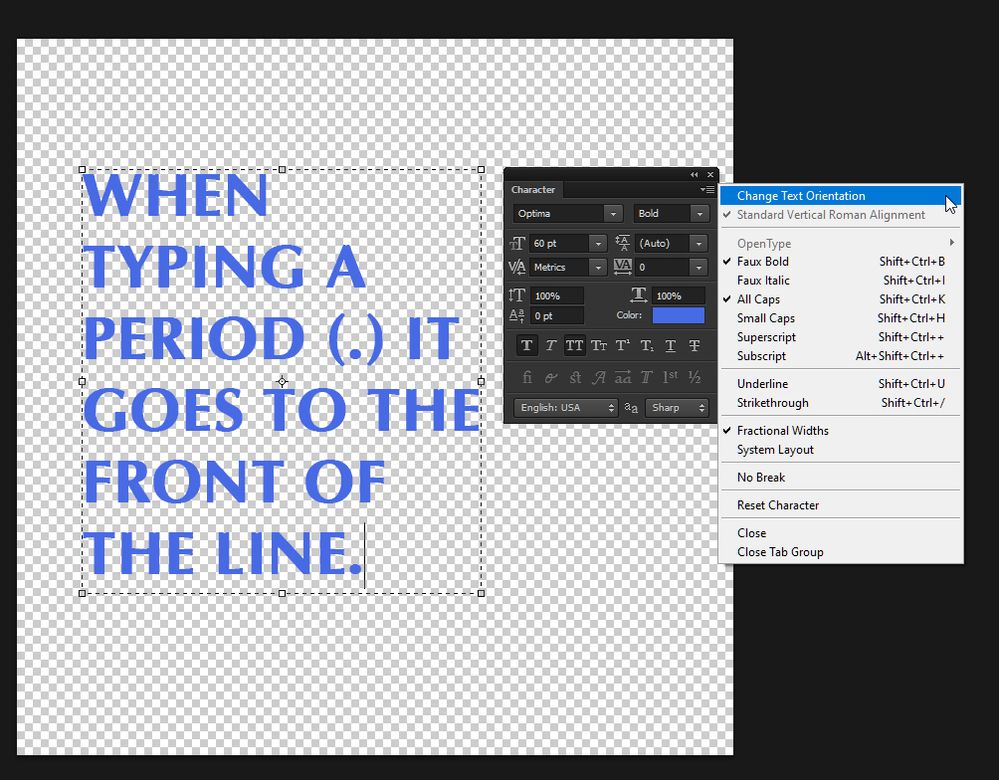
The issue seems to be that when typing and wanting to put a period or anything at the end of a line, it shows up at the front of the line.

Translate
Report
Community guidelines
Be kind and respectful, give credit to the original source of content, and search for duplicates before posting. Learn more
community guidelines
Community Expert ,
Jun 10, 2021 Jun 10, 2021

And you've closed and relaunched, I assume. Have you looked through the character panel to see if you have changed the orientation of the text or something like that?

 

sample-32.jpg

Translate
Report
Community guidelines
Be kind and respectful, give credit to the original source of content, and search for duplicates before posting. Learn more
community guidelines
Community Expert ,
Jun 10, 2021 Jun 10, 2021

In Preferences > Type, is it set to Middle Eastern or East Asian?


You can also change the direction of the text in the Paragraph menu (lower left).


Details here:

https://helpx.adobe.com/photoshop/using/arabic-hebrew.html


Let us know if this works. If you need more help I can tag our MENA expert.


~ Jane

Translate
Report
Community guidelines
Be kind and respectful, give credit to the original source of content, and search for duplicates before posting. Learn more
community guidelines
Community Beginner ,
Jun 10, 2021 Jun 10, 2021
LATEST

I just reset all photoshop preferences and all seems to be working fine now.


Translate
Report
Community guidelines
Be kind and respectful, give credit to the original source of content, and search for duplicates before posting. Learn more
community guidelines