
Known Participant
May 14, 2025
Answered

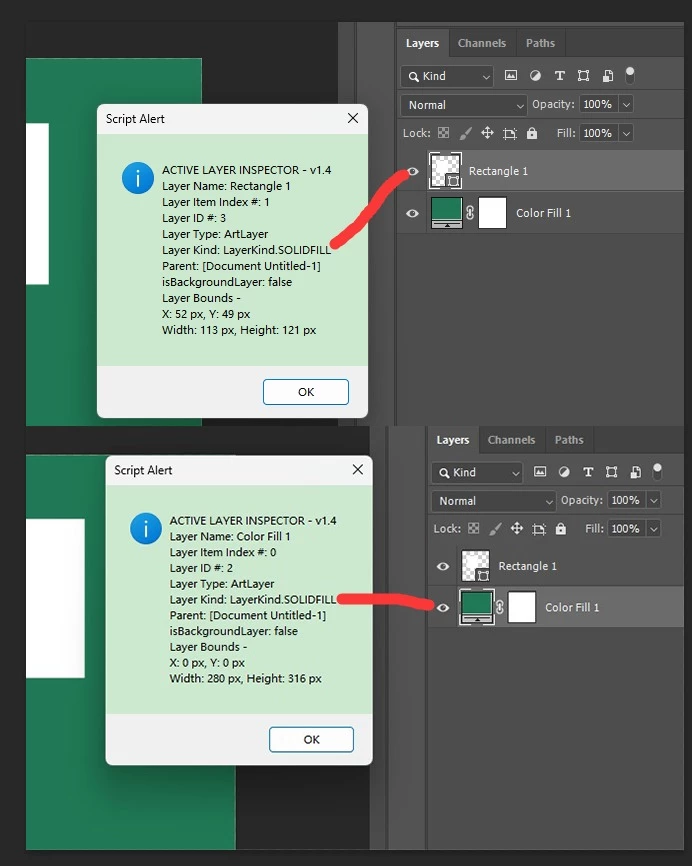
The kind of color fill layers and shape layers is the same

  • May 14, 2025
  • 2 replies
  • 761 views

The kind of color fill layers and shape layers is the same. How can I distinguish between a color fill layer and a shape layer using JSX?

The following checks if the layer's kind is a shape and the path is greater than or equal to 1, which would make it a shape layer. However, there’s a flaw: if a PSD file has paths with more than 1, a color fill layer might also be incorrectly identified as a shape layer.

(function() {
    // Get the currently active document
    var doc = app.activeDocument;

    var subPathsLength = 0;
    try {
        subPathsLength = doc.pathItems[0].subPathItems.length
        // Read the number of paths
    } catch (error) {}

    // Get the currently selected layer
    var selectedLayer = doc.activeLayer;

    // Check if the selected layer is a shape layer
    if (selectedLayer.kind == LayerKind.SOLIDFILL && subPathsLength >= 1) {
        alert("The selected layer is a shape layer.");
    } else {
        alert("The selected layer is not a shape layer.");
    }

}());
2 replies

Stephen Marsh
Community Expert
Community Expert
May 14, 2025

@w30290083o9nn 


That script looks kinda familiar (now at v1.8)  :]


https://gist.githubusercontent.com/MarshySwamp/ef345ef3dec60a843465347ee6fcae2f/raw/93b7719f6d44cf77fb20b7f0d5a10fe7b78ec44f/Active%2520Layer%2520Inspector.jsx


I have recently created a new script which processes all layers in the file (not just the active layer) and writes the data to a CSV file:


This script can show the difference between a shape and solid fill layer:
 
Layer Name Visibility Type Kind (DOM) Kind (AM)
Triangle  TRUE ArtLayer LayerKind.SHAPELAYER kVectorSheet
Color Fill TRUE ArtLayer LayerKind.SOLIDFILL kSolidColorSheet


The active layer inspector script could be updated to use this better codebase...

It's similar to Layer Groups, Artboards and Frame layers all being reported by DOM code as a layerSet – it takes extra AM code to qualify the differences:

Known Participant
May 14, 2025

Thank you, I extracted this code from it. It works fine in Photoshop CC and above versions, but not in CS6 and below. Thanks again!

(function() {
    if (isShapeLayerAM(app.activeDocument.activeLayer)) {
        alert("The selected layer is a shape layer.");
    } else {
        alert("The selected layer is not a shape layer.");
    }

    function isShapeLayerAM(layer) {
        try {
            var ref = new ActionReference();
            ref.putIdentifier(charIDToTypeID("Lyr "), layer.id);
            var layerDesc = executeActionGet(ref);
            return layerDesc.getInteger(stringIDToTypeID("layerKind")) === 4;
        } catch (e) {
            return false;
        }
    }
}());
Stephen Marsh
Community Expert
Community Expert
May 14, 2025
quote

Thank you, I extracted this code from it. It works fine in Photoshop CC and above versions, but not in CS6 and below. Thanks again!


By @w30290083o9nn


Yes, the wonders and joys of AM code, it can be version specific and various keys may be different or might not exist in earlier versions.